Fundraiser On the Go
Fundraiser on the Go is a web-based application fundraisers can use to complete prospect plan tasks from their mobile device. While fundraisers are out of the office, they can use the app to view a prospect's information to prepare for a meeting — afterwards, they can update their notes and next steps in the plan. Information entered in the app tracks back to prospect records in the database.
Tip: Because Fundraiser on the Go is a responsive web application, it can be accessed from a web browser on any type of device.
 Copy the Fundraiser on the Go URL
Note: Only application users in the Fundraiser on the Go system role can copy the Fundraiser on the Go URL.
From Prospects, under Configuration, select Fundraiser on the Go. Copy the URL to send to fundraisers who can bookmark it on their mobile devices for quick and easy access.
Access Fundraiser on the Go
Note: To use Fundraiser on the Go, users must be linked to a constituent who is an active fundraiser and assigned to the Fundraiser on the Go system role.
When you access the URL on a device, you must first enter your credentials on the Blackbaud ID sign-in screen.
Once you're logged in, you have 2 options:
-
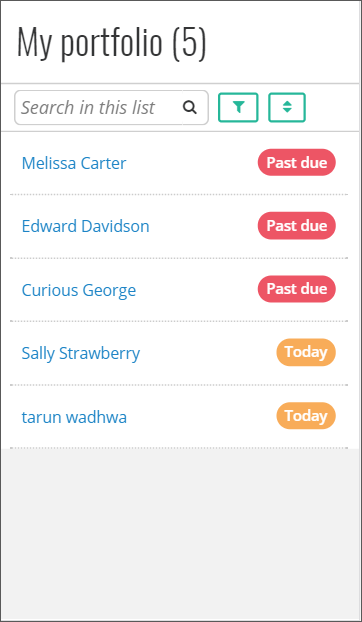
My portfolio tab: View a list of prospects assigned to you. You can view their current status, filter the list, and search for a specific prospect.
-
Search all tab: Search for any prospect in the database. You can search by name, city, state, zip code, country, or phone number.
Note: The prospect list does not include deceased prospects or those linked to inactive prospect plans. In addition, the list does not include any constituents for which you are a relationship manager — you must be their prospect manager.
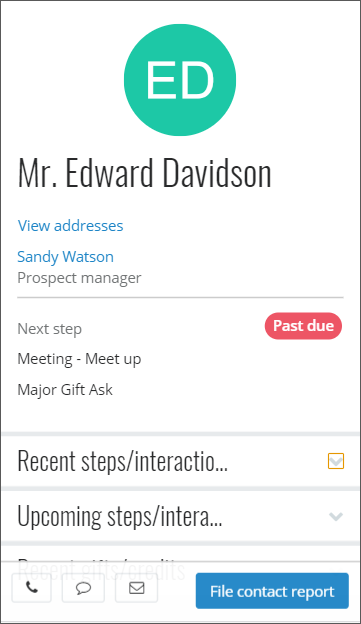
When you open a prospect, you can:
-
View the prospect's profile picture and details such as contact information, spouse name, and notes.
-
View the last five constituent interactions and major giving plan steps.
-
Add or edit constituent interactions and plan steps for existing plans. Note: You can’t add new plans from the app.
-
View the last five gifts and recognition credits.
-
File a contact report when you complete a step or an interaction.
-
View up to five smart fields for the prospect.
-
Select the prospect's address to get directions using Google Maps.
-
On mobile devices:
-
Use voice-to-text to quickly enter comments about your visit.
-
Use the app's buttons to call, text, or email the prospect using contact information from their record.
Show revenue smart fields
You can view revenue smart fields inFundraiser on the Go, under Summary information. To configure smart fields to display, fromAdministration, select Smart fields, under Data. On the add or edit screen for a revenue smart field, select Show this smart field in Fundraiser on the Go. You can configure a maximum of five smart fields for Fundraiser on the Go.
Note: You must have the appropriate security rights for smart fields to view them in Fundraiser on the Go.