Refresh Marketing Efforts
The refresh process updates the gift totals for an activated marketing effort with any new gifts received since the last refresh.
When you refresh the marketing effort, a “matchback” process runs automatically. The matchback attempts to match the appeal ID, marketing effort ID, source code, and/or finder number entered on gift records to those values on each segment in your marketing effort.
You may receive gifts from donors who were not included in segments for the marketing effort, but somehow their gifts are still associated with the marketing effort or appeal. These gifts are called Indirect and Unresolved Responses and they appear at the bottom of the marketing effort's Segments tab.
These tables explain how the program determines whether to match a gift to a segment, or consider the gift an Indirect or Unresolved Response for a marketing effort.
|
A gift is matched to a segment when: |
Appeal ID |
Marketing Effort ID |
Source Code |
Finder Number |
|
A constituent included in the marketing effort gives a gift where the following match: |
X |
X* |
|
X* *Need either Marketing Effort ID or Finder Number |
|
A constituent included in the marketing effort gives a gift where the following match: |
X* *If the appeal is associated with only one marketing effort |
|
|
|
|
A new constituent (via an imported list) gives a gift where the following match: |
X |
|
|
X |
|
A new constituent (via a vendor managed list or public media effort) gives a gift where the following match: |
X |
X |
X |
|
Note: We do not recommend that you use Source Code only when entering date. If you only use Source Code when you add revenue, the constituent will be associated with the Marketing Effort and Segment as a Direct response regardless of whether they are included in the Marketing Effort.
|
A gift is an Indirect Response when: |
Appeal ID |
Marketing Effort ID |
Source Code |
Finder Number |
|
A constituent who is NOT included in the marketing effort gives a gift where the following match: |
X |
X |
|
|
|
A gift is an Unresolved Response when: |
Appeal ID |
Marketing Effort ID |
Source Code |
Finder Number |
|
A constituent who is NOT included in the marketing effort gives a gift where the following match: |
X |
|
|
|
|
A constituent included in the marketing effort gives a gift where the following match: |
X* *If the appeal is associated with more than one marketing effort |
|
|
|
 Refresh a marketing effort
The marketing export refresh process can be scheduled by administrators in Administration, Manage Queues.
-
From a marketing effort record, select Refresh marketing effort under Tasks. You can also select Start process from the Refresh status page.
-
A message appears when the process completes. Any records that the matchback process was able to match with a segment are moved out of the indirect responses section of the grid and included as a response to the appropriate segment.
View Refresh Status for a Marketing Effort
After a marketing effort is refreshed, you can view details about the refresh process status. From the marketing effort profile page, under History, you can view the date the refresh process last ran and its current status. Icons represent the current status:
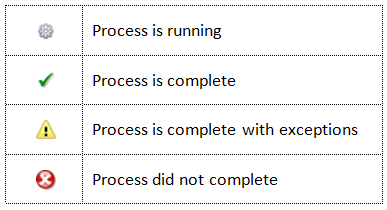
To view more details about the refresh process, select the date next to Refreshed The Marketing Effort Refresh Status page appears. On this page, you can manage the marketing effort refresh processes for your marketing efforts.
On the Recent Status tab, you can view the details of the most recent operation of the marketing effort refresh process. These details include the status of the process; the start time, end time, and duration of the process; the person who last started the process; the name of the server most recently used to run the process; the total number of records processed; and how many records processed successfully and how many were exceptions.
Each time you run the marketing effort refresh process, the program generates a status record of the instance. On the History tab, you view historical status record information about each instance of the refresh process. The information in the grid includes the status of the instance; the start time, end time, and duration of the instance; the person who started the instance; the total number of records processed during the instance; and the server used to run the process for the instance.
Delete refresh history for a marketing effort
-
On the Refresh Status page for a marketing effort, select the History tab.
-
Select an item in the grid and select Delete. A confirmation message appears.
-
Select Yes.