Projected Income Report
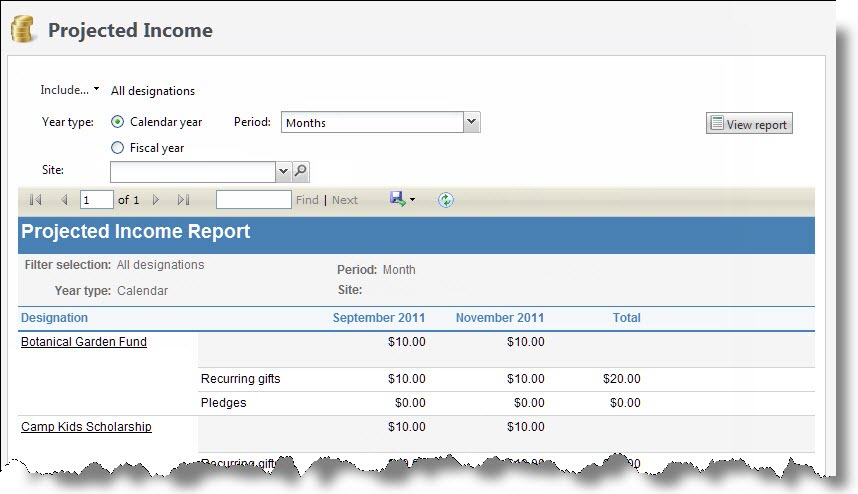
The Projected Income report provides information about anticipated revenue from scheduled pledge installments and recurring gift payments. When you run the report, you can select whether to display projected revenue from pledges and recurring gifts until the end of either the calendar year or fiscal year. You can also select whether to view totals from all designations, selected designations, or a specific designation. When you run the Projected Income report, the program calculates and displays the total projected revenue from pledges and recurring gifts until the end of the calendar year or fiscal year, broken down by period of month, quarter, or year.
Note: Only recurring gifts with a status of "Active" or "Lapsed" count towards the projected income.
Note: If your organization uses site security, the amounts that appear in the Projected Income report include only revenue associated with the sites the user who generates the report has rights to access.
When you generate a report, you can use the toolbar buttons to modify how you view the report. The toolbar buttons are common to all reports.
-
From Revenue, select Projected incomeunder Reports. Or, from Analysis, select Revenue reports, Projected income. The Projected Income report page appears.
-
Select whether to include revenue toward all designations, selected designations, or a specific designation. If you select "Selected designations," search for the selection of designations to include.
-
For Year type, select whether to calculate projected income to the end of the calendar year or fiscal year.
-
In the Period field, select whether to view totals by month, quarter, or year.
-
To include only revenue associated with a specific site, in the Site field, select the site to include.
-
Select View Report. The program generates and displays the report.