Pledge Receivables Report
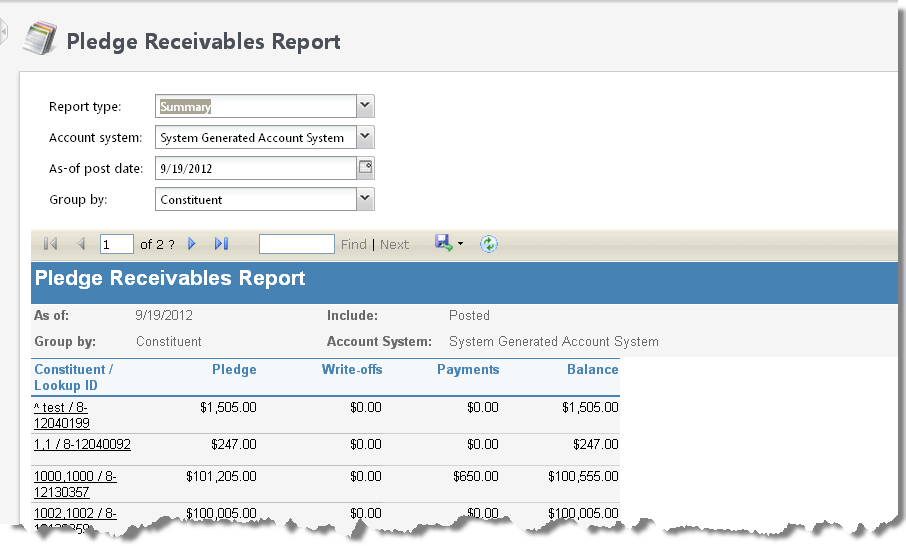
Use the Pledge Receivables report to view the detail and total amount of your outstanding pledges. Only posted activity is included in this report. You can filter the report by constituent or designation, and include only pledges with specific characteristics, such as account system and as-of post date. For each pledge, you can view its constituent and designation, pledge date, Lookup ID, and Revenue ID. You can also view information about any balance, payments, and write-offs associated with each pledge.
Note: You cannot filter the Pledge Receivables report by transaction date. Therefore, report totals on other pledge reports may vary.
For pledges applied toward multiple designations, the Pledge Receivables report displays each designation split as a separate pledge.
To view the details of the pledges associated with a constituent or designation, you can expand the constituent's or designation's node in the report.
To view additional information about a constituent, designation, pledge, select its link in the report.
Note: The purpose of this report is to reflect the detail and total amount of your outstanding pledges. Therefore, this report includes only posted activity. If you have pledges in your system marked as “Do Not Post,” they will not appear on the Pledge Receivables Report.
-
From Revenue, select Pledge receivables report under Reports. The Pledge Receivables Report page appears.
-
In the Report type field, select "Detail" to view the report with all pledge detail included. To view a summary of the report, select "Summary."
-
Select the Account System for which you want to run the report.
-
In the As-of post date field, enter the as-of post date for which you want to include pledge receivables. The as-of date you enter includes transactions up to, and including, that date.
-
In the Group by field, select whether to group the pledge receivables included in the report by constituent or designation.
-
To generate the report, select View report. The Pledge Receivables report appears.