Recurring Gift Missed Payments Report
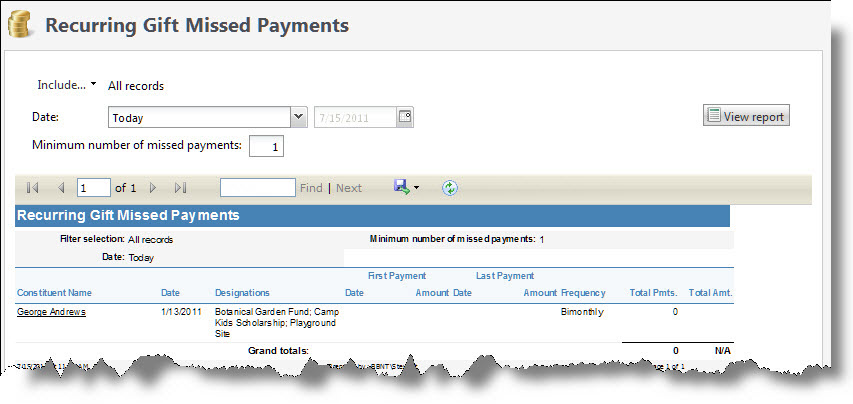
The Recurring Gift Missed Payments Report processes information for recurring gifts with missed payments, such as the number of payments skipped or missed since the last payment made. For example, you may want to see all donors who missed their last three payments. You can then use the information to contact them about resuming their donations.
Note: This report includes recurring gifts of all statuses.
Note: If your organization uses site security, the amounts that appear in the Recurring Gift Missed Payment report include only revenue associated with the sites the user who generates the report has rights to access.
The report processes information based on the number of payments skipped or missed since the last payment made. For example, Robert Hernandez made a recurring gift of $10 on January 1 with a transaction due on the first of each month. Since then, Robert made the following payments.
|
Date |
Payment |
|
January 1 |
$10 payment received |
|
February 1 |
$10 payment received |
|
March 1 |
$10 payment received |
|
April 1 |
$10 payment received |
|
May 1 |
no payment received |
|
June 1 |
no payment received |
|
July 1 |
no payment received |
If you run the report on July 15 with the missed payments of “3,” the report includes Robert Hernandez because he missed his last three payments.
Note: This report does count the payments with the current date in the missed payments if the "Today" or "Specific date" of the current date filters are selected.
-
From Revenue, select Recurring gift missed paymentsunder Reports. Or, from Analysis, select Revenue reports and then Recurring gift missed payments. The Recurring Gift Missed Payments Report screen appears.
-
To select the revenue transactions to include, select Include and select "All records," "Selected records," or "Specific record." If you select "Selected records" or "Specific record," in the field that appears,search for and select the records to include in the report.
-
In the Date field, select a date for which to view missed recurring gift payments. If you select "Specific date," select the date for which to view missed recurring gift payments. The report will display all missed recurring gift payments only for the date you select.
-
In the Minimum number of missed payments field, enter the minimum number of missed payments to include.
-
With Multicurrency, the Currency field appears. Use this field to determine how you want to view transaction amounts in the report.
“Base” is the base currency of the associated account system. “Organization” is the organization currency, and “Transaction” is the revenue’s transaction currency. When you add revenue, the program calculates and stores the base currency and organization currency amounts, along with the original transaction currency amount. When you switch currencies on the report, the amounts displayed are the original currency amounts calculated when the transactions were added.
-
Select View Report. The program generates and displays the report.