Giving Detail Group/Household Report
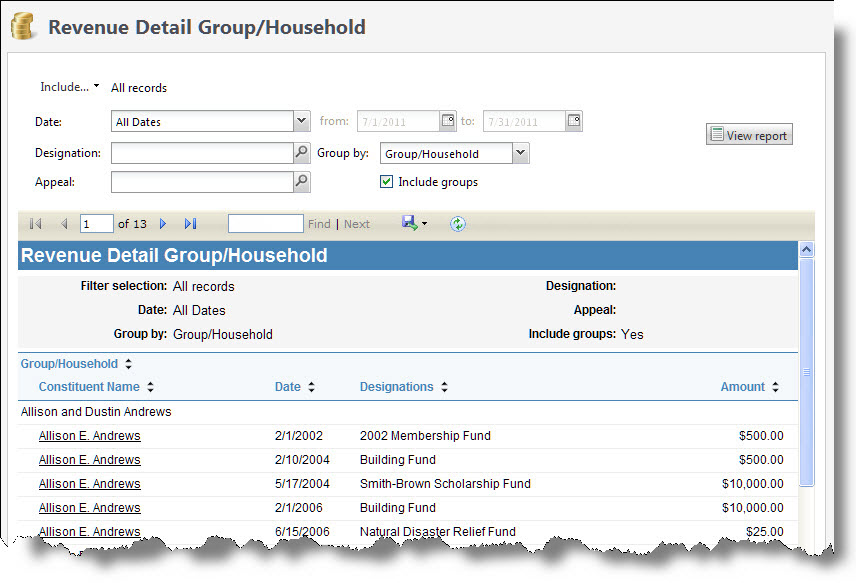
The Giving Detail Group/Household report provides information about individual group or household member giving during a time period you define. The report includes totals of revenue received within the date range for each designation, as well as constituent name and group/household information. The data included in the report depends on the parameters you select.
The report counts payments made towards a designation, such as donations and pledge and recurring gift payments, in the Amount column and any outstanding commitments, such as pledge balances, in the Balance column.
Note: Recurring gift balances are not included in the Balance column.
Tip: The Revenue Detail Group/Household report displays member giving for a constituent group only when the constituent group type is configured to include member giving.
Note: If your organization uses site security, the amounts that appear in the Giving Detail Group/Household report include only revenue associated with the sites the user who generates the report has rights to access.
-
From Revenue, select Giving detail group/household under Reports. Or, from Analysis, select Revenue reports and then Giving detail group/household report. The Giving Detail Group/Household Report screen appears.
-
Select Include and select the records to include. Select “All records,” “Selected records,” or “Specific record.” If you select “Selected records” or “Specific record,” in the field that appears, search for the revenue transaction records to include in the report.
-
Enter the date range to filter the report.
-
In the Date field, select a date for which to view revenue detail information for groups or households.
-
If, in the Date field, you select “Specific date,” in the next field, select the calendar and select the date for which to view revenue detail information for groups or households. The report will display information only for the date you select.
-
-
Select any filters you want for the Designation and Appeal fields.
-
In the Group by field, you can select how to display the report. To group the results by group or household, select “Group/Household.” To displays the results alphabetically by individual constituent, leave this field blank.
-
By default, the report includes revenue information for households only. To include revenue information for groups as well, select Include groups. If the revenue is associated with a constituent who is a member of both a group and a household, the revenue appears twice in the report, once as household revenue, and once as group revenue.
-
Select View Report. The program generates and displays the report.