Address Processing Tab
On the Address processing tab, select the address processing and name format options to use for marketing efforts created from the communication template.
Note: Configure name format and address processing options in Marketing and Communications, under Configuration. For more information, see Address Processing Options.
-
From the Add a communication template screen, select Select features and defaults.
-
Select the Address processing tab.
-
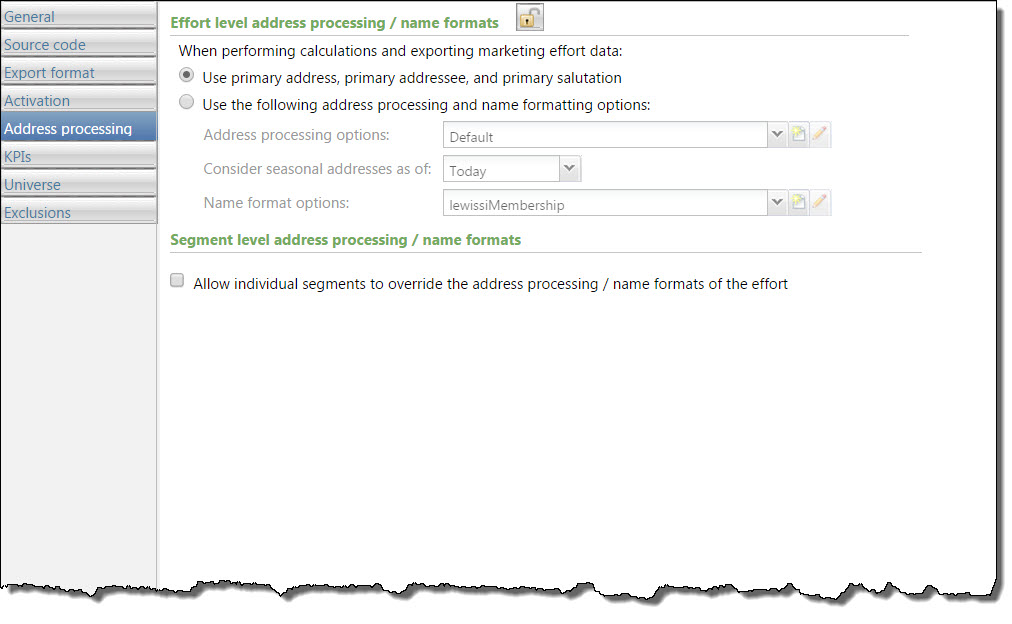
Under Effort level address processing/name formats, select which name format and address processing options to use:
-
Use primary address, primary addressee, and primary salutation—Select this option to use the primary address, addressee, and salutation selected for records included in the marketing effort. If a constituent has no primary address, primary addressee, or primary salutation, then the record is exported with a blank address, addressee, or salutation. To ensure that every constituent has a proper addressee and salutation, make sure to define at least one default name format with a specified primary addressee and primary salutation.
-
Use the following address processing and name formatting options—Select this option to choose custom address processing and name format options for the marketing effort. For example, you can use a unique address processing option set for your holiday appeal.
-
Address processing options — Select a pre-defined set of address processing options or create a new set.
-
Consider seasonal addresses as of — Select a date to take seasonal addresses into consideration when a marketing effort is processed to ensure delivery to the correct location. For example, if a constituent stays at a vacation home in December, you can send your marketing effort there rather than the primary address.
-
Name format options — Select a pre-defined set of name format options or create a new set.
-
-
To allow users to choose different addressing processing or name formats for segments, under Segment level address processing/name formats, select Allow individual segments to override the addressing processing/name formats of the effort.
-
Select another tab on the Select features and defaults form, or select Next to continue the setup process.