VSE Survey Report
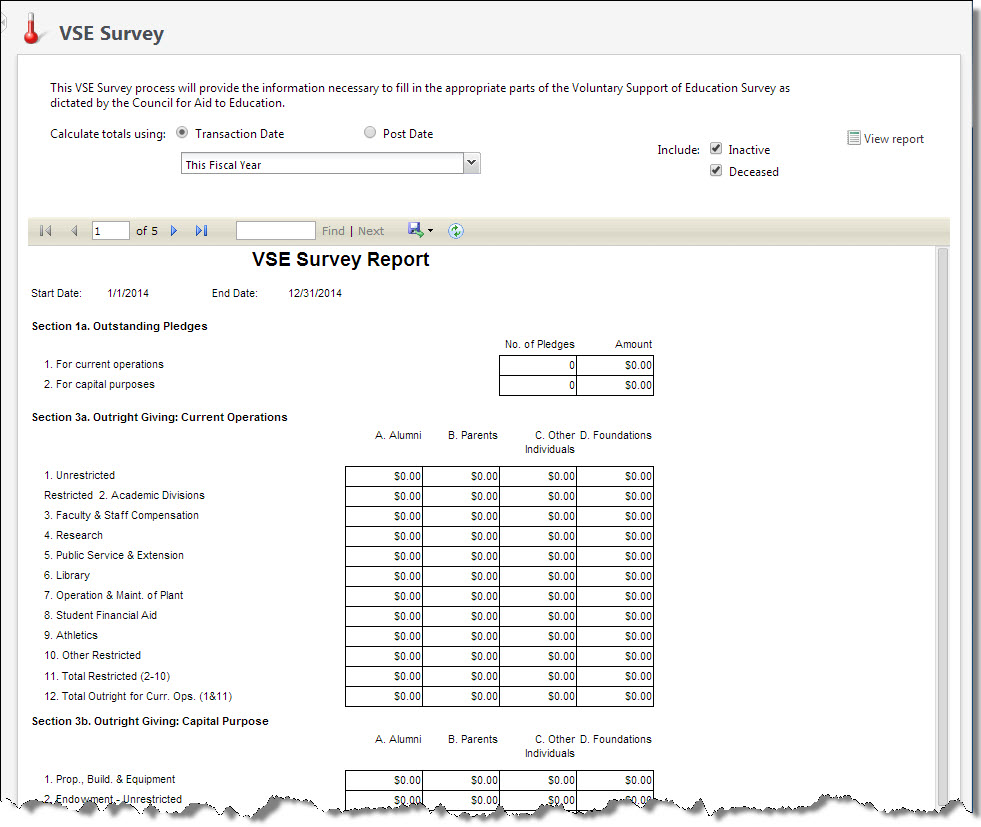
Colleges, universities, and private elementary and secondary schools can use the Voluntary Support of Education (VSE) Survey report to compile data, such as private gifts and grants received, to send to the Council for Aid on Education (CAE). The VSE Survey report shows information about the giving associated with the categories of the VSE Survey and is formatted to correspond directly with the survey. The report shows the quantity and total amount of outstanding pledges associated with current and capital operations, the outright giving associated with the VSE categories, and the total given to each category by constituency. The CAE uses this information to help your institution compare its data against other related organizations. Participation in the VSE Survey is voluntary.
Note: The constituencies and fundraising purposes associated with revenue determine to which VSE categories gifts are applied. When a fundraising purpose is added to the database, your organization can assign it to a specific VSE category. Similarly, your system administrator can map individual and organization constituencies to the constituencies of the VSE Survey in Constituents. For information about how to map your constituencies to the constituencies of the VSE Survey, see the Constituents Guide.
To access the report, on the Fundraising page, select VSE survey under Reports. The VSE Survey report screen appears. From this screen, you can select the parameters to use to generate and view the report. Once you run the report, you can print it or export its data in several different formats.
Note: To access this report from Report explorer, select Reports, Fundraising Efforts, VSE Survey Report.
The VSE Survey report does not provide all the information necessary to complete the VSE Survey. The VSE Survey report shows only information about the giving associated with the categories of the VSE Survey. For ease of use, the report is formatted to correspond directly with the survey. The reports in the VSE Survey report are consistent with the guidelines set forth in CASE Management Reporting Standards: Standards for Annual Giving and Campaigns in Educational Fund Raising, available from the Council for Advancement and Support of Education (CASE).
Note: VSE 2022 update: If your organization needs additional categories for your VSE report, please create a case with Support along with a list of the specific VSE categories.
For more information about CASE, visit their website at www.case.org or call them at (202) 328-2273.
-
From Fundraising, select VSE survey under Reports. The VSE Survey report screen appears.
To access this report from Report explorer, select Reports, Fundraising Efforts, VSE Survey Report.
-
For Calculate totals using, select the date to use to calculate the revenue totals for the report. You can select Transaction or Post Date.
In the adjacent field, select the date range of the revenue to include in the report. When you select "Specific Date," enter the start and end dates of the date range.
-
For Include, select whether to include revenue from inactive or deceased constituents in the report.
-
Select View report. The report appears.