View Calculation Status
After segment counts are calculated for a marketing effort, you can view details about the process status. To access the Marketing Effort Segment Record Count Calculation Status page, on the marketing effort profile page, under History, select the date next to Counts generated.
After segment counts are calculated for a marketing effort, you can view details about the process status. From the marketing effort profile page, under History, you can view the date the calculate counts process last ran and its current status. Icons represent the current status:
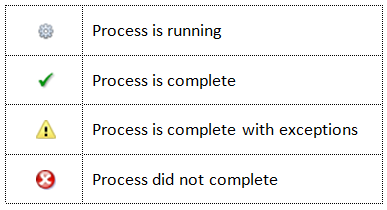
To view more details about the calculation process, select the date next to Counts generated. The Marketing Effort Segment Record Count Calculation Status page. On this page, you can manage the marketing effort calculation processes for your marketing efforts.
On the Recent Status tab, you can view the details of the most recent operation of the Calculate segments counts process. These details include the status of the process; the start time, end time, and duration of the process; the person who last started the process; the name of the server most recently used to run the process; the total number of records processed; and how many records processed successfully and how many were exceptions.
Each time you run the Calculate segments counts process, the program generates a status record of the instance. On the History tab, you can view historical status record information about each instance of the process. The information in the grid includes the status of the instance; the start time, end time, and duration of the instance; the person who started the instance; the total number of records processed during the instance; and the server used to run the process for the instance.