Add and Manage Personal Access Tokens (PAT) for Proxy Users
A personal access token (PAT) enables third‑party software to authenticate as a proxy user in Blackbaud CRM. Report Builder uses a personal access token to connect to SQL Server Reporting Services, and the proxy user needs a role that includes Report Builder rights. For the list of roles, see Manage Proxy Users. A proxy user is a non‑interactive account created for system‑to‑system communication. A proxy owner manages personal access tokens for the proxy users that belong to them.
-
Interactive application users authenticate with a username and password, sometimes with multifactor authentication (MFA) or database authentication.
-
A proxy user authenticates with a username and a personal access token. Each personal access token is unique to the proxy user and the Blackbaud CRM database where it is created.
Add a Personal Access Token (PAT)
A proxy owner can add a personal access token for their proxy users. You can't add tokens for proxy users owned by other application users.
A proxy user can have two active personal access tokens. If the proxy user already has two active personal access token, revoke one before you add a new personal access token.
-
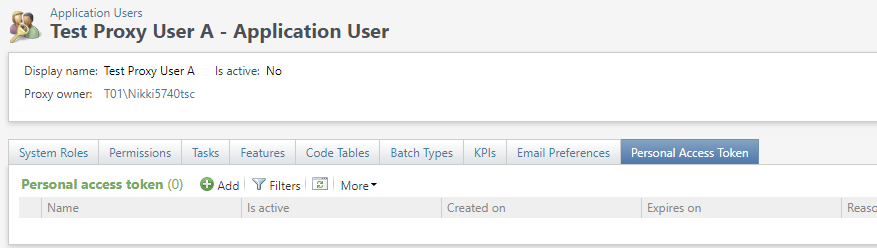
Open the proxy user record (Application User Summary).
-
Select Personal Access Token.
-
Select Add.
-
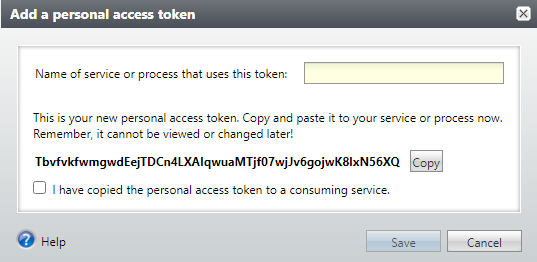
Enter a descriptive name. We recommend you include the name of the third-party software that uses this token, such as Report Builder.
If you select Cancel before you copy the personal access token, a personal access token won't be created.
-
Copy the personal access token. It only appears one time.
-
Use the personal access token in the third‑party software that authenticates as the proxy user, such as Report Builder.
Note: The PAT can only be used to authenticate for that proxy user to gain access to information within that database.
-
Confirm that you copied the personal access token. You won't be able to see it again in the future.
-
Select Save.
The personal access token is automatically encrypted for secure storage. The personal access token does not appear again.