Business Index
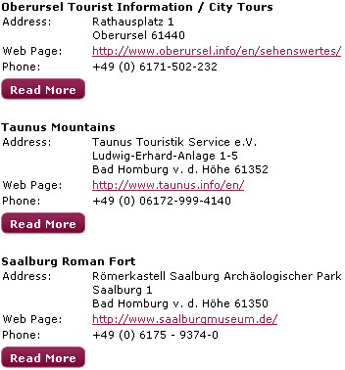
Provide contact information for local hotels, restaurants, attractions, etc. such as to create a virtual visitor's guide.
The business index does not exist within a category. It is added directly to a page builder page. It cannot be added to a portal or group page.
-
Select Core or School website.
-
Select Content.
-
Choose the content type you want to work with.
Business index is an "additional content type."
 Add a business index to a page
-
Open to the page to which you want to add the channel.
-
Select Edit page.
-
From the Content type menu, select Business index.
-
Select Save/save & exit.
-
From the channel, select Manage business index category.
Add a business to the Business Index
-
From the Manage Business Index category page, select Add index item.
-
Enter the Business name.
-
Enter the Address information(optional).
-
Enter the Distance(optional) from campus.
-
Enter the Web page(optional).
-
Enter a Description (optional), such as what services it provides.
-
Select Save & Exit.
-
To organize the businesses within the Business Index, select the organize link from the Manage business index category page.
Business index display options
To edit the display options, edit the channel options.
-
Display the business index descriptions
Use this to show the business descriptions.
-
Sub-categories
Use this to organize downloads by sub categories, if available.