Enroll a payer in Auto-Pay
Enroll payers in Auto-Pay to ensure charges are satisfied automatically, without the need to log in and make manual payments.
Types of Auto-Pay plans
There are two primary types of Auto-Pay plans a payer can enroll in:
-
Auto-Pay based on payment plans: Covers all charges included within a designated payment plan.
-
Auto-Pay based on incidentals: Applies to charges that fall outside of any active payment plan.
Enroll a payer in Auto-Pay for payment plans
Auto-Pay based on payment plans requires payers to be on a payment plan for the current billing year before they can enroll. Split families can maintain independent Auto-Pay plans for their respective responsibilities.
-
Multiple active Auto-Pay plans are permitted per student per school year, provided all charges on the payment plan are assigned to specific responsible payers.
-
If all charges are set to "Any payer," or if there is a mixture of "Any payer" and specifically assigned charges, only one payer can logically enroll in Auto-Pay.
-
If an Auto-Pay plan already exists for the full payment plan amount, specific payer partial Auto-Pay plans cannot be created.
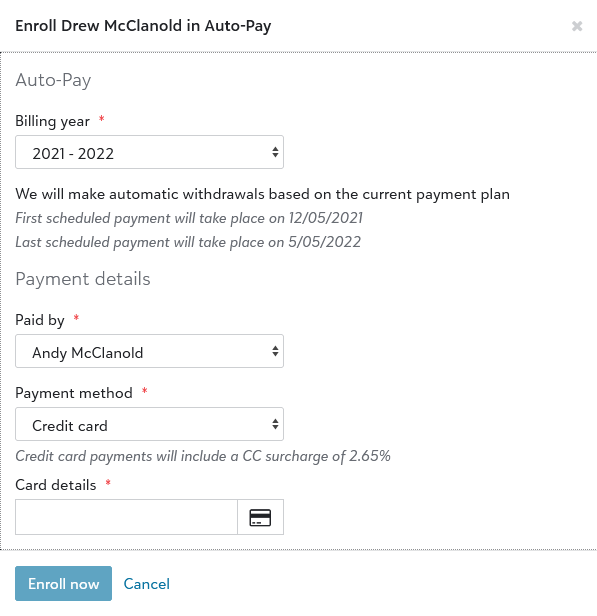
To enroll a payer in Auto-Pay based on a payment plan:
-
In Billing Management, use the People finder under the navigation menu to search for and open a student's billing profile.
-
Under the Auto-Pay section, select Add Auto-Pay.
-
Select the relevant billing year corresponding to the payment plan.
-
Enter the Statement recipient/payer responsible for satisfying the installment payments.
-
Select the Payment method.
Note: (Canada only) Billing clerks are unable to select direct debit payment methods on behalf of Canadian payers.
-
Select the Card/Account details text field and enter the appropriate billing credentials.
-
Select Enroll now.
Enroll a payer in Incidental Auto-Pay
-
In a student's billing profile, under the Auto-Pay section, select Add incidental Auto-Pay.
-
Enter the statement recipient the payment is paid by, the payment method, and the details for the payment method.
-
Select Enroll now.
When Auto-Pay payments are processed
Auto-Pay payments are scheduled for processing three days before the actual due date, at which time the Upcoming Auto-Pay notification is sent to the payer. The actual payment begins processing one day prior to the due date.
For example, if the installment date is the 15th of the month:
-
The payment is scheduled, and the Upcoming Auto-Pay notification is sent, on the 12th.
-
The payment begins processing on the 14th.
Provided below are actions you can take to affect Auto-Pay processing. Note that some actions can only be performed before a payment is scheduled:
| Action | Before Payment is Scheduled | After Payment is Scheduled |
| Pause Auto-Pay |

|
|
| Update payment method (e.g., switch from direct debit to credit card) |
|
|
| Update payment details (e.g., update bank or card info) |
|
|
| Make a manual payment to affect Auto-Pay amount |
|
|
| Sign up for Auto-Pay |
|