Let’s Talk About Parent Submitted Attendance
New Features
With the new school year on the horizon, we wanted to reintroduce you to our Parent Submitted Attendance feature.
https://d3cy9zhslanhfa.cloudfront.net/media/314ECBC4-9678-41CF-9E352DD63C518811/947CECE4-D85A-4DD5-A4CEC641BC63F62C/webimage-601C3CC7-3E51-47AE-ADE20D33E51751F1.png
August 17, 2026
Just like that, a new school year has arrived! We know you have a ton of things to do in preparation for the new year, so today’s journal entry is all about helping your school simplify the attendance process.
After releasing Parent Submitted Attendance, we’ve continued to build upon that foundation by adding functionality and features to help the process feel intuitive but also ensure ease of use for parents. To help your school get everything up and running, let’s take a deep dive into this feature to help make your attendance gathering even easier than before.
Tip: For more detailed information of this feature, make sure to visit our Help Center.
What is Parent Submitted Attendance?
Before we get into the details of how this all works, let’s step back and start at the beginning to explain what this feature is.
As the name suggests, Parent Submitted Attendance allows parents to report things like absences, late arrivals, or early dismissals directly to the school. Keep in mind that the attendance is live once a parent submits it, but the benefit is that teachers are immediately notified and better prepared without needing to wait for an action to be taken by an administrator. Even with the attendance being live, administrators can still review and edit as necessary.
Working with Parent Submitted Attendance
This feature isn’t active by default, so it’ll need to be enabled by a platform manager through Academics, Attendance, Settings, and finally Parent submit. In this modal window, you can determine what school levels will allow for this feature as well as the time frame for when parents can submit attendance. It’s worth noting that this feature does support future attendance changes, but you’re in control of how far in advance and it won’t lock down the master schedule.
We also recommend setting up confirmation notifications and adding instruction text to give tips, advice, and other helpful information, further helping your parents feel supported through the process.
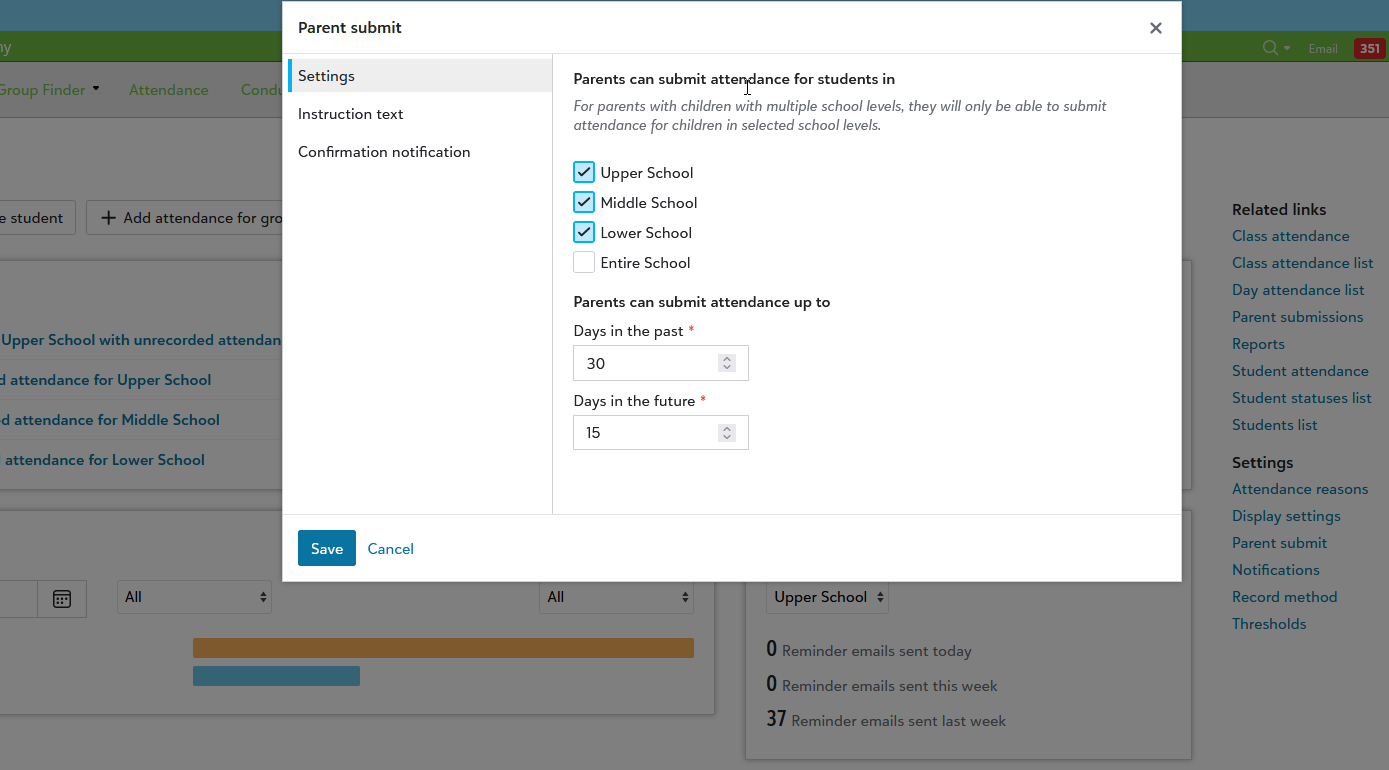
Also, don’t forget to set up Attendance Reasons and set the Parent submit access to Yes. This not only provides a list of options for parents to select when filling out the attendance but allows you to control which options are available to pick from. Read more about Attendance Reasons right here.
We also recommend turning on confirmation emails once attendance has been submitted. This helps parents confirm that their request went through while also bolstering confidence that your school has been notified of the action.
The Parent Perspective
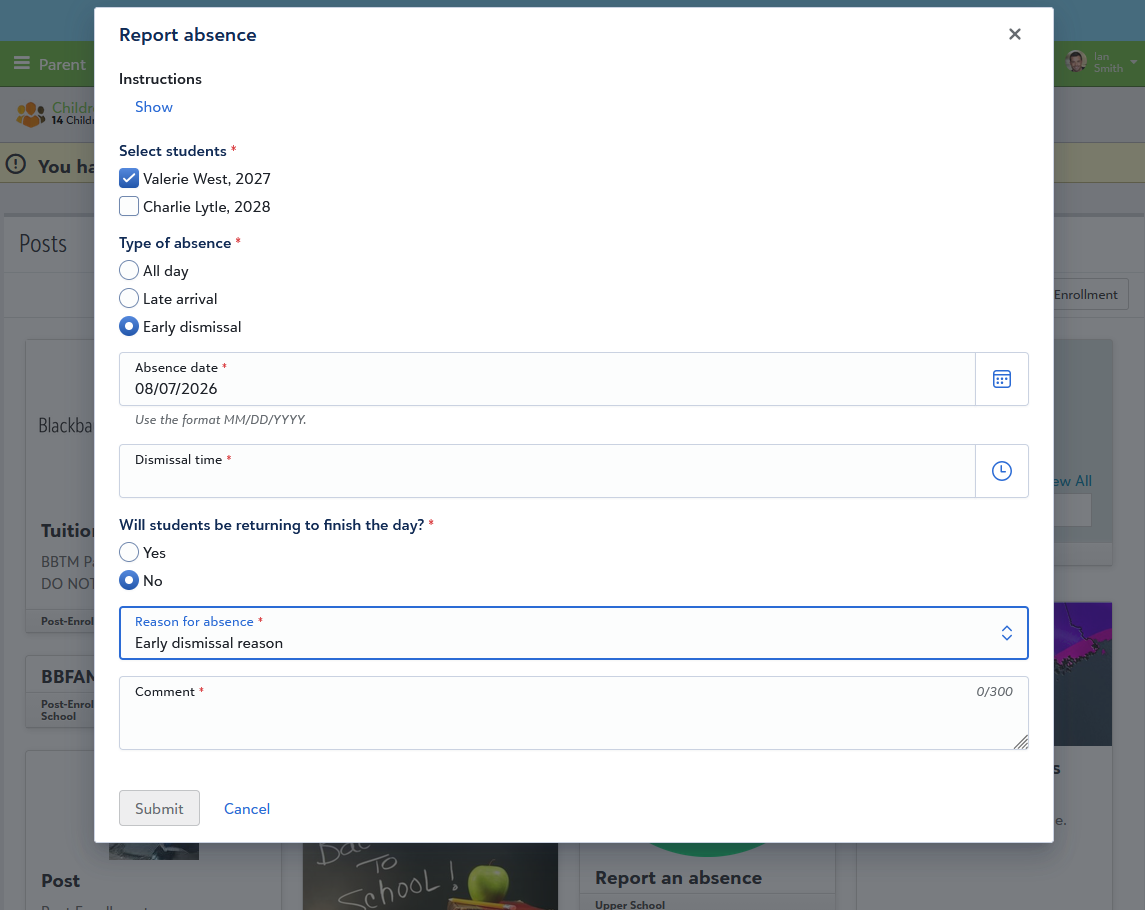
Parents can easily access attendance submission through the Parent Portal and then opening their child’s record. They should look for the +Report absence button, which opens a new modal they can fill out for the type of absence (All day, late, dismissal), the date for when it’ll be taking place, a reason, and comment.
Alternatively, parents can use the Report Absence tile from the Resource Board as long as the school has published it beforehand.
In terms of record keeping, parents can keep tabs on the attendance they’ve already submitted by going to their student’s progress tab and then selecting View submitted attendance.
Let's Review!
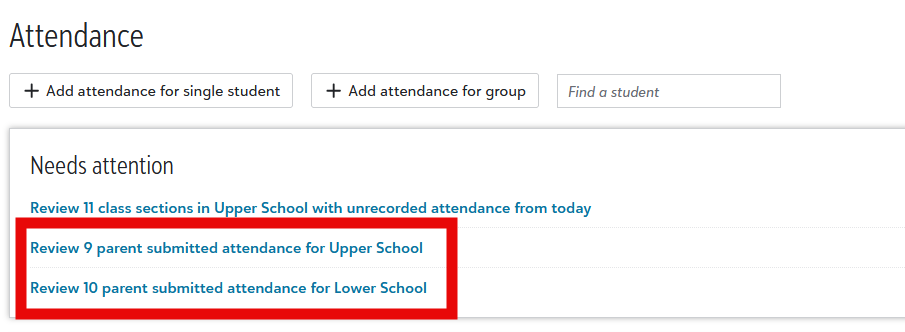
With the feature set up and parents now submitting their own attendance, what now? New attendance submissions appear within the Needs attention tile in the Attendance Hub.
You’ll see the full list on the left side and selecting one will open a review window on the main screen. You’ll see all the details added by the parent, the students’ grade information, as well as how the attendance change will impact their schedule by displaying which activity they would be at during those specific times. Better yet, the parent contact information is also displayed so admins don’t need to go digging to find it if questions arise.
If needed, admins can make additional changes to the Reason or Comment sections. Finally, the Parent submissions list is the place to go to keep track of previous submissions.
So, What's Next?
While everything we’ve talked about so far is live now, we have more plans to continue adding more functionality to this feature. We've heard many of you and are currently working on the ability to upload files and documents along with the submitted attendance. What makes this element valuable is that parents can add documents like a doctor’s note or other excused absence documentation.
That’s going to do it for Parent Submitted Attendance! We hope you found this blog post informative and that this feature manages to make things easier for you this year. Make sure to check out the documentation links above for more details. Have a great school year![