Making Your Due Dates Conditional in Enrollment Management
New Features
Conditional Due Dates are live in EMS for Candidate checklists! Here’s what you need to know!
https://d3k2f0s3vqqs9o.cloudfront.net/media/314ECBC4-9678-41CF-9E352DD63C518811/8DA2EE44-062B-472D-AC9429DBE96C9795/webimage-87869E38-5939-44D2-A599487C6B6F5E6E.png
June 8, 2026
As part of the June 2 What’s New release letter for Blackbaud’s Education management, the Enrollment management team has essentially upgraded the Due Date field when working with Checklist steps. It’s now a true conditional field, if you want it to be, so let’s talk about it.
Introducing Conditional Due Dates
We’ve expanded the capabilities of the Due Date field when adding a step on a Candidate Checklist, allowing you to still set a hard due date if you want, or have the system automatically generate the date based on when a checklist step has been assigned or when a prior step has been completed.
There’s a lot of flexibility here now, so let’s dive in a bit more.
Where Is It?
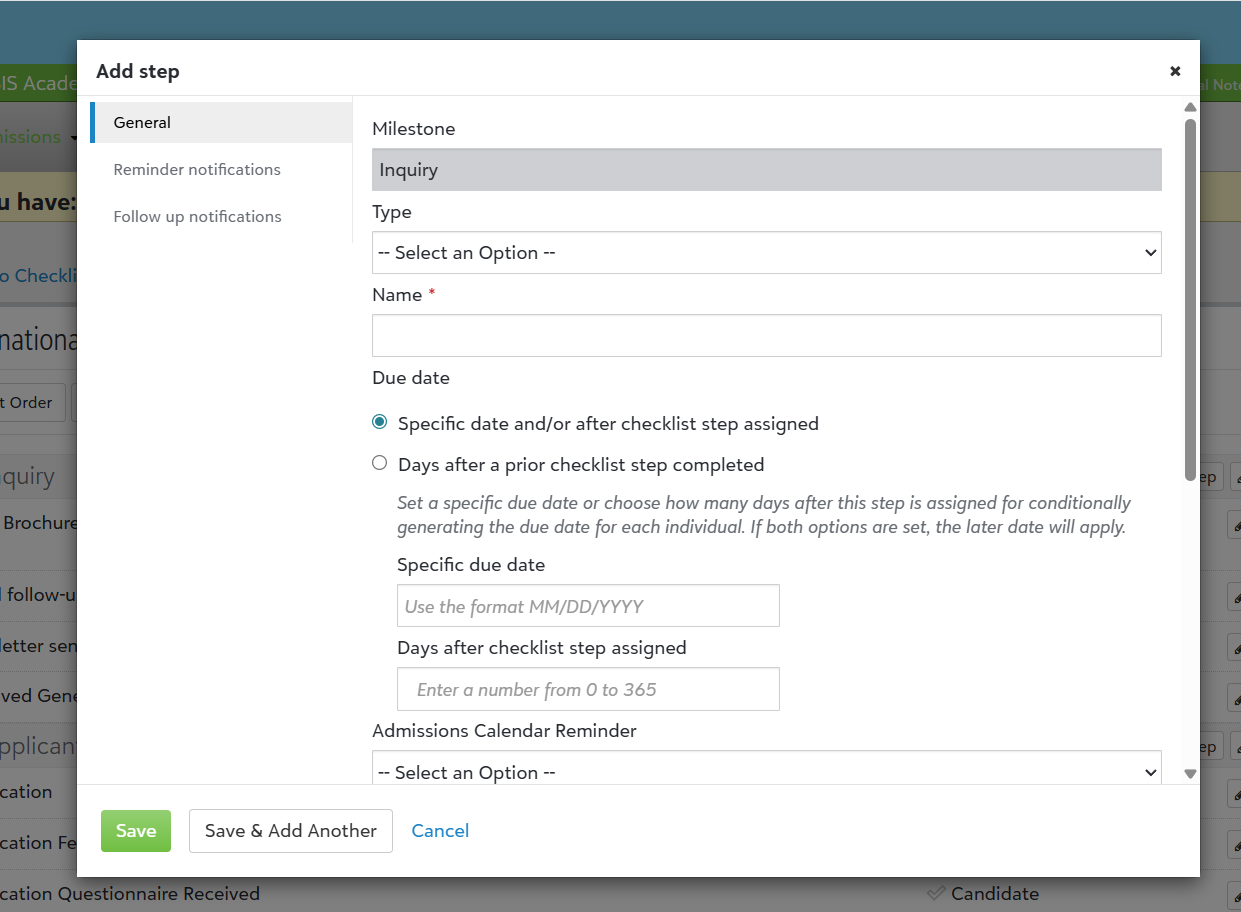
To get started, you’ll be working with Candidate Checklist steps. So, in this case, select Enrollment management, then Admissions, Admissions setup, and finally, Checklists. Whether you’re creating a new checklist or editing an existing one, when you Add Step, look for the Due Date field which will have two options for you to pick from.
-
Specific date and/or after checklist step assigned – The first option allows you to either set a specific Due Date, or how many days after the step is assigned. Alternatively, you can enable both options here if you want, with the later date being the one that is applied.
-
Days after a prior checklist step completed – If you pick this option, the Due Date will be set to the number of days after a previous checklist is completed. Use the dropdown option here to select which checklist step will trigger the date. So, if you set 3 in the Days after a prior checklist step's completion box, then it will add 3 days to the date when the selected step is marked completed.
About Reminders
But that’s not all! If you’ve set up a Reminder Notification, the Due Date is automatically adjusted to match your conditions as well. In addition, if a Due Date is manually changed from the Candidate’s Checklist directly or removed entirely, the condition will automatically update to the new date or not send anything at all if the date is removed and left blank.
By the way, I’ll let you in on a little secret. We’ve got more plans for these conditional due dates and will be bringing them to Contracts soon. More on that later though so stay tuned.
As always, thanks for stopping by to check out the latest journal entry. More soon!