What's New - GrantsConnect Release 2.157.0
This release is scheduled for October 19, 2026 during our release window of 10:30-11:00 AM ET.
Applications
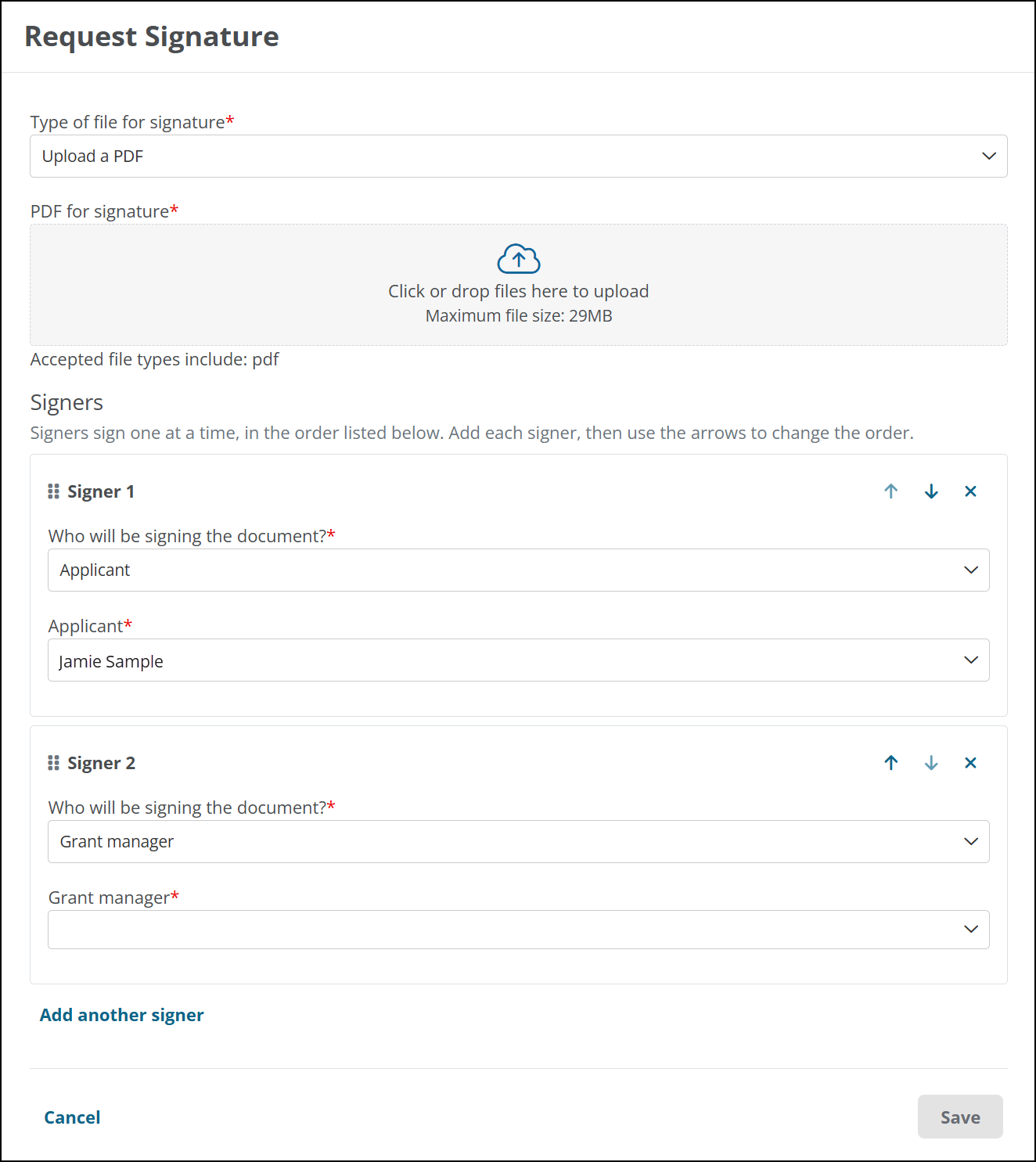
 Send Signature Requests to Multiple Signers In Order
Grant managers can now send one Adobe Acrobat Sign request to multiple people and set the order in which they sign. Each signer can be an applicant, a grant manager, or an external signer, and the applicant doesn’t have to be one of them. This supports agreements that need a countersignature or an approval chain, including agreements that do not require the applicant’s signature.
Adobe Acrobat Sign sends the request to the first signer, then notifies each next signer after the previous signer completes their part. In the Signers column on the Signatures tab, grant managers can see each signer’s status and date and who the request is waiting for.
When the final signer completes the request, GrantsConnect saves the signed document to the application. If a signer declines, the request is rejected and the remaining signers aren’t prompted to sign.
Note: Requests sent before this release continue to display and complete as before. You can’t change signers after sending a request.
For details, see Send a Signature Request to Multiple Signers and Request and Track Adobe Acrobat Signatures for an Application. Applicants and others who are asked to sign can learn what to expect in Sign Applications and Documents Electronically.