Overview
Feature Groups were first made available for Blackbaud CRM in the 2.93 version of the SDK.
Feature Groups fit into the overall design of feature security and system roles by allowing the SDK developer a better way to organize and manage the authorization of individual Infinity features, such as data forms, data lists, record operations, etc. into a larger logical feature. Feature Groups allow you to simultaneously grant rights to a multiple tasks and features instead of granting rights to individual forms, lists, and other items one at a time. They are designed to allow you to easily assign rights to related tasks that groups of users are likely to need.
Note: Feature Groups are known as Permissions within the user interface
Prior to Feature Groups, the feature security model was organized like this:
- Developers author features
- Users (System Administrators) configured features into System Roles.
- Users (System Administrators) assign other users into System Roles.
This proved to be too fine grained a pattern because in practice a entire set of individual features needed to be organized into a System Role for a user to actually be able to perform a larger logical function in the application. For example, a Volunteer Manager is role that oversees all aspects of a volunteer program. A user assigned to the Volunteer Manager System Role requires the ability to update constituents. Updating constituents required access to a large number of individual features such as code tables, data forms, data lists, record operations, and a search list.
With Feature Groups a new model for feature security is established. This new model has the following parts.
- Developers author features
- Developers group related features using a FeatureGroupSpec via the SDK.
- Users (System Administrators) configure Feature Groups to a system role using the Permissions tab that appears within a page for a System Role
- Users (System Administrators) assign users into System Roles.
In the new model, the first 2 items are defined by the developer by creating the appropriate specs in a Catalog project. The 3rd and 4th item is something defined by configuration by a user (typically a system administrator). In this way, the developer is out of business of manipulating System Roles. FeatureGroupSpec was introduced in a way that was compatible with all existing configuration and specs, so it is optional but highly recommended as the best way to simplify permissions. The art is in defining the group of features at the right grain.
Going back to the example of a Volunteer Manager, a Feature Group can be defined which organizes all features necessary for updating constituents. A developer can author a Feature Group named Update constituents via a FeatureGroupSpec. Within the definition of the FeatureGroupSpec the developer references a list of features necessary for updating constituents. Once the spec is loaded into the catalog system, an administrator can assign the Update constituents Feature Group to the Volunteer Manager system role via the Permissions tab on the page that manages the Volunteer Manager system role. Any user assigned to this system role will have access to all the features organized within the Feature Group.
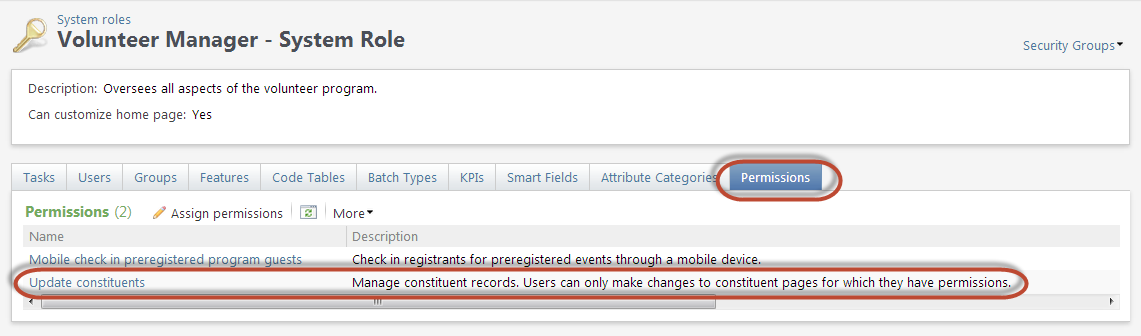
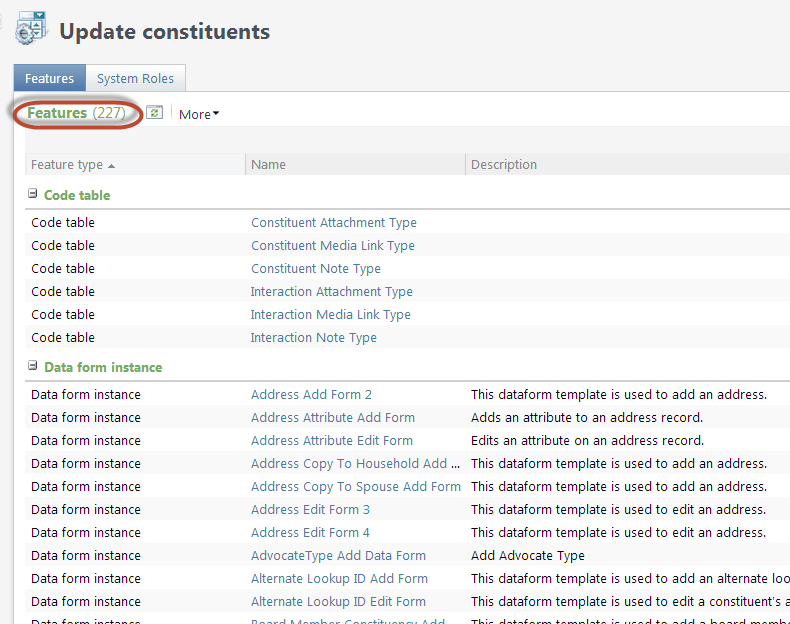
In the figure above, selecting Update constituents Feature Group item in the list of Permissions will navigate the users to a page which displays all the features assigned to the Feature Group. Below we can see the page displaying the Update constituents Feature Group which organizes 227 individual features.
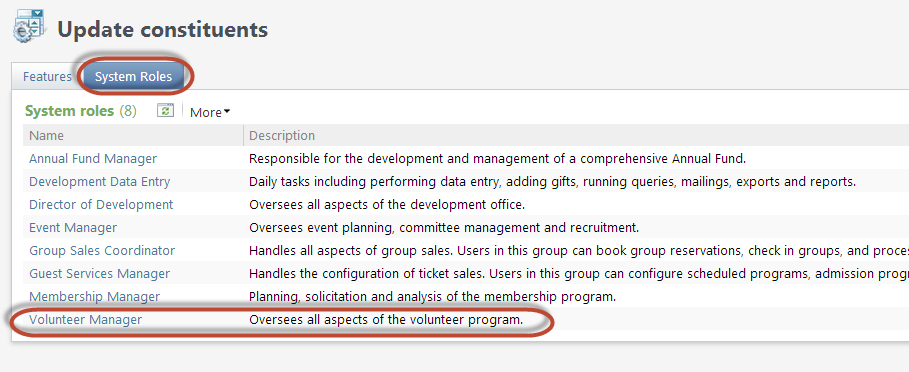
Selecting the System Roles tab on the same page reveals all the other system roles that rely on the Update constituents feature group to help organize and manage feature permissions. Looking at the listing of system roles below we can see the Volunteer Manager system role along with 7 other system roles:
So the FeatureGroupSpec was created to allow a developer to express a grouping of related features that can be safely updated over time. New features that should logically be granted to users who already have the other related features granted without worrying about stomping on the end user's security configuration. For example, if in the next release of Blackbaud CRM there are enhancements to the logical Volunteer Manager system role that in practice introduce 3 new forms and 2 new data lists then Blackbaud can simply update the Volunteer Manager FeatureGroupSpec. When the new version of the product is released, any user that has already been granted access to these group of features would be granted access to the new forms and data lists without requiring any configuration by a system administrator.
3rd party developers can also use the FeatureGroupSpec as an extensibility point when it makes sense.