Business Rules for Duplicate Contact Information
To prevent duplicate contact information on constituent records in The Raiser’s Edge 7.95, you can set a business rule to disallow multiple phone numbers and email addresses of the same type to be saved. The phone and email options business rule is flexible so that you can set different rules for phone numbers and email addresses. You can also set the rule to allow duplicate types if you prefer, or display a warning each time a duplicate type is about to be saved.
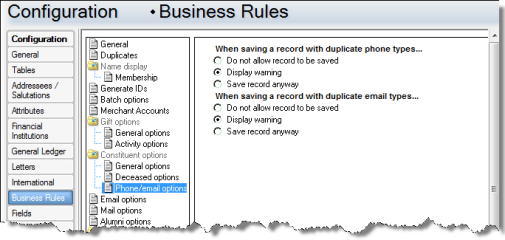
Based on the rule you set in The Raiser’s Edge, the integration with Luminate Online will behave accordingly.
Do not allow record to be saved
If the business rule is set to not allow duplicate phone and email types to be saved, you will be prompted with a message on the Constituent Information page when you try to process changes from Luminate Online that include duplicates. You can select to overwrite the duplicate information or discard the information from Luminate Online. If there are multiple phone numbers or email addresses with the same type on the constituent record, you can select to manually update it instead.
|
Note: When bulk processing constituent updates from Luminate Online, records with duplicate information will not be processed. Those records will remain on the Constituent Information screen for you to manually review and process into The Raiser’s Edge. |
Display warning
If the business rule in The Raiser’s Edge is set to display a warning when duplicate phone and email types are going to be saved to a record, you will be prompted with a message on the Constituent Information page when you try to process changes from Luminate Online that include duplicates. You can select to add the duplicate information from Luminate Online to the record, overwrite the existing information on the record, or reject the update entirely.
Save record anyway
If the business rule in The Raiser’s Edge is set to save records with duplicate phone and email types, all constituent updates from Luminate Online will be processed as normal, without warnings for duplicate information. We recommend you select this option with The Raiser’s Edge and Luminate Online integration.
|
Note: When bulk processing constituent updates from Luminate Online, if the business rule in The Raiser’s Edge is set to display a warning or save the record anyway when duplicate types are encountered, duplicate information will be added to The Raiser’s Edge. |