Query Node Types (Single-Row Result Layout)
Note: Don't see this yet? No need to worry. Expect its wider release in a future update.
In the Available Fields tree, single row result layout includes three node types. Each type reflects how records in a node relate to the parent node and determines how results are returned.
One-to-One Nodes
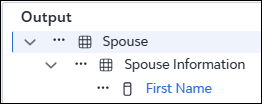
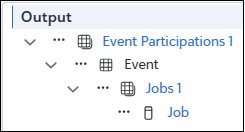
A one to one node returns information from a single, related record. For example, a constituent information node on a constituent query returns fields from the constituent record itself. One-to-one nodes can appear at the top of the tree, like Spouse in a Constituent query. They can also appear in the middle of a tree, like Event under Event Participations in an Individual query. There can only be one instance of any given one-to-one node included within its parent node. Likewise, each one-to-many node can have its own one-to-one node. One-to-one nodes cannot be renamed.
One-to-Many Nodes
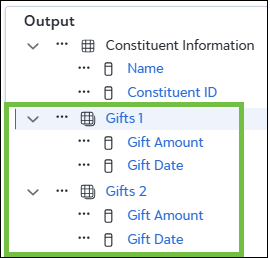
One to many nodes return multiple related records. For example, gifts and actions on a constituent query are one to many nodes. You can control how results are returned by selecting the number of records and applying filters and sorting.
Summary Nodes
A summary node targets data with a one to many parent child relationship but aggregates that data into a single result. For example, a gift summary node on a constituent query can return totals and averages. You can filter which records are included in the aggregation, but you cannot control record count or sort order because the output is a single, aggregated value.
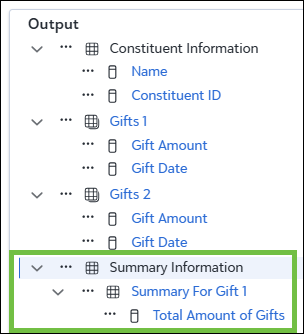
First Gift or Last Gift are also summary nodes and are available to select a single record from a set of related records and then return values from that record. You cannot control the record count or sort order for these records either, but you can filter the records returned for the first or last gift. You can also include multiple instances of these nodes with different filters.
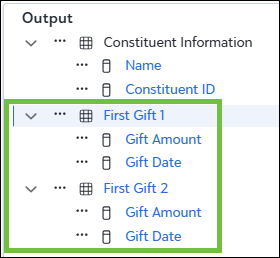
One to many and summary nodes support multiple instances with different criteria. This allows you to define distinct sets of related records within the same query, such as separating recent gifts from lifetime gifts. In web view, you can rename these nodes to reflect the records they include.