How Query Result Fields Are Named
Note: Don't see this yet? No need to worry. Expect its wider release in a future update.
When you add output fields to a query, the corresponding result columns are automatically named to reflect where they appear in the query structure. The name follows this pattern:
NodePath_FieldName
NodePath represents all NodeName_RecordInstances and extends from the root of the tree to the field. A field can have multiple NodeName_RecordInstance elements included.
Each part of the name provides context about the field:
-
NodeName identifies the node that the record and field belong to (for example, Gifts 1).
-
RecordInstance identifies the record within a node when multiple records exist. It only applies to one to many and summary nodes since they can have multiple instances.
-
FieldName identifies the specific field selected for output.
How Numbering Works
NodeName and RecordInstance include numbering that distinguish multiple instances of the same node or record at the same level of the query.
The system adds a number to each instance to keep them unique. These numbers increase incrementally (for example, _1, _2, _3) and are separated by underscores. These incremental numbers for record instance will appear in the results.
NodeName vs. RecordInstance
By default, a sequence number is included in the node name, but users can remove it. Node names are part of the query definition and are included in the result field name.
A sequence number appears in the result field names to distinguish multiple instances of records for a given node. These numbers are only visible in the result field name.
Each number represents a separate instance, not a hierarchy or priority.
Examples
Assume that a Campaign query has this node structure and all nodes return two records:
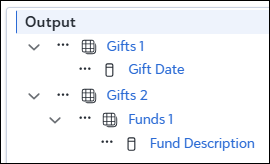
The Results columns include:
| Results column default label | Definition |
|---|---|
| Gifts_1_1_Gift_Date | Identifies the Gift Date field from the first record of the Gifts 1 node. |
| Gifts_1_2_Gift_Date | Identifies the Gift Date field from the second record of the Gifts 1 node. |
| Gifts_2_1_Funds_1_1_Fund_Description | Identifies the Fund Description field from the first record of the Funds 1 node within the first record of the Gifts 2 node. |
| Gifts_2_1_Funds_1_2_Fund_Description | Identifies the Fund Description field from the second record of the Funds 1 node within the first record of the Gifts 2 node. |
| Gifts_2_2_Funds_1_1_Fund_Description | Identifies the Fund Description field from the first record of the Funds 1 node within the second record of the Gifts 2 node. |
| Gifts_2_2_Funds_1_2_Fund_Description | Identifies the Fund Description field from the second record of the Funds 1 node within the second record of the Gifts 2 node. |
For all examples, one-to-many nodes return two records.
One-to-one node at the top of the tree:
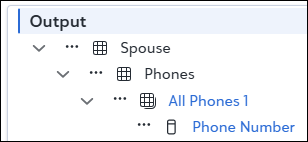
The Results columns include:
| Results column default label | Definition |
|---|---|
| Spouse_All_Phones_1_1_Phone_Number | Identifies the Phone Number field from the first record instance of the All Phones 1 node for the Spouse one-to-one node. |
| Spouse_All_Phones_1_2_Phone_Number | Identifies the Phone Number field from the second record instance of the All_Phones_1 node for the Spouse one-to-one node. |
Note: When terms are repeated across nodes in a way that doesn’t provide additional context (such as “Phones” and “All_Phones”), the term appears once to keep the names as short as possible while still providing context.
One-to-one node in the middle of the tree:
| Results column default label | Definition |
|---|---|
| Event_Participations_1_1_Event_Jobs_1_1_Job | Identifies the Job field from the first record instance of the Jobs 1 node for the Event one-to-one node within the first record instance of the Event Participations 1 node. |
| Event_Participation_1_1_Event_Jobs_1_2_Job | Identifies the Job field from the second record instance of the Jobs 1 node for the Event one-to-one node within the first record instance of the Event Participations 1 node. |
| Event_Participations_1_2_Event_Jobs_1_1_Job | Identifies the Job field from the first record instance of the Jobs 1 node for the Event one-to-one node within the second record instance of the Event Participations 1 node. |
| Event_Participations_1_2_Event_Jobs_1_2_Job | Identifies the Job field from the second record instance of the Jobs 1 node for the Event one-to-one node within the second record instance of the Event Participations 1 node. |
Node Names and Field Labels
You can accept default node labels and field names or rename them. Custom labels can make criteria names easier to read and reduce confusion when similar elements appear multiple times in a query. A renamed node will change where it’s listed anywhere in the result column name. A renamed field will change the entire name of the column name in the results. It will be appended with a number.
Example (default behavior)
When outputting Gifts, Gift Amount, Gifts Funds, Fund ID, the layout appears as follows:
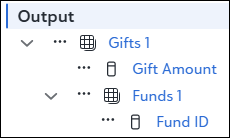
The default naming convention would be:
Gifts, Gift Amount
Results column default label: Gifts_1_1_Gift_Amount
In this example, we are outputting a single gift, so each node is configured to only return one record. Therefore, we include a “1” after Gifts_1.
Gifts, Funds, Fund ID
Results column default label: Gifts_1_1_Funds_1_1_Fund_ID
We are outputting the first fund for the first gift, so we include two instances of “1”. Each additional gift and fund included means that we are incrementing the numbers to indicate which fund and which gift.
Renaming Behavior
If we rename the “Gifts” node to “Last year’s gifts”, and we rename the “Fund ID” field to “ID”:
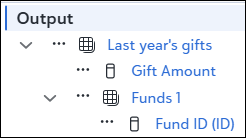
Last year’s gifts, Gift Amount
Results column label: Last_year’s_gifts_1_Gift_Amount
Last year’s gifts, Funds, ID
Results column label: The renamed field applies to the entire column: ID