Premium Features in Raiser’s Edge NXT
Premium features are advanced capabilities that provide additional value beyond core fundraising functionality. Many Premium features focus on automation, intelligence, and analytics to help organizations work more efficiently and make more informed decisions.
These features may include AI‑powered insights and automation, while Blackbaud continues to invest in core fundraising workflows and the unified web experience. For additional information, see Introducing Premium Features for Blackbaud Raiser’s Edge NXT in the Blackbaud Community.
Learn more about:
Who has Premium features?
Access depends on your organization’s subscription and entitlements.
Customers in the United States and Canada with Raiser’s Edge NXT Complete (and certain region‑specific packages) have access to Premium features.
Premium feature availability is based on organizational entitlements, not individual user roles.
How can I tell if I have Premium features?
Go to your customer account area:
-
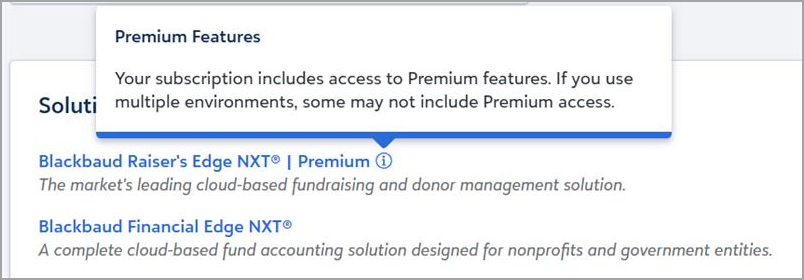
Look for a Premium label next to your product.
-
Hover over Premium to confirm access.
-
If you use multiple environments, Premium access may vary.
What’s the difference between Premium and Complete?
These terms describe different things:
-
Complete = a subscription package
-
Premium features = advanced capabilities included with some packages, such as Complete
Premium features are used to differentiate access to newer, advanced capabilities as they are introduced.
What's available today?
Today, Premium features include:
Create and apply structured cultivation plans with Action Plans
Action plans enable you to generate a complete, AI-driven cultivation sequence for an opportunity. Each plan is organized into up to seven steps aligned to your ask date or deadline and includes suggested activities such as emails, calls, meetings, and mailings, along with supporting content.
You can review and adjust each step in Chat for Blackbaud AI before applying it. Once finalized, add steps directly to the opportunity as actions to track progress and manage engagement through the Actions tile.
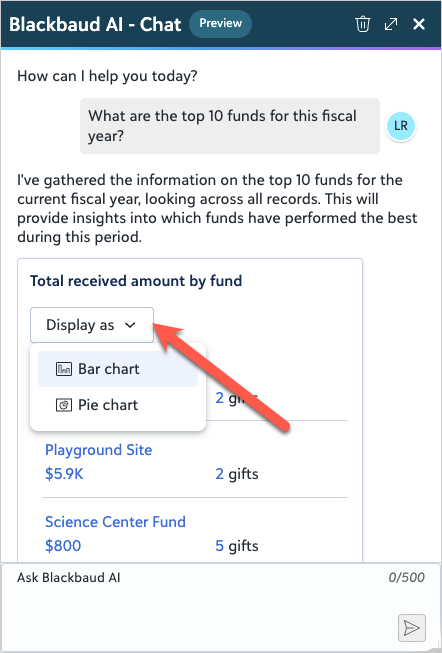
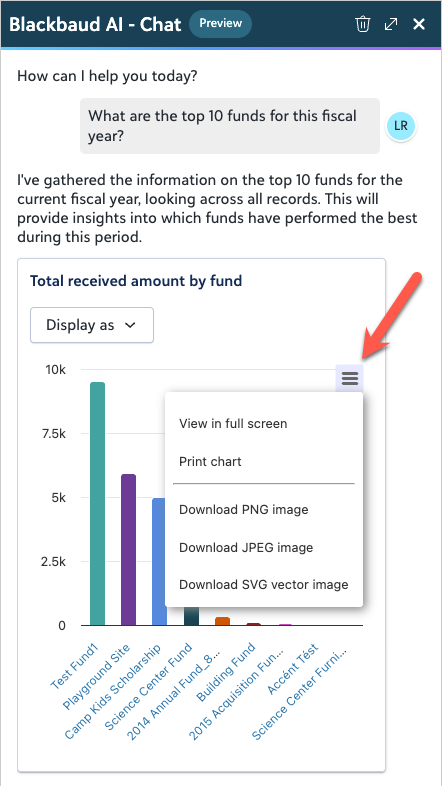
Turn common giving analysis questions into clear visuals — right in Chat for Blackbaud AI. Switch between Bar chart, Pie chart, or List view using the new Display as field, then print or download the chart image from the menu to share or save.
Why it matters
See cash flow at a glance. Visualize projected revenue from future pledge and recurring gift payments to better understand upcoming cash flow.
Spot what’s driving results. View giving by revenue or gift counts across top campaigns, funds, or appeals to quickly identify what’s performing.
Move faster from insight to action. Toggle views without re-running queries and share visuals instantly.
Ask Blackbaud AI: "Show me all actions assigned to me grouped by type."
Ask Blackbaud AI: "What are the top 10 funds for this fiscal year?"
Ask Blackbaud AI: "Show me projected revenue for next fiscal year." (bar chart only)
These Premium features are currently available to eligible customers in the United States and Canada.
You can also review What’s New and release communications, where Premium features are identified when they are introduced.
Where do Premium features appear?
Premium features are sometimes integrated into existing workflows and may appear:
They might not appear as separate menu options.