Overdue Actions
Get a clear view of what needs attention so nothing slips through the cracks. Instantly surface all open actions assigned to you that are past their due date. You can quickly refocus on what's overdue and keep work moving forward without digging through lists or reports.
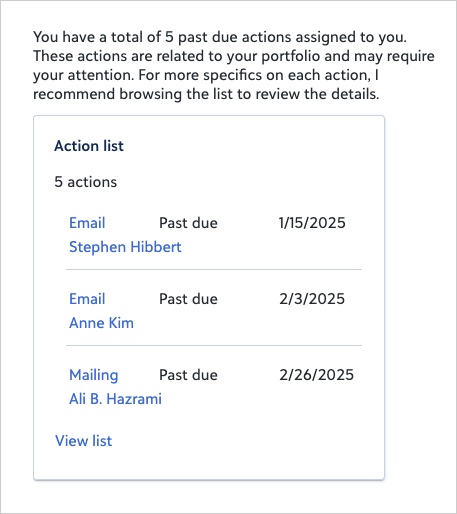
You'll get a live, filterable list of your overdue open actions, showing the constituent, action type, due date, and other key details. You can fine-tune the results by tweaking your wording to focus on what matters most, such as a specific action type, donor, time period, or tasks only (not calls or meetings). Just adjust the prompt to narrow the list to the overdue work you want to tackle right now.
From the chat results, you can review what needs attention and open individual records directly to take action. An action is considered past due when its scheduled date has already passed and it hasn't been marked as completed. Completed actions are never included, even if their date has passed.
"Assigned to me" means you're the responsible fundraiser on the action. If you want to see overdue actions related to donors in your portfolio, regardless of who the action is assigned to, ask "List past due actions for my portfolio."
 Tip: Select View list to sort, filter, and work with results in the full list view.
Prompt
|
List all actions assigned to me that are past due. |
Sample Response