Add a Deposit Correction
Once you add a deposit, you may need to correct the deposit amount. For example, the expected amount of ticket sales may not equal the amount of cash in your drawer at the end of the day. You can add a correction so that the deposit amount reflects the actual amount of cash taken in. Corrections increase or decrease the total deposit amount without affecting the individual payment amounts in the deposit.
From a deposit record, select the Deposit Corrections tab and select Add. The Add a deposit correction screen appears. For more information about how to add a deposit, refer to Add Deposits.
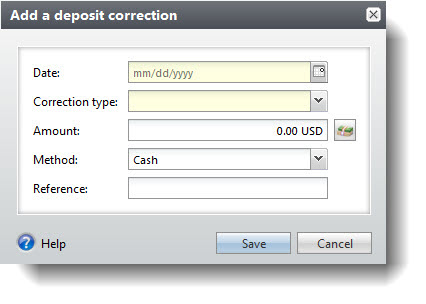
In the Date field, select the date of the correction.
In the Correction type field, select the reason for the deposit correction. For example, your deposit might be short of the deposit amount. In the Correction type field, you can select "Treasury - Short" to signify that your deposit has less cash than it should.
In the Amount field, enter the amount of the correction.
Note: When you add a deposit correction, individual payment amounts within the deposit are not affected.
Your selection in the Correction type field determines whether or not the deposit correction is positive or negative. For example, if you select “Sales - Over,” the total in the Amount field is automatically considered positive and increases the total deposit amount.
Sales - Short: Signifies a decrease in the deposit amount.
Sales - Over: Signifies an increase in the deposit amount.
Treasury - Short: Signifies a decrease in the deposit amount.
Treasury - Over: Signifies an increase in the deposit amount.
Refund: Signifies a decrease in the deposit amount.
Note: Certain correction types may not appear based on system configurations.
In the Method field, select the payment method you want to correct. For example, if you want to correct the cash total in your deposit, select “Cash.”
In the Reference field, enter any additional text to explain the significance of the correction.
Select Save. You return to the Deposit Corrections tab, where your deposit correction appears in the grid.