Get Started with the CSRconnect API
The CSRconnect API helps your community connect and interact with CSRconnect.
Sample use cases include:
-
Create in-app dashboards for CSRconnect.
-
Update your intranet with year-to-date (YTD) charitable donations and matches.
-
Add a widget to your employees’ Workday environment to show individual and company matching donations.
-
Create individualized My Giving home pages to show employees their own statistics for giving and volunteering.
-
Creating, updating, registering, and recording participation for company-sponsored volunteer events programmatically.
We have a variety of APIs that allow you to retrieve information on:
-
Specific employees.
-
Employee groups.
-
Metrics for employees, volunteer events, giving campaigns, and donations to specific charities.
-
Volunteer events, including creating, editing, and deleting them using APIs.
-
Custom question responses.
Review our API documentation on Swagger for the full list of available endpoints.
Our sample Postman collection with example API calls is available for download. To use it, set up your Postman environment to include:
-
The base URL of the environment you want to use:
-
Production: https://api.yourcause.com
-
-
Your API key in that environment (xbbkey)
-
Your internal AffiliateID in our system. If you don’t know your AffiliateID, contact our support team or your Customer Success Manager.
-
A sample employee email address for a valid employee in that environment.
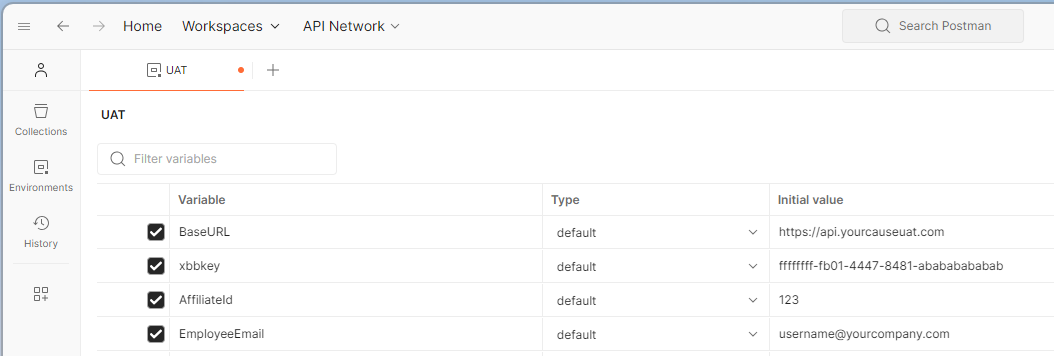
After creating the environment in Postman, options include:
-
Run the whole collection to see all results.
-
Open a specific API endpoint and select Send to see the result for that endpoint.
Complete API Setup Requirements
To use this API, your community must:
-
Obtain a valid API key.
-
Be an existing customer.
Manage API Keys
To manage external API keys, navigate to CSRconnect Admin Portal, Community setup, Integrations, External API. Your role must include the Can Manage API Keys permission.
To generate a new external API key:
-
Select Create API Key.
-
Enter a name for the API key.
-
Indicate the expiration period and all applicable client services.
-
Select Save.
-
On the External API Keys page, select Show Key for the key you want to view.
-
Copy the key listed under Key.
-
Include this key in a header variable named x-bb-key for each request you send to the CSRconnect external API.
Use External API Swagger to view full details about the CSRconnect external API.