Cancel a Communication
If you don't want a scheduled communication to go to a specific constituent, you can cancel it before it's sent.
-
Cancel — The engagement moves to Complete/Cancelled and no longer appears as Upcoming. The associated action is automatically marked as complete.
Note: To stop an engagement that's actively in progress (for example, an ongoing conversation with a constituent), use Cancel. This is currently the only way to stop an in-progress engagement, whether from Work Center or from Scheduled communications. Select the ellipsis (⋯) next to the engagement and choose Cancel engagement. This stops the message from being sent and closes the related action so it no longer appears as past due.
Cancel a scheduled communication
-
In the Development Agent, on the right under Related links, select Scheduled communications.
-
Locate the scheduled communication you want to cancel.
-
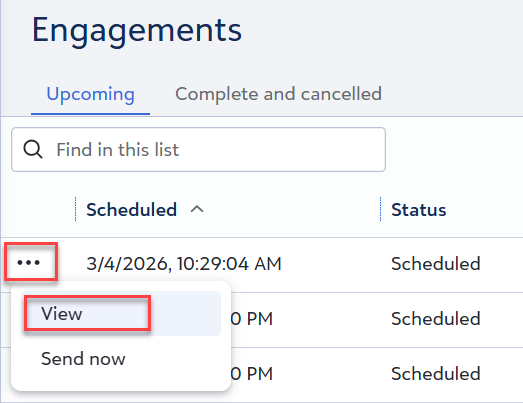
Select the ellipsis (⋯) next to it, and choose View.
-
Scroll to the bottom of the communication details and select the X to cancel.
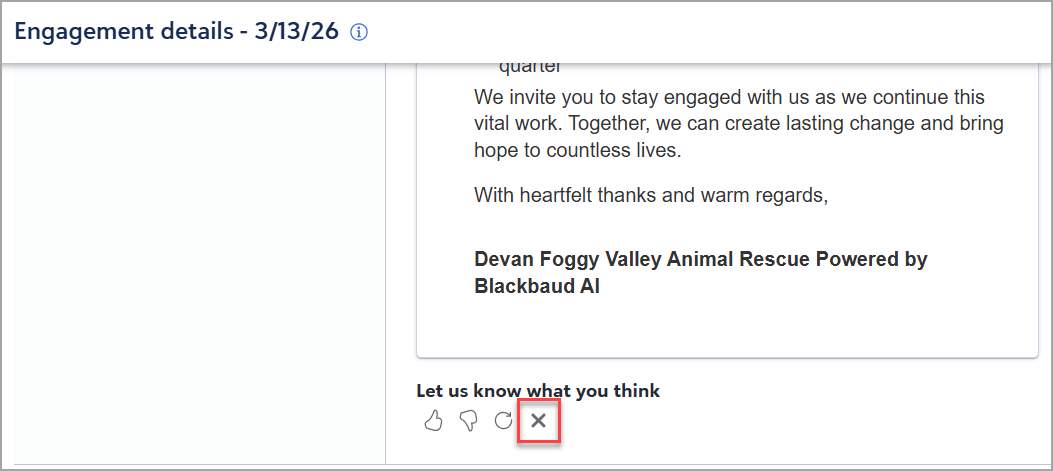
The engagement is canceled immediately and moves from the Upcoming tab to Complete/Cancelled. The associated action is marked as complete.