Approve Data Transfer Authorization Request on IRS.gov
If you selected Option 2: Allow IRS data transfer for your income verification method and authorized Blackbaud to receive your tax information directly from the IRS, you will receive an email from Halcyon, Blackbaud's third-party partner, after submitting your application with instructions to approve the data request.
Note: The IRS data transfer option is only available if a selected school is using Financial Aid Management's IRS integration. For more information on manually uploading documents, see Document Upload FAQs.
Email sender: Halcyon Solutions (taxwallet@halcyonsw.com)
Subject: Important: Action Required for Your Financial Aid Application with BLACKBAUD
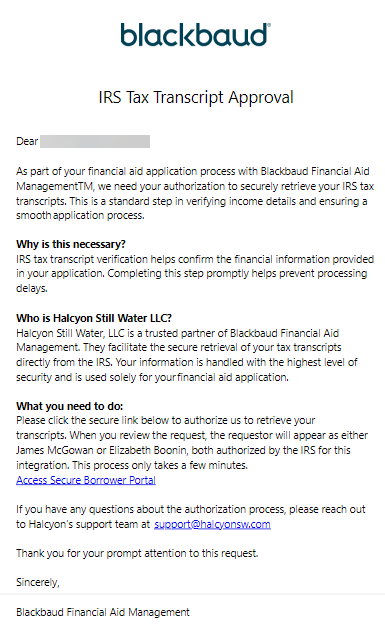
Note: If you have any questions about this authorization process on IRS.gov, contact Halcyon's support team at support@halcyonsw.com.
Generate and approve the Tax Information Authorization (TIA) request:
-
Open the email and select the Access Secure Borrower Portal link.
-
Follow the prompts to create or sign into your ID.me account.
Note: The IRS uses ID.me for secure authentication and identity verification. For more information, see the ID.me help center.
-
Follow the prompts to generate the request.
-
Once you locate the request under Power of Attorney and Tax Information Authorizations, select Approve/Reject.
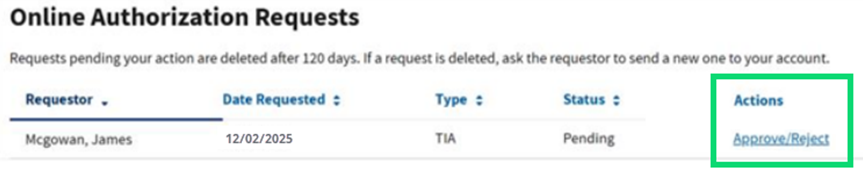
Tip: The request will display Mcgowan, James or Boonin, Elizabeth as the Requestor. Both are authorized by the IRS for this integration.
-
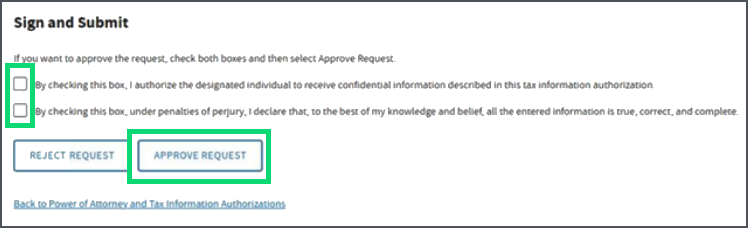
Select both checkboxes, then select Approve Request.
Tip: When finished, check your Home page in for any required documents.