Add Layout Components to Forms
Layout components help you organize fields so the form is easier to read, easier to complete, and easier to maintain. Use them in the Form Builder to group related fields, improve visual structure, and control how content appears on the page.
After you add a layout component, open the Configure Forms and Form Fields topic if you need help with the available settings for the component you selected. Different components expose different options, so it helps to review the settings before you finalize the form.
Add a layout component
-
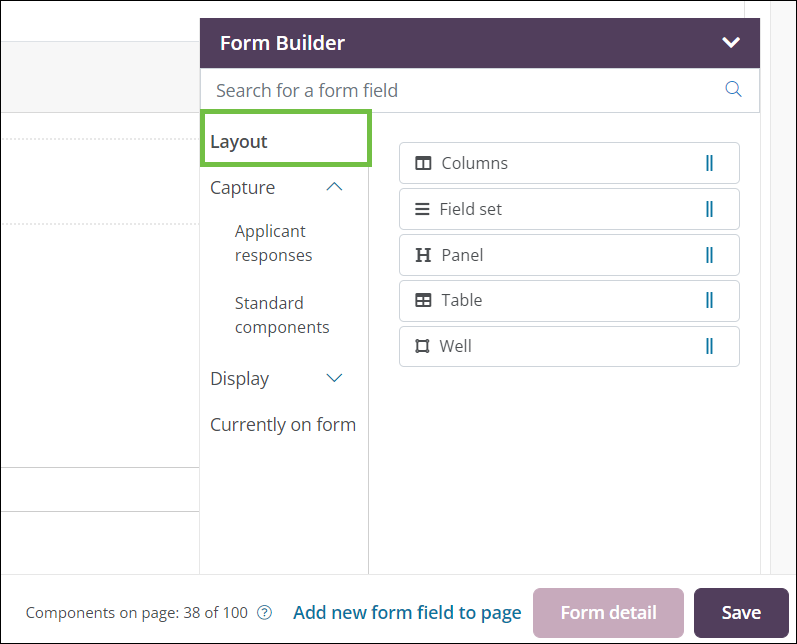
In the Form Builder toolbox, select the Layout group.
-
Drag a layout component onto the form page.
-
Columns - Place fields side by side to create a clearer page layout and control how content flows across the form.
-
Field set - Group related fields under a shared title when you want structure without additional styling.
-
Panel - Group related fields with a title and visual styling so the section stands out on the page.
Note: Panels can be configured to collapse by default or be collapsed by the applicant, which can help reduce visual clutter on long forms.
-
Table - Organize content into rows and columns when you need a structured layout that can contain additional components.
Note: To remove a component from a table, hover over the component and select Edit component or Delete component.
-
Well - Group fields together without a title or visible styling when you want a lightweight organizational container.
Note: Wells are most useful for organizing the form during editing. Because they do not add visible styling, applicants may not notice them on the published form.
-
-
On the Configuration screen, adjust the settings for the component you added.
Note: Available options vary by component, but they typically include Details, API, and Display. Review the Configure Forms and Form Fields topic for more information.
-
Save your changes.
After you add a layout component, you can move it within the page or copy it to another page in the same form to keep the layout consistent.