Create a Data Form Extension Spec
This material pertains to version 4.0 of Blackbaud CRM SDK.
This task walks through steps to create a new Data Form Extension (CLR) Spec or Data Form Extension (SP) Spec with the Add New Item wizard,
Note: By default, data form extension specs include the same items as Add Data Form (CLR) Specs or Add Data Form (SP) Specs. The only difference is the addition of extension-specific information in the DataFormExtension and Context elements. For information about how to adjust the specs, see Create an Add Data Form (CLR) or Create an Add Data Form (SP).
-
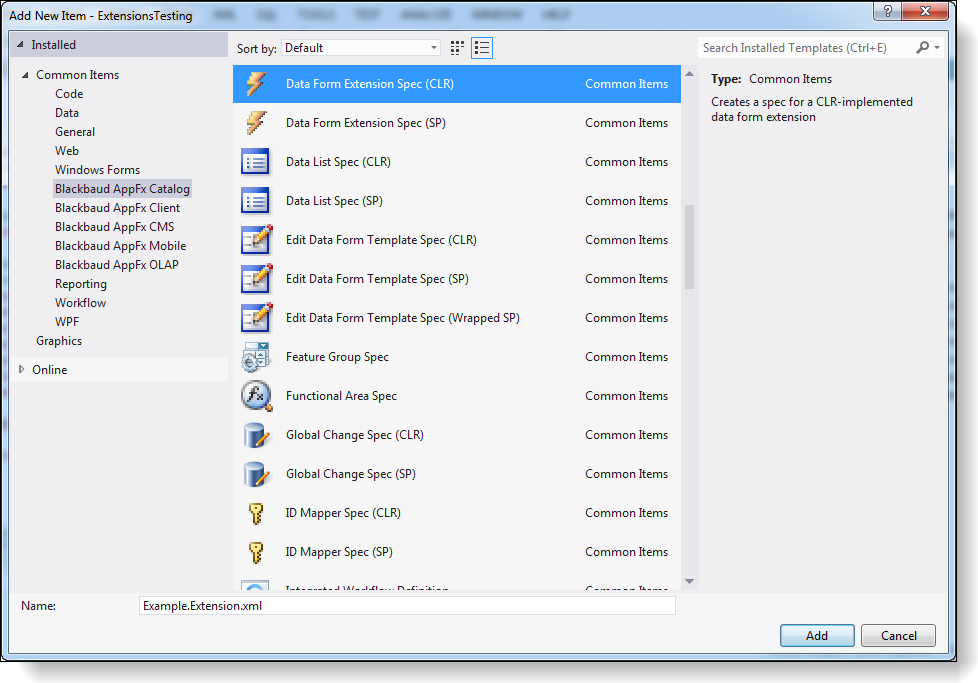
From an existing Blackbaud AppFx Catalog Project, right-click the project and select Add > New Item. The Add New Item screen appears.
-
Select Blackbaud AppFx Catalog > Data Form Extension Spec (CLR) or Blackbaud AppFx Catalog > Data Form Extension Spec (SP).
-
In the Name field, enter a name such as Example.Extension.xml.
-
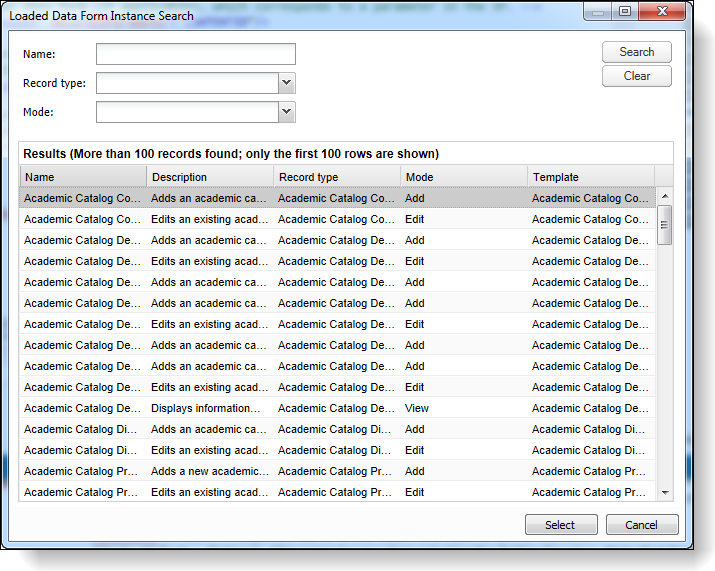
Click Add. The Loaded Data Form Instance Search screen appears.
-
Enter search criteria and select a data form to extend. The new spec appears in Solution Explorer and in the XML Editor with the same elements and stubbed-out procedures as a new Add Data Form (CLR) Spec or Add Data Form (SP) Spec, but it is updated with some extension-specific information.
The DataFormExtension element is included to indicate that this is an extension, and its DataFormInstanceID attribute specifies the instance ID of the parent data form. The spec also provides a default render style and tab caption.
<c:DataFormExtension DataFormInstanceID="39bbbd08-02ce-4bec-b7b6-0d2f3c7a856d" RenderStyle="Tab" TabCaption="Extension"/>
In addition, the Context element's ContextRecortType attribute is set to the same record type as the parent data form. For example, if you extend the Account Add Form, the ContextRecortType attribute is set to "Account."
<Context ContextRecordType="Account" RecordIDParameter="CONTEXTID"/>
-
In the XML Editor, you can adjust the spec as necessary. For information about how to update Add Data Form (CLR) Specs and Add Data Form (SP) Specs, see Create an Add Data Form (CLR) or Create an Add Data Form (SP).
-
Save the spec, load it, and open it. The Table Spec must also be loaded. To access the data form, you can create a task to open the form. For development, you can use LoadSpec. For CLR forms, the assembly must also be copied to vroot\bin. For deployments, you can use the Catalog Browser.