Display interest-related content using WYSIWYG links
You can also provide links to content that you have associated with interests by choosing the HTML component in PageBuilder and then using the WYSIWYG Links menu. Providing links to your Calendar, the Photo Album List, the Survey List, and a News Article all include links at the top of the web page that allow your users to view items by Interest Categories—either those in their favorite categories or those in other selected categories as well. The illustration below shows what the user will see when selecting a link to your Survey List.
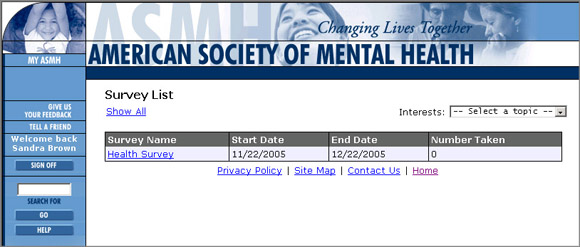
This viewer is currently viewing the list of surveys that are associated with her "favorite" interests. (The link to "Show All" surveys is replaced by "Show Favorites" when selected by the user.) The interest selector box at the right of the page allows the user to search for a survey that relates to a specific interest.
For more information on creating links to a Calendar, a Photo Album, a Survey, or a News Article refer to the Content Editor help.