If you are using the Personal Events application, you can add a Personal Events Search component to any page or email so that your constituents can search for Personal events by name, activity type, date, or location.
Note: This component only allows constituents to search for Personal Events that they can attend. It does not provide the option to host a Personal Event.
To insert a Personal Events Search component:
-
Access the WYSIWYG content editor for the page or email where you want to insert the component.
-
Provide introductory text.
-
Place the cursor on a separate line.
-
Select
 , Components.
 -
Uncheck any of the search fields that you do not want to include in the component.
-
Select the Personal Event Campaigns in the left panel. Select Add.
-
Select the Activity Types in the left panel. Select Add.
-
Add or remove Radius Values. (The maximum radius value permitted is 200 miles.) Users can choose from the values you provide when trying to narrow the events list to those that fall within a certain Zip code radius.
-
Select Insert to return to the WYSIWYG content editor window.
-
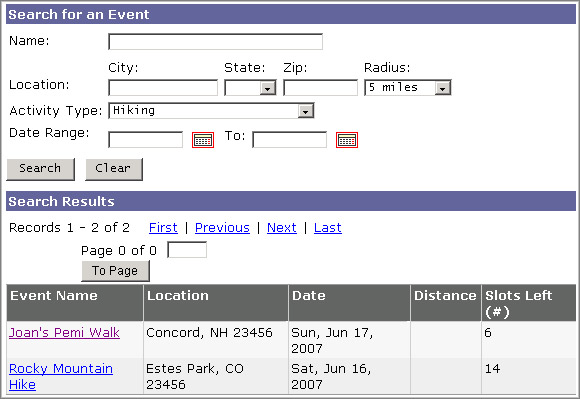
Complete your page or email according to your standard procedure. Your Search component will allow your constituents to view a list of events that meet the criteria they specify. In the illustration below, the constituent has chosen to search for Hiking events:
Select Personal Event, Personal Event Search. The Component Selector window opens.
Note:
Including the Zip field also allows a constituent to search by radius around the Zip location.
Note:
The Activity Types that are available will be determined by the Campaigns you choose to include.
Note:
Zip and Radius are tied to one another. A zip code value must be provided to display activities that fall within a certain radius.