Configure Designations for Gifts
Designations allow donors to direct contributions to specific funds or projects. Enable and configure designations to give donors more control over how their donations are applied and to support targeted fundraising goals.
Enable Designations for Gifts
Enable this setting to allow donors to select a designation during the donation process.
-
Locate Designations.
-
Select Enable designations for gifts.
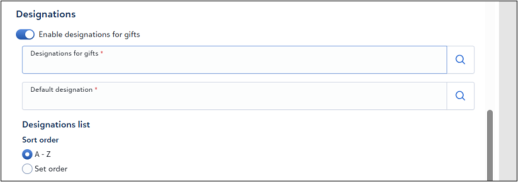
Select Designations
Select the funds or projects that donors can choose from.
-
Select Designations for gifts or Search.
-
Select one or more funds.
Tip: Enable Show only selected items to review the selected funds.
Note: This setting is required. The system displays an error if no designation is selected.
After you select one designation, the form displays it as confirmation text. After you select multiple designations, the form displays a list for donors to choose from.
Set Default Designation
Set a default fund to apply when donors do not select a designation.
-
Select Default designation or Search.
-
Select a fund.
Note: This setting is required.
Set Sort Order
Control how designations appear on the form.
-
Locate Sort order.
-
Select one of the following:
-
A - Z to sort alphabetically.
-
Set order to arrange items manually.
-