Configure Fee Coverage
Use fee coverage to control how transaction processing fees are handled for online donations. This setting determines whether your organization, the donor, or Blackbaud absorbs the fees.
A Blackbaud Merchant Services account is required to support fee coverage for eligible transactions. Select Information (i) next to the section heading to review this requirement.
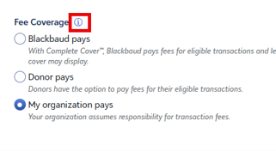
Select a Fee Coverage Model
Choose the option that aligns with your organization’s financial strategy:
-
Blackbaud pays: Activates Complete Cover™. Blackbaud covers processing fees for eligible transactions and invites supporters to contribute a percentage, such as 10 percent, to support the service. If a transaction is not eligible, a standard donor cover option can appear.
-
Donor pays: Gives donors the option to cover 100 percent of the processing fee. During checkout, donors see a One last ask! screen where they can choose to include the fee so your organization receives the full donation amount.
-
My organization pays: Your organization covers all transaction processing fees. This option is selected by default.
Verify the Fee Coverage Experience
Review the Live Preview to understand how each option affects the donor experience.
-
Select My organization pays.
-
Confirm that checkout continues directly to payment selection without prompting for fee coverage.
-
Update the fee coverage selection in the preview.
-
Confirm that the Gift amount updates when the selection changes.
-
-
Select Donor pays.
-
Review the One last ask! screen and confirm how the fee option appears.
-
-
Select Blackbaud pays.
-
Review the One last ask! screen and confirm how the percentage contribution and Complete Cover™ details appear.
-