Configure Gift Range and Minimum Gift Amounts
Define the donation amounts available on your form and set the lowest donation amount allowed. This helps guide donors and prevents very low or invalid transactions.
Configure the Gift Range
Use this section to define the donation amounts available on your form.
Configure Predefined Amounts
Define fixed donation amounts for donors to select.
-
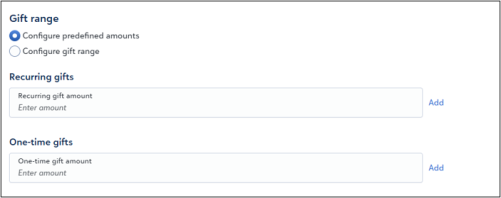
Select Configure predefined amounts.
-
Enter a value in One-time gift amount or Recurring gift amount.
-
Select Add.
-
Repeat to add at least three donation amounts.
The form displays the donation amounts and includes an Other option for custom entries.
Configure a Gift Range
Automatically generate donation amounts within a defined range.
-
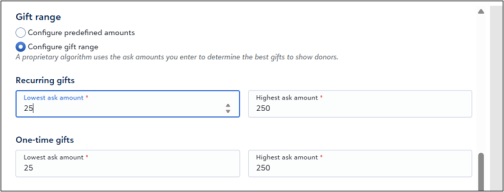
Select Configure gift range.
-
Enter a value in Lowest ask amount for One-time gifts or Recurring gifts.
-
Enter a value in Highest ask amount.
Note: The system generates suggested donation amounts within the defined range. The maximum allowed value is $50,000.
Set a Minimum Gift Amount
Set the lowest donation amount allowed on the form.
-
Locate Minimum gift amount.

-
Enter the minimum amount.
Note: The value must be greater than zero. The system blocks donations below the minimum amount to prevent very low or invalid transactions.