Configure Tribute Gifts
Allow donors to dedicate a donation in honor or in memory of a person or cause.
Enable Tribute Gifts
Enable this setting to allow dedications on the form.
-
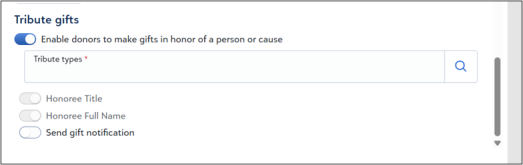
Locate Tribute gifts.
-
Select Enable donors to make gifts in honor of a person or cause.
Configure Tribute Types
Select the dedication options available to donors.
-
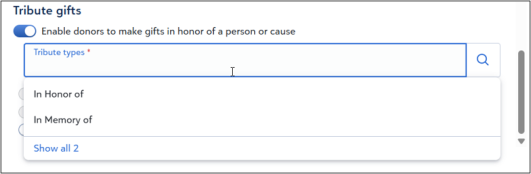
Select Tribute types or Search.
-
Select one or more options, such as In Honor of or In Memory of.
-
Select Select.
Note: This field is required. The system displays an error if no option is selected.
-
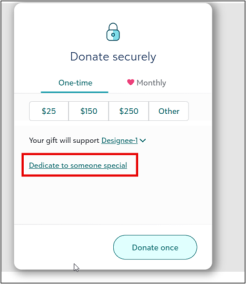
Verify that Dedicate to someone special appears in the preview.
-
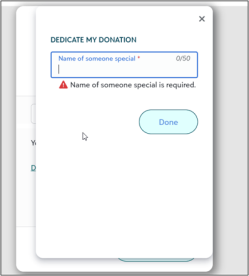
Select Dedicate to someone special.
-
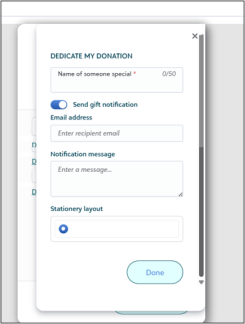
Enter a name and select Done.
Capture Honoree Information
Capture required details for the honoree.
-
Review Honoree Title and Honoree Full name.
These values are required and cannot be changed.
Send Gift Notifications
Enable this setting to allow donors to send a notification.
When enabled, the form displays fields for an email address and message.
Note: This option is available only when tribute gifts are enabled.
Configure Gift Notifications
-
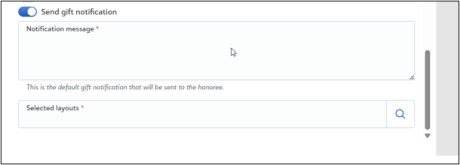
Select Send gift notification.
-
Enter a message in Notification message.
-
Select Search under Selected layouts.
-
Select a layout.
Note: The message and layout are required.
Verify Donor Experience
-
Open the Live Preview.
-
Select Dedicate to someone special.
-
Verify the layout and message.
-
Enter an email address and select Done.