Chat with Blackbaud AI Quick Start Guide
Generative AI (artificial intelligence) chat tools — like Blackbaud AI - Chat — are intelligent assistants that generate human-like responses based on your input. Within Raiser's Edge NXT, this means you can perform many tasks, including:
-
Get quick answers about your constituents
-
Draft and refine donor communications
-
Ask questions about fundraising best practices
Whether you're writing an email, preparing a report, or exploring donor insights, Blackbaud AI can help you work faster and smarter. Let’s explore how to use chat effectively in Raiser’s Edge NXT!
To get started, select the Blackbaud AI - Chat sparkle icon from the top navigation. If you don't see the sparkle icon, have your solution admin assign you the Chat with Blackbaud AI permission.
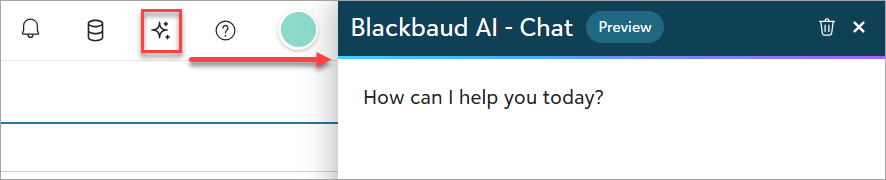
Note: To use Chat for Blackbaud AI, your organization admin must first enable generative AI features in your Blackbaud environment. For instructions, see the Opt In to Generative AI Features Globally help.
Training: Need a visual walkthrough? Explore the Chat for Blackbaud AI video from Blackbaud University.
Do you have more questions about Blackbaud AI? Visit the Blackbaud Trust Center to view FAQs about Blackbaud AI.
Start with a Clear Prompt
To get the best results when chatting with Blackbaud AI, begin with a specific and well-structured prompt. This helps Blackbaud AI understand your intent and deliver more accurate, useful responses.
Be Specific
Instead of saying:
“Summarize this”
Try:
“Summarize this constituent in 3 bullet points.”
The more precise your request, the better the response. Avoid making Blackbaud AI guess what you mean.
Include Context
Let Blackbaud AI know what you're working on. For example:
“I’m writing an email to a donor. Can you help simplify this paragraph?”
When asking about a record, include the name of the record type to help the AI respond more accurately. For example:
"Find me the list of gifts for the Building fund."
Providing context helps Blackbaud AI tailor its response to your task — whether you're drafting donor communications, preparing reports, or updating constituent records.
Refine Through Interaction
In contrast to a traditional search engine like Google — where you have one shot to phrase your question just right — Blackbaud AI chat is designed for conversation. You can refine your request step by step, making it easier to get the information you need to support your fundraising efforts.
Here’s how to make the most of it:
-
Ask follow-up questions – If the initial response isn’t quite what you need, ask again with more detail or a different angle.
-
Clarify or correct – If something seems off, let the AI know. You can say things like “That’s not what I meant” or “Try again using gift data.”
-
Try variations – Adjust your prompts to suit your current needs, such as:
-
“Make it more formal.”
-
“Add examples relevant to major gifts.”
-
“Summarize this for a board report.”
-
This conversational approach helps you get more accurate, tailored responses — whether you're drafting donor communications, analyzing campaign performance, or preparing reports.
Clear the Chat to Improve Accuracy
To get the best results from the chat, start a new chat when you switch topics. This clears previous context, which helps Blackbaud AI focus on your current prompt without being influenced by unrelated history. Starting fresh improves accuracy, relevance, and performance — especially when your new topic is unrelated to the previous one.
Blackbaud AI uses your chat history to understand context, but too much or outdated context can dilute the quality of its responses. Long, continuous chats can lead to confusion or irrelevant answers. By starting a new chat, you ensure that the chat grounds its response in the most relevant information.
Tip: Use the trash can icon to clear the chat and begin a new conversation. This keeps your interactions focused and improves the chat’s ability to deliver precise, helpful answers.
Use Chat for Blackbaud AI for These Types of Tasks
Chat for Blackbaud AI can support a wide range of tasks within Raiser's Edge NXT, including:
-
Drafting and editing content – Create or refine donor communications, acknowledgments, and outreach messages.
-
Summarizing constituent and gift information – Quickly distill key details from records into bullet points or short summaries.
-
Asking for best practice advice – Get guidance on fundraising strategies, donor stewardship, or campaign planning.
-
Translating or simplifying language – Make content more accessible or adjust tone for different audiences.
-
Getting help with Raiser's Edge NXT features – Ask how to use specific tools, navigate workflows, or troubleshoot common tasks.
Tip: We're continually expanding what Blackbaud AI can do. Keep using the chat, refining your questions, and watch for new capabilities as they’re added over time.
Tips for Better Results
To get the most accurate and helpful responses from Blackbaud AI, keep these best practices in mind when crafting your chat prompts.
Use Plain Language in Sentence Format
AI understands natural, conversational phrasing best. Instead of using keywords or fragments, write full sentences to help the AI interpret your intent more accurately.
Break Complex Tasks Into Steps
Dividing a task into smaller parts makes it easier for the AI to follow your instructions and provide more accurate, manageable responses.
Ask for Specific Formats
If you need the response in a certain structure — like a bulleted list or a table — just ask. For example: “Give me a bulleted list of key donor insights.”
Provide Examples
Sharing an example of what you're looking for helps the AI match your tone, structure, or style more accurately.
Review Critically
AI-generated responses can be helpful, but they’re not always perfect. Always double-check for accuracy, especially when using the content externally.
Be Specific
Clear, structured prompts lead to better results. Vague questions leave too much room for interpretation and may result in less useful answers.
What Chat for Blackbaud AI Can Access (and What it Can't)
Chat for Blackbaud AI is designed to be secure, permission-aware, and responsibly deployed.
Permissions – Access to chat with Blackbaud AI is controlled by roles and permissions. Only users with the Chat with Blackbaud AI permission in the Artificial Intelligence role can use it. Additionally, AI answers are scoped to the functionality the user is authorized to access.
Security – Blackbaud AI respects your organization’s data boundaries:
-
It only surfaces data users already have access to.
-
It does not train on your data—your prompts and responses stay within your environment.
-
Feedback mechanisms (like thumbs up/down) are reviewed with sensitive details redacted when needed, and are used only to improve the AI chat tool.
Premium features – Some AI chat capabilities — such as asking questions about untapped prospects — are exclusive to users with Prospect Insights Pro. While Blackbaud AI may attempt to answer these questions, responses will lack the full capabilities and precision available to premium users.
What to Avoid
To get the most out of your experience with Blackbaud AI, it's important to be aware of a few common misconceptions and pitfalls. Here’s what to avoid when interacting with the AI chat:
-
Assuming the AI is always correct – AI can generate inaccurate or misleading information. Always verify critical details from trusted sources.
-
Using vague or overly broad prompts – Specific, well-defined prompts lead to more accurate and useful responses.
-
Assuming the AI has personal experience – AI may sound conversational and human-like, but it does not have consciousness, emotions, or lived experience. Its responses are generated based on patterns in data, not personal knowledge or firsthand understanding.
What Can Blackbaud AI Help Me with Today?
Our AI assistant is designed to help make your fundraising tasks easier, more strategic, and more efficient. Here are some of the key ways it can support your work:
-
Identifying top prospects to contact – Surface high-potential donors based on engagement history and available data.
-
Understanding key information about your prospects – Gain insights that can shape your outreach strategies, including donor interests and giving patterns.
-
Brainstorming fundraising strategies – Collaborate with the AI to explore creative campaign ideas and engagement approaches.
-
Generating content to support donor engagement – Draft personalized messages, thank-you notes, event invitations, and more.
Help Improve Blackbaud AI with Feedback
We're always working to make the Blackbaud AI chat more useful based on your needs. Your feedback helps us improve the experience and build tools that support your work.
Provide Feedback in the Chat
Use the thumbs up and thumbs down icons in the Blackbaud AI – Chat window:
-
Thumbs up – If the response helped, select the thumbs up and tell us how it helped.
-
Thumbs down – If the response didn’t help, select the thumbs down and choose the category that best describes the issue (for example, inaccurate, misleading, or irrelevant). Then, describe what happened in the comment box. You don’t need to include your original question — just explain why the response didn’t meet your expectations and how it could be improved.
Our development team reviews the feedback. We redact sensitive details and use your input only to improve the Chat for Blackbaud AI tool.
Share Ideas
Submit suggestions and vote on ideas in the Raiser's Edge NXT Idea Bank under the Blackbaud AI - Chat category.