Intelligent Tags Overview
Intelligent tags — previously known as Tags in Raiser’s Edge NXT — help fundraisers identify which constituents need attention and why by surfacing relevant context across donor activity, engagement, and relationships. They appear automatically throughout Raiser’s Edge NXT to support prioritization and informed outreach.
Some intelligent tags rely on system processing to evaluate constituent behavior and apply insights automatically. How and when a tag is applied depends on its defined criteria. When the process determines that a constituent meets the criteria for a tag — such as giving recently or having an upcoming birthday — that tag displays throughout the product, including constituent records, lists, Work Center, and prospect outreach recommendations in Chat for Blackbaud AI.
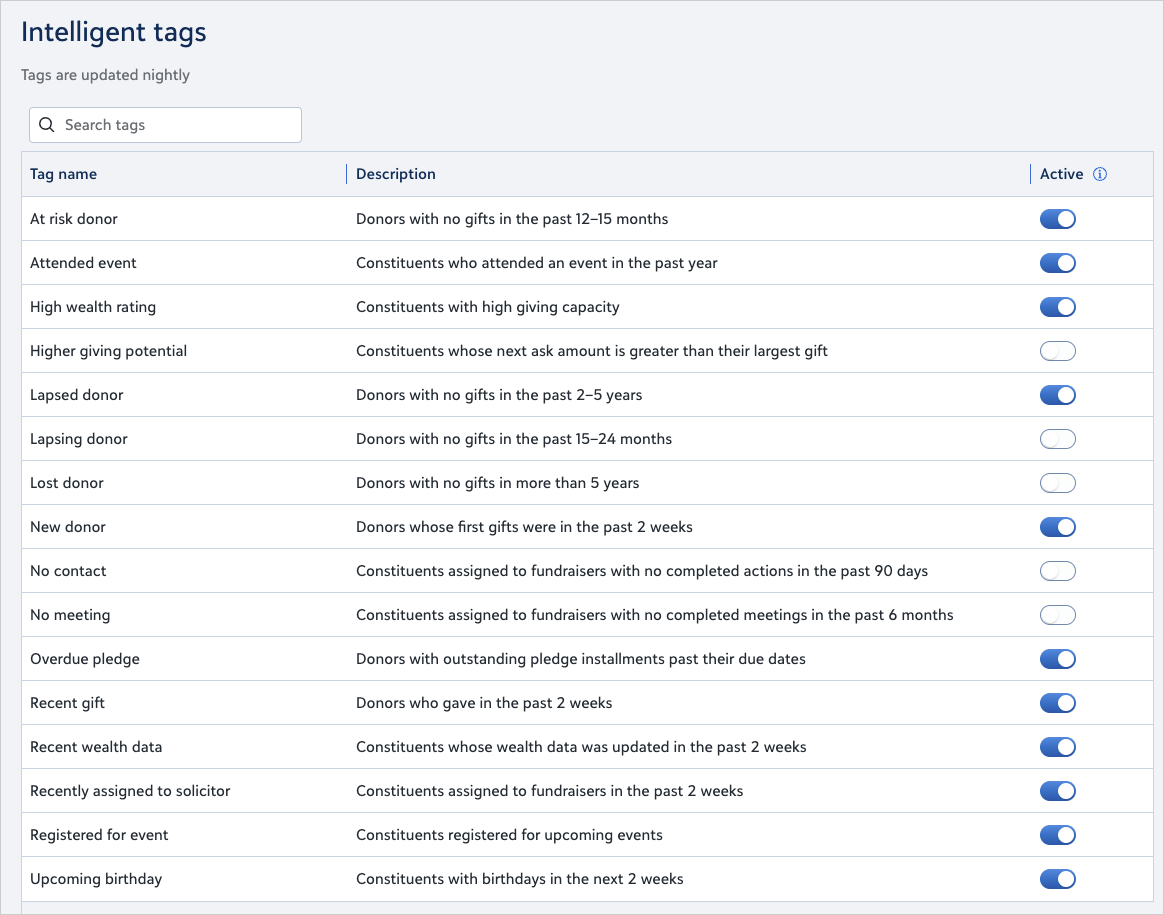
Admins can now control which insights appear in Settings, so teams are guided by consistent, strategy‑aligned signals that support confident, results‑driven fundraising. By managing intelligent tags and displaying only the ones that matter to your organization, fundraisers see the most relevant donor insights when they work in Raiser’s Edge NXT.
Making a tag inactive hides it everywhere but does not remove any underlying data.
What Intelligent Tags Show
Intelligent tags display clear, defined fundraising insights based on recent activity or relationship changes. Examples include:
-
Recent giving (such as gifts in the last two weeks)
-
Lapsing and lapsed donor indicators
-
Event attendance and event registrations
-
Fundraiser relationship activity (no contact, no meeting, recently assigned)
-
Wealth insights and giving capacity
-
Overdue pledges
-
Upcoming birthdays
These insights help fundraisers prioritize outreach and stay aware of evolving donor behavior. For detailed descriptions of each tag, see the Intelligent Tag Definitions page.
Where Intelligent Tags Appear
Intelligent tags display in key areas where fundraisers review constituent activity:
-
Constituent records, in the Tags section
-
Constituent lists, including filters, the Tags column, and exports
-
Work Center, including Needs attention and portfolio views
-
Blackbaud AI experiences that use tag visibility to shape recommendations
If a tag becomes inactive, it is hidden everywhere. Lists that already reference the tag continue to function until you remove the filter.
How Intelligent Tags Are Updated
Intelligent tags refresh automatically each night based on the donor activity, engagement, and relationship history. New activity doesn't appear in tags until after nightly processing.
How Admins Manage Intelligent Tags
Admins manage tag visibility in Settings, Intelligent tags.
-
Tags start as active.
-
Admins with permission select whether each tag is active.
-
Each change saves immediately.
-
Updates appear across the environment within about fifteen minutes as the system refreshes.
-
Visibility applies to every user in the environment.
Best practices for managing tags:
-
Enable tags that align to fundraising strategy
-
Limit active tags to signals teams can realistically act on
-
Review tag usage periodically to maintain clarity and trust
This central control supports consistent governance and helps fundraisers work with clear, organization‑aligned insights.
Permissions to Manage Intelligent Tags
Assign permission to manage tags only to users who should have the ability to mark tags as active or inactive.
-
From Security, select Role management.
-
Edit the Settings role assigned to the user or create a new one.
-
Under Intelligent tags tasks, select Manage intelligent tags.
-
Select Save.
Users without this permission can view tags but cannot change them.
Using Intelligent Tags in Searches and Lists
You can use tags to:
-
Filter lists to find groups of constituents with specific tags
-
Add the Tags column to lists to review tag activity across groups
If a saved list filter uses a tag that becomes inactive, the filter remains until you remove it. The tag no longer appears elsewhere.
How Intelligent Tags Support Fundraising Insights
Intelligent tags provide shared context across the platform. This context helps guide prioritization and recommendation experiences by highlighting what may be most relevant about a constituent at a given moment.
By surfacing timely signals, intelligent tags help fundraisers:
-
Identify donors needing timely outreach
-
Track relationship health and engagement
-
Recognize recent contributions and milestones
-
Understand giving potential and upcoming opportunities
Intelligent tags support recommendations, but they do not make decisions on behalf of fundraisers. Fundraisers should use intelligent tags as prioritization signals, not instructions. When a tag appears, fundraisers should:
-
Review recent activity and context on the constituent record
-
Determine whether outreach, follow-up, or review is appropriate
-
Apply professional judgment and portfolio strategy
Intelligent tags are one of several signals used to help surface priorities and recommendations.
What Intelligent Tags Are Not
-
Intelligent tags do not replace fundraiser judgment.
-
Not all intelligent tags are predictive or prescriptive.
-
Intelligent tags provide context to support prioritization and recommendations.
Summary
Intelligent tags help fundraisers focus on the right constituents at the right time. By highlighting meaningful signals across donor activity, engagement, and relationships, tags reduce manual review and help teams prioritize actions that support fundraising outcomes.