Escalated Conversations
Escalations occur when the agent needs additional information, guidance, or approval before continuing an engagement. Review escalated engagements and take action to help ensure constituents receive accurate responses.
While an escalation is pending, the agent won't respond to additional messages from the constituent until the escalation completes. If the constituent sends another message while the escalation is pending, they may receive an automated reply. After the escalation is handled, automated replies stop unless another message is escalated.
Open an Escalated Engagement
You can review escalated actions from the Needs attention section on the Development Agent or Work Center page.
-
Go to the Development Agent or Work Center page.
-
In Needs attention, select a link to review inbound or outbound escalations.
-
Select an engagement to open the Escalated conversations page and review the escalation.
Review Inbound Escalations
Inbound escalations occur when the agent needs information or human review before responding to a constituent. The reason for the escalation determines which actions are available.
 What reasons cause an inbound escalation?
-
Cannot answer — The agent doesn't have enough information to respond confidently.
-
Should not answer — The question falls outside what the agent is designed to answer on its own.
-
Too many messages — More than 5 messages have gone back and forth in the conversation.
-
Failed quality check — A generated message still doesn't meet your organization's rules after multiple retries.
-
Scheduling request — A constituent asks to schedule a call or meeting.
-
Content safety — The message contains content that's automatically flagged in one of four categories: violence, hate speech, sexual content, or self‑harm. Self‑harm is treated as a special case that also triggers an immediate, automated supportive response.
Answer Escalation Questions
When the agent needs more information to answer a constituent's question, select Provide more information.
In Answer escalation questions, answer questions with information that can help the agent generate an accurate response. You can also add a URL for the agent to reference in its response.
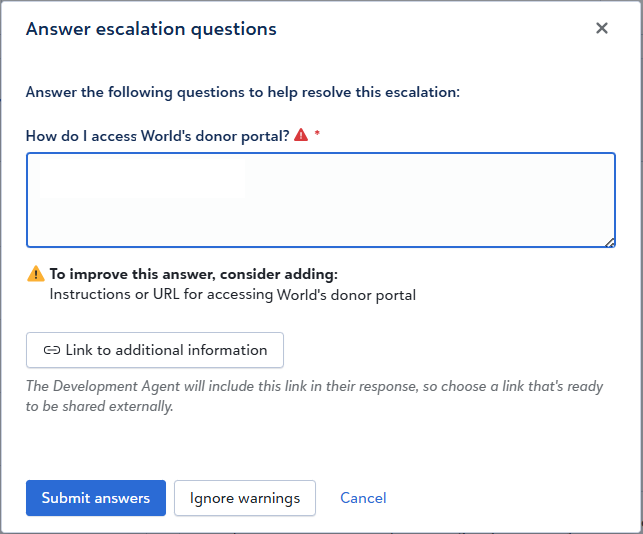
If the agent identifies potential gaps in your answer, it displays suggestions for additional information you may want to include. You can revise your answer or select Ignore warnings to continue without making changes.
Select Submit answers to update the agent's response.
Review Conversations That May Require Human Follow-up
When an escalation requires human review, review the conversation and decide whether the agent should continue or a person should follow up.
After you review the engagement, choose one of the available actions:
Let the conversation continue if the agent can continue responding to the constituent.
Assign to a person when someone should respond directly to the constituent.
If a message includes sensitive or urgent information, follow your organization's policies for review and follow-up.
Review Outbound Escalations
Outbound escalations occur when the agent needs review or approval before continuing with a message.
Choose an action:
-
Finish review to mark the engagement as reviewed and allow the agent to proceed with the message as written.
-
Provide feedback to help the agent regenerate the message. You can choose whether feedback applies only to the current message or also to future engagements.
-
Cancel engagement to stop the message from being sent. The message moves to the Complete and cancelled tab.
-
Mark all engagements as reviewed to approve all listed engagements without opening each one individually.
Questions about escalations? See Escalations in the FAQs.