Development Agent FAQs
Find answers to common questions about Development Agent, including setup, assignments, communications, approvals, escalation handling, and how the agent uses your organization's information.
Use the sections below to find the topic you're looking for.
Overview | Get started | Assignments | Brand Voice & Knowledge | Communications & Content | Donation forms | Escalations | International | Learning Behavior and Data Use | Review & Approval | SMS Engagements
Overview
 What are Agents for Good™?
Blackbaud is introducing a series of artificial intelligence agents that will act as staff support or “virtual team members” by autonomously executing complex workflows for nonprofits.
The first Agent for Good in the series, Development Agent, helps organizations expand donor engagement by building personalized relationships at scale, crafting outreach strategies, and managing cultivation plans with minimal human intervention. Unlike assistants that simply suggest actions, the Development Agent takes initiative, freeing up human fundraisers to focus on high-impact, personal outreach strategies. This innovation marks a major leap forward in fundraising automation, empowering nonprofits to raise more with greater efficiency and precision.
Training: What Is a Development Agent?
Is the agent just for fundraisers?
No, the agent is treated as a user with its own permissions and roles, not just a fundraiser.
Get started
What’s the onboarding process like?
It follows a phased approach:
-
Start by assigning 10 donors to the agent.
-
Review communications and get comfortable.
-
Gradually ramp up the number of assigned constituents.
See Onboarding progress.
Training: How to Set Up Your Development Agent.
Why use a phased rollout?
It helps users build confidence and avoid overwhelming situations like sending 1,000 emails prematurely.
See Onboarding progress.
What's the Needs Attention section on the Development Agent homepage?
You should monitor the Needs Attention section for escalated issues. The agent flags questions it shouldn’t answer so that you can step in.
See Escalated actions.
How long does it take for an action to appear on a constituent record?
Actions are recorded when the agent completes an activity. In most cases, they appear shortly after, but display timing can vary slightly due to system processing and page refresh behavior.
Assignments
How do automatic assignments work for organizations in the United States?
When automatically assigning constituents, the agent uses Blackbaud’s Prospect Insights Pro algorithms to identify mid‑level donors based on your organization’s defined giving range. By default, this range is $500–$10,000, but you can update it at any time in Data mappings.
Automatic assignments run once per day in an early-morning batch. If a constituent becomes eligible during the day, the agent typically adds the assignment during the next run.
Assignments are created during the daily process rather than continuously throughout the day.
If no assignments appear, it could mean:
-
The process didn’t run successfully.
-
There were no eligible constituents.
-
Your environment has limited or incomplete data.
Note: The agent uses Prospect Insights Pro to support this process but does not provide standalone access to Prospect Insights Pro.
How do constituent assignments work for Canada, United Kingdom, Australia, and New Zealand?
Organizations in these regions select one or more constituent lists to identify the constituents the agent can manage. The agent creates assignments from constituents in those lists.
How are constituents assigned to the agent?
Constituents are automatically assigned only if they:
-
Don’t already have a human fundraiser
-
Have a valid, active email address
-
Don't have a recorded opt-out for Development Agent email or SMS communications in Consent
What happens if a constituent no longer has a valid email address?
An email address is checked when the agent schedules a message, not only at assignment. If the constituent's email address is removed or becomes invalid after assignment, the agent doesn't retry the message indefinitely. Instead, the engagement is canceled with the reason "Cancel: recipient has no valid email address on record," and it moves to the Complete and canceled list. The constituent remains assigned to the agent, so add a valid email address to resume communications.
Can we prevent specific constituents from being assigned?
Yes. You can prevent assignment by:
-
Assigning a constituent to a human fundraiser
-
Opting a constituent out of agent communications through Consent
If I change the assignment criteria, are previously assigned constituents unassigned?
No. Updating your assignment criteria, such as the mid‑level giving range or the constituent list, only affects future assignments. Constituents assigned under the previous criteria remain assigned even if they no longer meet the new criteria. To remove them from the agent, you must unassign or replace them manually.
Are inactive or deceased constituents excluded from automatic assignments?
Yes. The agent excludes all inactive and deceased constituents from automatic assignments.
What happens if a fundraiser relationship ends?
When a fundraiser relationship is removed, the agent stops communicating with that constituent. Scheduled communications remain visible but won’t be sent, and you can delete them if you want to remove them from the queue.
This also applies to future-dated actions on the constituent’s record. The planned communications remain in the list, but you can mark them complete or delete them. They will not be sent when the assignment is removed.
What are the assignment limits?
Constituent assignment limits vary by onboarding phase and include both manual and automatic assignments.
-
Manual assignments have no limit after Phase 2
-
Automatic assignment limits are lifted in Phase 8
See Onboarding progress for full details.
Are automatic assignments done little by little or all at once?
Automatic assignments are processed in a batch, but may be added in controlled increments during a nightly batch.
Brand Voice & Knowledge
Can we upload brand preferences?
Yes. Use Brand voice to teach the agent how your organization writes and Knowledge to give it information it can reference in communications. See What's the difference between brand voice and Knowledge? for details on what to add to each.
What's the difference between brand voice and Knowledge?
They serve different purposes and work best together:
-
Brand voice controls how the agent writes. Use it to define your preferred tone, length, formality, and urgency, add words to avoid, and provide voice samples that show the agent your style.
-
Knowledge controls what the agent knows. Use it to give the agent information it can draw on when interacting with constituents—such as your mission, upcoming events, active campaigns, and organizational history.
For example, brand voice might tell the agent to write in a warm, conversational tone and avoid jargon. Knowledge might tell the agent about your annual gala or a scholarship program a constituent helped fund.
Can I move a brand voice entry to Knowledge?
Yes. If a brand voice entry contains factual information about your organization rather than an example of your writing style, move it to Knowledge. Select the menu next to the entry and choose Move to knowledge.
Although brand voice allows for a 30,000 character entry, a knowledge entries have a 10,000 character limit to ensure the agent can use factual information more precisely.
What kind of information should I add to Knowledge?
In Knowledge, add information the agent can reference in a conversation with a constituent. Examples include:
-
Upcoming or recurring events
-
Active or past campaigns
-
Programs or services you offer
-
Impact stories or outcomes you're proud of
-
Historical facts about your organization
For time-sensitive entries like events or campaigns, use the Valid dates fields so the agent only references the content while it's current.
Note: Mission statements are sourced only from your Blackbaud Verified Network profile. Manual mission statement Knowledge entries are no longer used. To update your mission statement, see Manage Your Nonprofit Profile.
How do I keep Knowledge entries up to date?
There are two ways to keep content current:
-
Valid dates — Set a start and end date when adding or editing an entry. The agent will only use the entry while it's within the active date range. This works well for events, seasonal campaigns, or time-limited programs.
-
Content review — Assign a reviewer and a review frequency (every 30, 60, 90, 180, or 365 days). The assigned reviewer receives a reminder to check the entry on the scheduled cadence.
Both fields are optional. If an entry is always valid and doesn't need a scheduled review, you can leave them blank.
Communications & Content
How does the agent generate communications?
Emails and SMS messages are dynamically generated based on the donor’s record. The content is personalized and not pulled from historical communications unless configured otherwise.
Our agent's email is configured correctly, so why are some messages still going to spam?
Even with DKIM, DMARC, Bounce domain, and Track domain all configured, no sender can guarantee a 100% inbox delivery rate. Email providers such as Gmail and Yahoo run their own spam filters, weighing signals like the recipient's mail history with your agent's address and domain, your domain's overall reputation, whether other recipients reported similar messages as spam, and automated analysis of the message content. Because every provider applies its own heuristics, results can vary from one recipient to the next. See Delivery rate expectations.
Can we customize the agent’s communication style and the information it shares?
Yes. Use Brand voice to customize how the agent writes, and Knowledge to give it information it can reference in communications. See What's the difference between brand voice and Knowledge?
Can the agent use preferred names or salutations?
Yes, by default it uses the primary name and salutation, but you can adjust the preferred name and salutations.
When do communications go out?
Communications are generated approximately seven days before their scheduled send date to allow time for review. Thank You communications follow a shorter timeline and are generated closer to their scheduled delivery.
By default, each constituent receives an email or SMS roughly once every six weeks. You can configure the cadence in Engagement options.
The agent sends messages within defined delivery windows to ensure messages reach constituents at appropriate times based on regulatory guidance and engagement best practices:
-
Email messages send between 10 AM and 6 PM during daytime hours for your organization region.
-
(US only) SMS messages send between 11 AM and 7 PM ET.
For SMS, the earliest delivery time aligns with 8 AM Pacific Time (PT), which meets TCPA guidelines for the continental United States.
What changed with scheduling?
Communications now generate about seven days before their scheduled send date so they can incorporate recent Knowledge and Brand voice updates while still providing time for review before delivery.
For constituents assigned on or after July 29, 2026, an updated scheduling experience generates communications one at a time instead of creating a full year's communications plan upfront.
Constituents assigned before July 29, 2026 continue using their existing scheduled engagements and generated content. Once those communications have been sent, future communications follow the updated scheduling experience.
How does the agent decide when to make a solicitation?
The agent doesn’t follow a fixed script or send asks after a set number of messages. Instead, it evaluates engagement signals, such as timing, past interactions, and responses, to determine when a solicitation is most appropriate. This helps ensure that asks feel timely, relevant, and respectful of each constituent’s relationship with your organization.
What happens if a constituent and agent have an extended back-and-forth conversation?
If more than 5 messages go back and forth in a conversation, it's escalated for human review. This ensures that complex situations or sensitive topics get appropriate attention from your human team.
How do I see a summary of a constituent’s interaction and next steps?
Open the constituent’s record and select Actions.
Find an action created by the agent, then select more in the Action summary to expand the details.
You’ll see:
-
Interaction Summary – a quick overview of the conversation
-
Key Info – important details shared by the constituent
-
Notes – context and any required next steps
If the interaction was escalated, the Notes section includes an Action Required message that tells you what to do next.
How does the agent handle a constituent who may be in distress?
If the agent detects language that may indicate emotional distress or self‑harm, it automatically sends a brief, supportive message encouraging the constituent to seek help. It's important to note that the message does not assess intent, provide counseling, or continue the conversation.
Because the agent doesn't know a constituent’s location, it directs them to the global resource, Find a Helpline, which helps people locate free, confidential crisis support services.
For example, on SMS, a constituent may receive:
"It sounds like you're going through a really hard time. You don't have to go through this alone. Find free, confidential support at https://findahelpline.com."
These crisis‑support messages are sent automatically and are not monitored by Blackbaud.
Which dates does the agent avoid?
The agent automatically avoids weekends and major holidays based on your country's settings. The following dates are excluded from the communications schedule.
United States
| Holiday | Date |
|---|---|
| New Year's Day | January 1 |
| Memorial Day | Last Monday in May |
| Juneteeth | June 19 |
| Independence Day | July 4 |
| Labor Day | 1st Monday in September |
| Thanksgiving Day | 4th Thursday in November |
| Christmas Eve | December 24 |
| Christmas Day | December 25 |
| New Year's Eve | December 31 |
United Kingdom
| Holiday | Date |
|---|---|
| New Year's Day | January 1 |
| Good Friday | 2 days before Easter |
| Easter Monday | 1 day after Easter |
| Early May Bank Holiday | 1st Monday in May |
| Spring Bank Holiday | Last Monday in May |
| Summer Bank Holiday | Last Monday in August |
| Christmas Day | December 25 |
| Boxing Day | December 26 |
Canada
| Holiday | Date |
|---|---|
| New Year's Day | January 1 |
| Family Day | 3rd Monday in February |
| Good Friday | 2 days before Easter |
| Victoria Day | Monday on or before May 24 |
| Canada Day | July 1 |
| Civic Holiday | 1st Monday in August |
| Labour Day | 1st Monday in September |
| National Day for Truth and Reconciliation | September 30 |
| Thanksgiving | 2nd Monday in October |
| Remembrance Day | November 11 |
| Christmas Day | December 25 |
| Boxing Day | December 26 |
Australia and New Zealand
| Holiday | Date |
|---|---|
| New Year's Day | January 1 |
| Australia Day | January 26 |
| Good Friday | 2 days before Easter |
| Easter Monday | 1 day after Easter |
| ANZAC Day | April 25 |
| King's Birthday | 2nd Monday in June |
| Christmas Day | December 25 |
| Boxing Day | December 26 |
Which email address does the agent use if a constituent has more than one on record?
The agent only considers email addresses that are marked active and that aren't flagged Do not email. Inactive or suppressed addresses are never candidates. Among the addresses that qualify, the agent prefers the one marked Primary.
If no qualifying address is marked Primary, the agent still uses one of the active, deliverable addresses on file rather than treating the constituent as having no email address.
Note: If a constituent has more than one qualifying address of the same type and none is clearly marked Primary, there's currently no secondary tiebreaker, such as most recently updated. In this case, the agent uses one of the matching addresses, but which one isn't guaranteed to be consistent. This only affects records with multiple, ambiguous email addresses of the same type — mark one address Primary to avoid this.
Donation forms
Can I change the donation form link used by the agent?
Yes, you can change your donation form at any time.
To change the form, open the agent (On the left, select Portfolio, Development Agent), then on the right, select Engagement Types. Under Solicitation, enter the new donation form URL in the Donation form field and select Save.
Escalations
Why do escalations happen?
The agent evaluates every incoming message to decide whether it can respond on its own or whether the interaction needs human review. Escalations generally fall into these categories:
-
Cannot answer — The agent doesn't have enough information to respond confidently and needs you to provide an appropriate answer.
-
Should not answer — The question falls outside what the agent is designed to answer on its own.
-
Too many messages — If more than 5 messages go back and forth in a conversation, it's escalated for human review.
-
Failed quality check — If a generated message still doesn't meet your organization's rules after multiple retries, it's escalated.
-
Scheduling request — If a constituent asks to schedule a call or meeting, the agent escalates so a person can coordinate directly.
-
Content safety — Every message is automatically checked for content in four categories: violence, hate speech, sexual content, and self‑harm. A match in any of these categories triggers an escalation. Self‑harm is treated as a special case that also triggers an immediate, automated supportive response. See How does the agent handle a constituent who may be in distress? above.
Fundraising best practices can also inform how the agent decides whether to respond, but this evaluation isn't based on a fixed list of trigger words or phrases—its purpose is to determine whether the agent should try to respond or escalate to a person.
When these situations arise, use your judgment to assess the need for human support and provide clear, accurate assistance to ensure the constituent’s questions are fully addressed.
See Escalated actions.
How do we assist the agent when there are escalations?
You can either take over the conversation or provide guidance for the agent to respond appropriately.
What happens if a constituent sends another message while an escalation is pending?
If an escalation isn't resolved, the conversation remains in an escalated state. Additional constituent messages are still associated with the escalation until it is addressed.
When is an escalation considered resolved?
The agent tracks when an escalated interaction is addressed and uses that information to determine when normal conversation processing can resume.
Will automatic replies continue while an escalation is pending?
Yes. While a conversation remains in an escalated state, the agent can continue sending automatic replies if it receives additional messages. After the escalation is handled, escalation-related automatic replies stop.
International
Which countries are supported?
Development Agent is available for organizations in the United States. We are currently in an Early Access Program for Canada, United Kingdom, Australia, and New Zealand with general availability coming soon to those regions.
Are suggested ask amounts available for international organizations?
Yes. For organizations outside the United States, suggested ask amounts are calculated from a constituent's gift history rather than Prospect Insights or Prospect Insights Pro data.
Are automatic assignments available for organizations outside the United States?
No. Organizations in Canada, United Kingdom, Australia, and New Zealand assign constituents from a Raiser's Edge NXT list instead. See How constituent assignments work.
How do I choose constituents for Development Agent assignments?
For non-US organizations, select one or more constituent lists. The agent uses constituents from those lists when creating assignments.
Is SMS available for organizations outside the United States?
No. SMS is not available for organizations in Canada, UK, Australia, and New Zealand at this time.
However, United States organizations are currently able to send texts to Canadian numbers.
How does email consent work for organizations outside the United States?
For organizations in Canada, UK, Australia, and New Zealand, the agent only sends email to constituents who have a positive opt-in consent flag in Raiser's Edge NXT. Organizations in the United States follow the existing behavior, where the agent sends to constituents who have not opted out.
Learning behavior & data use
Will the agent eventually learn from organizational patterns?
Yes, the goal is for the agent to adapt to important dates and giving patterns specific to each organization.
What does “reactivity” mean in the context of engagement planning?
Reactivity refers to the system’s ability to adjust communication plans based on constituent actions or changes, rather than sticking to a pre-set schedule.
What data does the agent use to personalize communications?
The agent uses select constituent and organizational information from your organization's Raiser's Edge NXT constituent records and, if available, Blackbaud Verified Network profile. While it uses information such as giving milestones and engagement insights to inform communications, it does not currently provide detailed donor history or donation record information during constituent conversations.
The agent currently uses information from your organization's Raiser's Edge NXT constituent records, such as:
Basic constituent details
-
Name
-
Primary salutation
-
Birth date
Contact information and consent
-
Email address
-
SMS phone number (US only)
-
Email consent status
-
SMS consent status (US only)
Giving and engagement insights
-
First gift (the gift amount, date, type, and any associated appeals, funds, and campaigns)
-
Latest gift (the gift amount, date, type, and any associated appeals, funds, and campaigns)
-
Giving milestones (consecutive years given, total years given, total lifetime giving, total received giving, total pledge balance, total committed and received matching gifts, and total soft credits)
-
Relationships
-
Education
-
Active constituent codes
-
Donor persona
-
Sustainer Giving Likelihood (US only)
Note: While the agent uses this information to guide interactions, it doesn't currently provide direct access to detailed constituent records or complete donation history during constituent conversations. Payment method isn't currently included in first gift or latest gift data.
If you have a Blackbaud Verified Network profile, the agent may also use:
-
Mission statement
A Blackbaud Verified Network profile is optional. If your organization doesn't yet have a profile, you may receive a notification prompting you to add one.
All data remains secure and private.
Why doesn't the Development Agent use all of my constituent data?
The Development Agent uses a carefully selected set of constituent and organizational data to personalize communications and support engagement activities. Rather than using all available data in your database, Blackbaud reviews and selects data points that are appropriate for constituent outreach and engagement.
This approach helps ensure communications remain relevant, consistent, and aligned with responsible AI practices. It also recognizes that organizations may use certain fields for internal purposes, notes, or processes that are not intended to be used in constituent-facing communications.
As the Development Agent evolves, Blackbaud continues to evaluate additional data points and capabilities to ensure they provide value while maintaining appropriate safeguards.
Does the agent consider 1st and 3rd party data?
The agent primarily uses data from your organization's Raiser's Edge NXT constituent records.
It can also access organization profile data from the Blackbaud Verified Network (YourCause), if your organization has a profile there.
What happens if a donor gives while the agent already has engagements scheduled?
When the agent detects a new donation, it adjusts upcoming engagements to prioritize a timely thank‑you.
-
If an introduction has already occurred, the agent schedules a thank‑you engagement for two days later.
-
To avoid over‑contacting the donor, the agent ensures there are at least 7 days between engagements, pushing other engagements as needed.
This happens automatically and helps ensure donors are acknowledged promptly while maintaining appropriate contact spacing.
How does thumbs up/down feedback affect the agent's content generation?
When you provide thumbs up or thumbs down feedback on an engagement, the agent uses that feedback to update the current message review flow.
Thumbs up
A thumbs up confirms that the generated content met your expectations. The agent records the positive signal but no changes to generation behavior are triggered.
Thumbs down
A thumbs down flags that the content did not meet your expectations. You can add written feedback and regenerate the message.
-
Thumbs down with regenerate: The feedback applies immediately to the regenerated output only.
-
Apply this feedback to future engagements selected: The same feedback is also included in the process that improves future generated content for your organization.
-
Apply this feedback to future engagements cleared (default): The feedback is used only for the current regeneration.
How feedback builds rules
When you select Apply this feedback to future engagements, written feedback is aggregated by the agent into a rules document specific to your organization. These rules capture your organization's preferences and act as guardrails that the agent applies when generating future messages.
How the feedback loop works during generation
Each time the agent generates a message, a grading step runs automatically:
-
The agent generates a message using your organization's rules.
-
A separate grading agent evaluates the output against those rules.
-
If the message passes, it proceeds through the normal workflow.
-
If the message fails, the grading agent identifies which rules were violated and provides a critique. The agent uses that critique to revise and retry the message.
-
If the message still does not pass after multiple retry attempts, it is escalated. You will see it in the Needs Attention section so you can review and handle it manually.
This process means that feedback you provide over time directly shapes how the agent writes for your organization, without requiring any manual configuration changes.
Review & Approval
How do I review an engagement?
From the main Development Agent page, under Related Links, select Scheduled communications to review engagement details.
How does the agent handle changes after a message is approved?
If significant changes occur (such as a new gift or a deceased record), the message may be regenerated and sent back for review before sending.
Can we snooze the 7-day review period before communications are sent?
No, the review window is fixed at 7 days. Future enhancements may allow snoozing or accelerating the send. Thank You communications have a shorter, 48-hour review window.
When are messages generated for review?
Messages are generated about seven days before the scheduled send date, providing a seven-day review cycle before delivery. This timing allows communications to incorporate recent Knowledge and Brand Voice updates while still giving users time to review generated content.
What time zone does the agent display?
The agent automatically adjusts to the time zone set in your browser. If your browser reflects your current time zone, the times shown will match your local day and time.
Does the agent create a full year's communications plan?
No. Development Agent schedules and generates communications one at a time rather than creating a full year's communications plan when a constituent is assigned. This allows communications to be generated closer to their scheduled send dates while still providing time for review before delivery.
SMS Engagements
Note: Sending SMS is currently available to United States organizations to send texts to United-States based 10DCL and Canadian numbers.
Is SMS required for Development Agent?
No, SMS is completely optional. You can enable it while onboarding or later via settings. You can disable SMS at any time.
Is there a cost to turning on SMS?
No, SMS functionality is included with the agent as an agent capability, just like email.
Can we control which types of messages use SMS?
Yes. There are two levels of control:
-
Org-level: Enable or disable SMS as an available channel
-
Engagement type-level: Enable or disable SMS for specific communication types (Solicitation, Cultivation,Stewardship, etc.)
For example, you might enable SMS overall but turn it off for solicitation messages if you only want to use texts for stewardship and event communications.
How does the agent decide whether to send email or SMS
The agent makes a decision based on where the constituent is in their donor journey.
The agent only chooses between channels that the organization has enabled for that engagement type. Within those options, it follows logic rooted in Blackbaud research including considerations around:
-
Donor lifecycle stage (new donor vs. recurring vs. lapsed)
-
Engagement type (solicitation vs. impact update vs. thank you)
-
Constituent's communication history and preferences
Can the agent send both an email and a text for the same message?
Not currently, but this is on our roadmap.
Does SMS add more messages?
No, adding SMS does not add more messages. SMS messages follow the same cadence as email. When it's time to send an engagement, the agent selects the best channel for that scheduled engagement.
How often are SMS messages sent?
The agent creates a personalized 12‑month engagement plan for each constituent with up to 8 total proactive outreach engagements per year, whether that's SMS or email. Engagements are distributed evenly over time, resulting in an average cadence of approximately one message (either SMS or email) every 6–8 weeks, with a minimum of 7 days between contacts.
How long does SMS approval take?
Phone number provisioning and carrier registration usually takes 1-2 weeks.
During this time, your organization can complete other onboarding steps and the agent can still use email. You'll receive a notification when your agent's phone number is provisioned and SMS functionality is activated, confirming that the agent can begin messaging constituents via text after they opt in.
What do we need to provide for SMS setup?
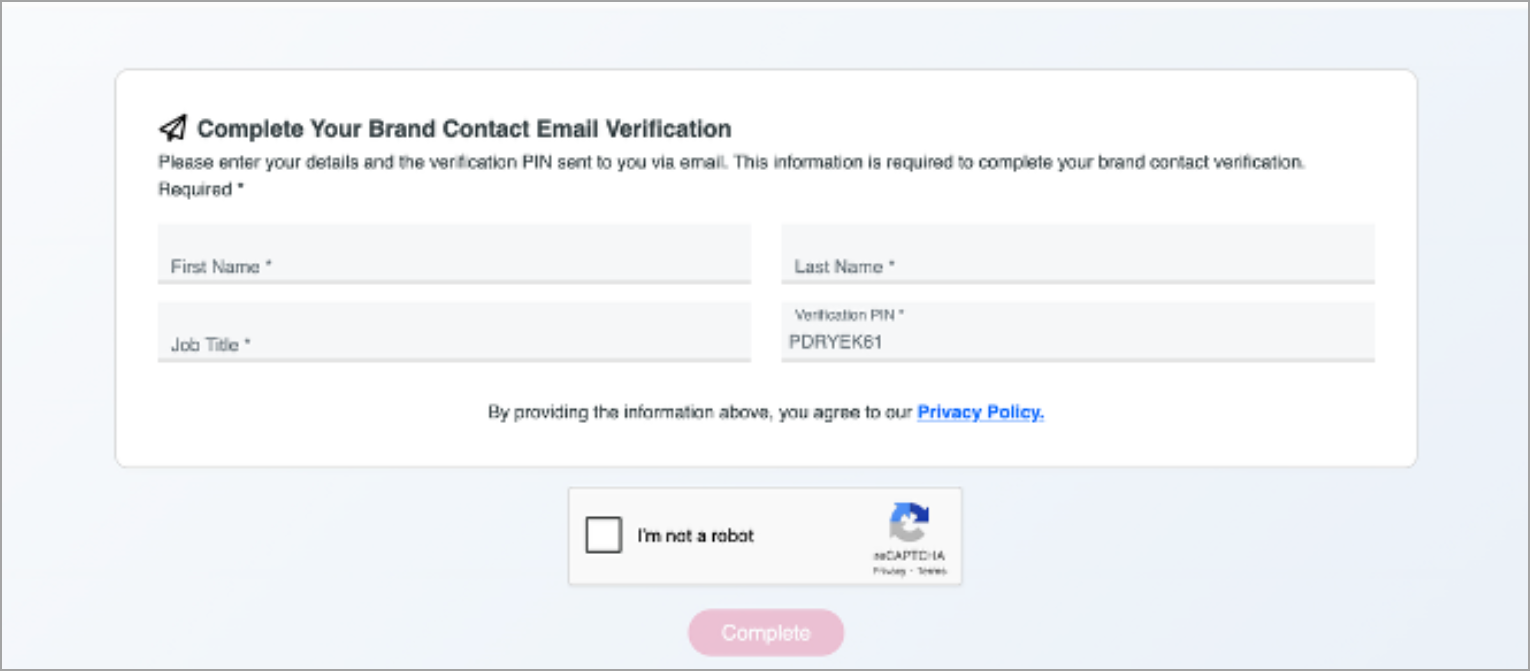
During SMS configuration, provide a link to your privacy policy and terms & conditions, and an email address for a point of contact.
Your designated point of contact will receive an email from our third-party vendor, Bird. The email includes a verification pin and instructions to complete a brief form (example below). The form requests the contact's name, job title, and verification pin provided in the email. Ensure that your point of contact completes this portion to start provisioning review.
Why isn't my local area code available?
Not all area codes are available for selection. Available options depend on existing phone number inventory and may not include every geographic region.
When configuring SMS, area code selection is optional. If you don't see your preferred area code, you can leave this option blank and an area code will be assigned to your agent.
How do I know when my agent's SMS phone number is ready?
After the carrier approves your phone number and SMS is enabled, you’ll receive a notification in Development Agent confirming that SMS messaging is ready to use.

If additional setup is required, such as reviewing or updating which engagement types can use SMS, you’ll see a one‑time reminder with next steps.
If provisioning is still in progress, a pending state is shown when you select Configure SMS. If provisioning fails, you’ll receive a notification. Blackbaud will respond to the carrier on your behalf to identify the issue and work through to resolution.
Why do some emails include information about SMS opt‑in at the bottom?
To help organizations grow SMS participation without running separate campaigns, the agent can automatically include an SMS opt‑in message at the bottom of scheduled emails. The message appears only when SMS messaging is enabled for your organization.
The message gives constituents a simple way to opt in, with either a link to an opt‑in page or by replying directly to the email, depending on what’s offered. Once a constituent opts in or out, the SMS opt‑in message is automatically removed from future emails.
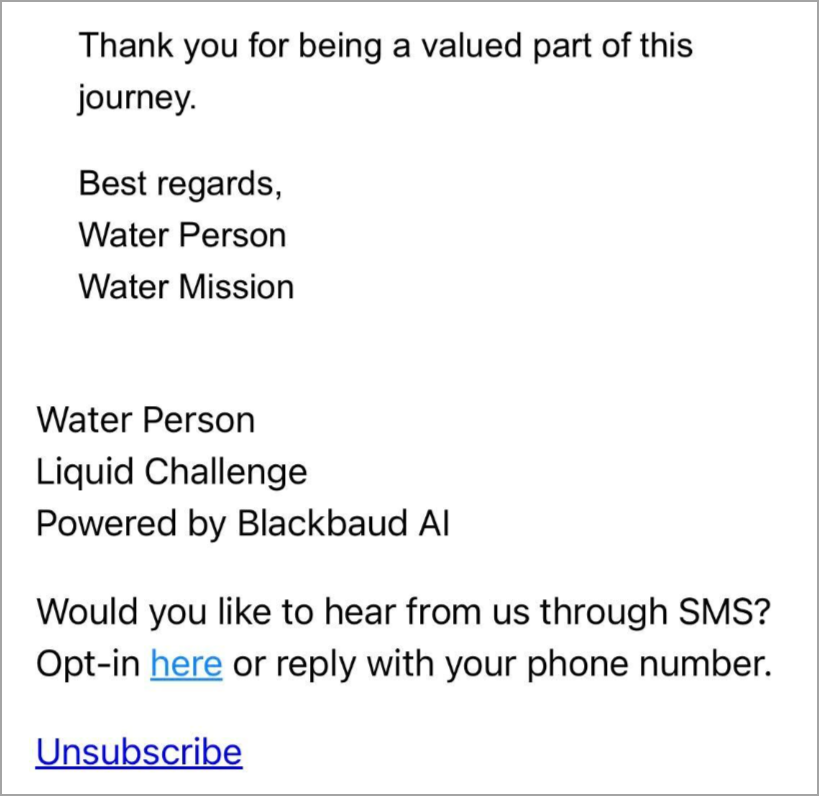
"Would you like to hear from us through SMS? Opt-in [here] or reply with your phone number."
This approach allows you to promote SMS enrollment through your existing email communications, helping reach both existing constituents and new ones who may not have opted in during onboarding.
Can we review SMS messages before sending?
SMS follows the same standard review process as email. Messages are generated approximately seven days before their scheduled send date and appear in the review queue for approval. However, Thank You communications follow a shorter review timeline. Thank You communications send 48 hours after a donation, leaving 48 hours for review.
What is the SMS character limit?
The character limit is 160 characters.
Can we text international phone numbers?
Yes, United-States based 10DCL and Canadian numbers can be sent and receive SMS.
What happens if a constituent has an international phone number?
For phone numbers that are not from the United States or Canada, the system automatically routes them to email-only communication. No error occurs.