Engagements
Engagements are communications between the agent and assigned constituents. Review upcoming messages by engagement type to focus on the communications most important to your organization, or use the scheduled and completed or canceled engagement lists to view details and history.
Note: Scheduled messages are sent whether they're reviewed or not. Review and approval are optional and indicate that a human reviewed the message.
Review upcoming communications for up to 7 days before a message is sent. Message timestamps adjust automatically based on browser settings to appear in your local time zone.
Note: Thank You communications for a donation are sent 48 hours later, leaving 48 hours for review.
Review next week's messages
-
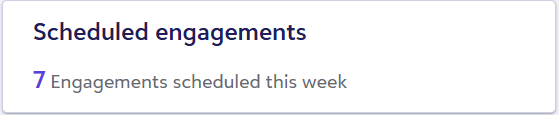
In Scheduled engagements on the Development Agent home page, click on the number of engagements scheduled for the next week.
-
For an engagement type with unreviewed messages, select Preview.
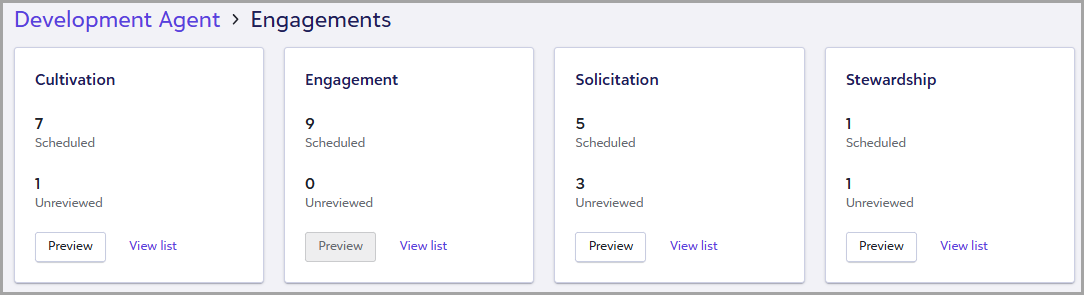
Tip: While the Scheduled engagements tile displays the engagements scheduled during the next week, the engagement type cards display all upcoming scheduled engagements. Upcoming messages are organized by engagement type to help you focus on the communications most important to your organization and streamline message review.
-
Optionally:
-
Select Thumbs up or Thumbs down to provide feedback.
-
Select Regenerate to generate a different version of the message.
-
-
Select one of the following:
-
Approve and load another to continue reviewing messages.
-
Approve all to approve the remaining messages in the engagement type.
-
Load another to review another message.
Tip: Messages within an engagement type are often similar. If the messages look good, review a few examples and then use Approve all to approve the remaining messages in that engagement type.
-
Scheduled communications
Access upcoming engagements by selecting Scheduled communications under Related links from the main Development Agent page.
Each row represents a scheduled engagement and includes the following information:
-
Scheduled — Date and time the engagement becomes eligible to send. The message may be delivered shortly after the scheduled time.
-
Status — Current engagement status.
-
Scheduled — The engagement is scheduled to be sent.
-
Review status — Indicates whether or not an engagement was reviewed.
-
Reviewed — A user reviewed the engagement.
-
Not reviewed — No review was recorded for the engagement.
-
Engagement type — Category of engagement, such as Cultivation, Engagement, Solicitation, or Stewardship.
-
Constituent — Constituent associated with the engagement. Select the constituent's name to view their record.
-
Interaction type — Delivery method used for the engagement, such as Email or SMS.
View engagement details:
-
Select the ellipsis (…) beside an engagement.
-
Select View.
The Engagement details page displays the message sequence, subject, body, and timestamp for the engagement.
If you provide feedback and regenerate content, the message updates for that unique engagement. If you want feedback to help shape future messages, select Apply this feedback to future engagements.
Note: For upcoming messages flagged by the agent as needing human review, see Escalated actions.
Complete and Cancelled Messages
Access past messages by selecting Communication history under Related links from the main Development Agent page. This view is read-only and intended for monitoring past activity, not for editing or resending messages.
Each row represents a single engagement and includes the following information:
-
Sent — Date and time the engagement was sent or was scheduled to be sent.
-
Status — Overall engagement status:
-
Completed – The message was successfully sent.
-
Cancelled – The message was not sent because conditions changed (for example, the constituent became ineligible or no longer has a valid email address on record).
-
Escalated – The agent couldn't complete the engagement, so flagged it for human review.
-
-
Review status — Indicates whether a user reviewed the engagement before it was sent:
-
Reviewed — A user reviewed the engagement.
-
Not reviewed — No review was recorded for the engagement.
-
-
Engagement type — Category of engagement, such as Cultivation, Engagement, Solicitation, or Stewardship.
-
Status (interaction) — The most relevant recipient interaction status for the engagement:
-
Sent — The message was sent to the recipient.
-
Opened — The recipient opened the message.
-
Replied — The recipient responded to the message.
-
Escalated — The conversation was handed to a person.
-
Bounced — The message couldn't be delivered. Verify the recipient's contact details.
-
Opted out — The recipient unsubscribed and won't receive future messages.
-
Cancelled — The engagement was canceled before a message was sent, such as when a constituent no longer has a valid email address on record.
-
-
Messages - Number of individual messages sent as part of the engagement. Some engagements include multiple messages, such as follow-ups or variations sent to the same person.
-
Constituent — Constituent associated with the engagement. Select the constituent's name to view their record.
-
Interaction type — Delivery method used for the engagement, Email or SMS.
View interaction details and next steps
To see more detail about an interaction, open the constituent’s record and select Actions.
Find an action created by the agent, then select more in the Action summary to expand the details.
The expanded view includes an Interaction Summary, Key Info, and Notes. If an interaction was escalated, the Notes section includes an Action Required message that explains what to do next.