Make a Payment
Make payments to pay down your balance and ensure timely fulfillment of scheduled payments as defined in your payment plan.
Tip: Enroll in Auto-Pay, if available, to automatically debit the installment amount scheduled in your payment plan.
Note: EFT payments are not supported. Payments via ACH are supported.
To get started, log in, hover over Billing in the navigation, and select Current bill.
1 Select Make payment
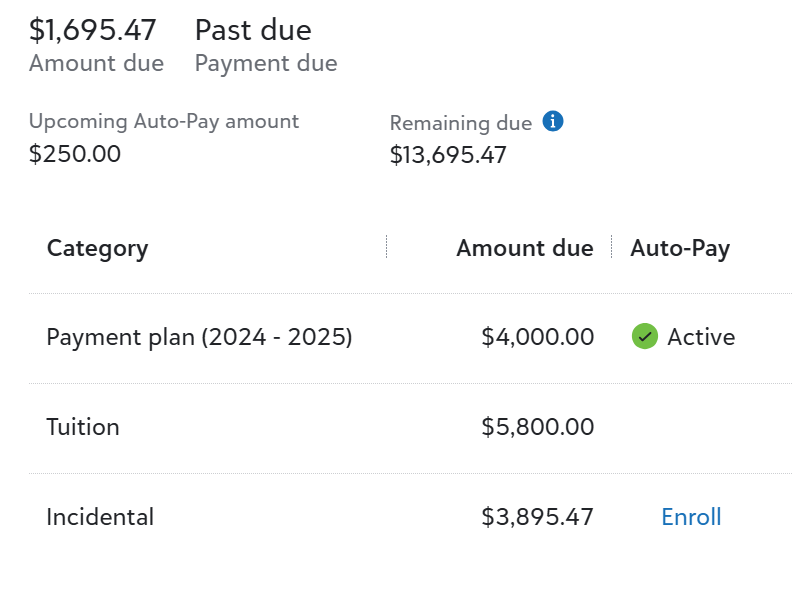
Locate and select Make payment to begin the payment process.
Note: If you cannot find the Make Payment , contact your bursar's office for assistance with making payments in-person or over the phone.
2 Select your repayment option
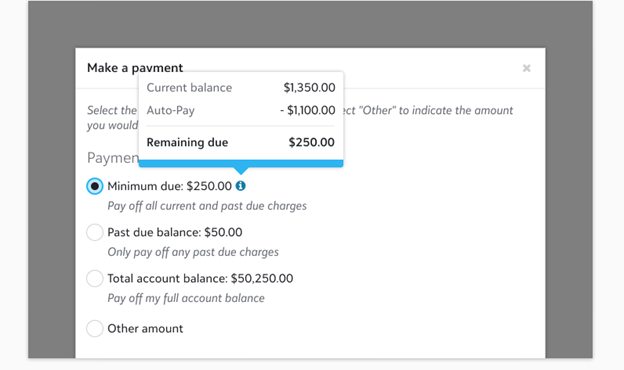
Select Direct debit or Credit card, or select Use a saved payment method and choose from an existing payment method, or add a new one by selecting either Add bank account or Add credit card; saved payment methods are stored and usable for future payments
3 Enter your Billing address
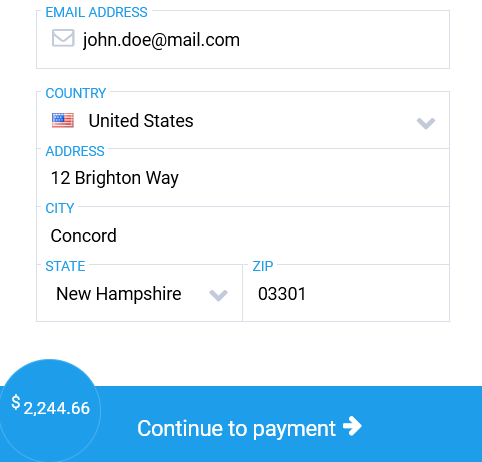
Select Enter payment info. Enter the address details associated with the payment method of your choice. Select Continue to payment.
4 Enter billing details and pay
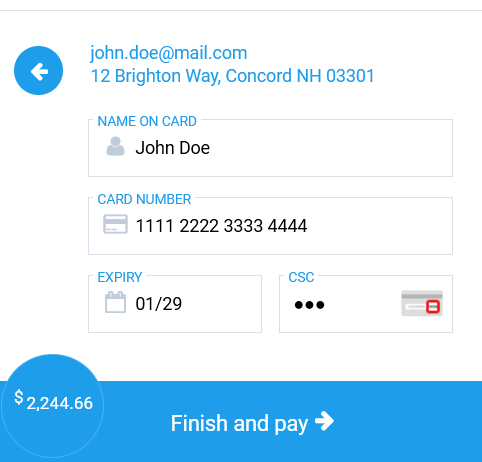
Enter your Billing credentials followed by your card or bank information. Finalize by selecting Finish and pay.
Note: Canadian direct debit payments are held for two days before being processed.