Billing profile payment plans
Payment plans divide student balances into installments that statement recipients pay over time, based on their assigned responsibility.
If Auto-Pay is enabled by your school and active for a student, installments are automatically debited from the recipient's funding source on the due date for each installment.
View payment plans on a billing profile
The Payment plan section inside a student's billing profile displays key details for the selected billing year. These include the total amount, total paid, total remaining, Auto-Pay status, and an indicator showing whether an upcoming payment is past due or has been paid.
To view a student's payment plan details:
-
In Billing Management, from the navigation menu, select People Finder.
-
Search for and select the student to open their billing profile.
-
Scroll down to the Payment plan section.
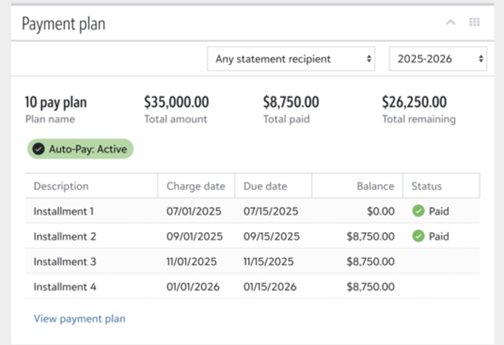
Filter payment plan details
You can adjust the information shown in the Payment plan section to focus on a specific billing period or individual recipient.
-
By billing year: Use the date picker to select a different billing year. The section refreshes to show the corresponding installment details.
-
By statement recipient: If a family is configured so that people cannot see each other's activity, a statement recipient dropdown appears. Select a specific recipient to refine the displayed details based on individual charge responsibilities.