Sharing Groups across Centers
Normally, in Center Mode, administrators will have access to only Center-specific Groups whenever they are using the Groups selector. However, Luminate Online can enable a site option that gives Center administrators access to site-wide groups when formulating queries, creating Report Writer filters, targeting Email recipients, configuring the Do Not Email groups for an Email Campaign Message, and creating conditional content in the WYSIWYG based on Group membership. This feature can help center administrators avoid sending unwanted email; it can also allow them to personalize center content based on overall site interactions. (See the Scenario below for more details.)
The site option can be enabled with either of two configurations: SPECIFIED and TRUE. The difference in the behavior between the two is that SPECIFIED is selective and includes only groups in security categories that you subsequently select for sharing, whereas TRUE includes groups in all security categories. (Any security categories shared display the word "Shared" under the security category name in the list of security categories.)
SPECIFIED: If you are interested in giving your Center administrators access to site groups of your choosing, you can request that Blackbaud Customer Supportenable the Group_Selector_Show_All_in_Center_Mode site option with the value SPECIFIED. When this option is enabled, a checkbox to share a security category will display when you are creating a new security category, editing an existing one, or editing an existing center:
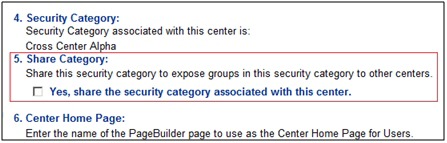
Site administrators or higher can designate a security category as shared. (Shared security categories will display the word Shared beneath the security category name in the Security Category List.) Subsequently, only groups in the current Center's security category and those in the shared security categories will display in the groups selectors in center mode (in Email Campaigns, Query, Report Writer, and the COM WYSIWYG as listed below for the True setting).
TRUE: If you are interested in giving your Center administrators access to all site groups (in these limited areas), you can request thatBlackbaud Customer Support enable the Group_Selector_Show_All_in_Center_Mode site option with the value TRUE.
The TRUE setting grants access to all groups in the following areas:
Email Campaigns: when creating the Do Not Target audience for messages
Email Campaigns: when targeting the audience and delivery targets for campaign messages, and the delivery target for Quick Email
Query: when adding a Group Clause
Report Writer: when adding a Group Membership filter (for example, in the Center Members report)
COM WYSIWYG Editor: in the Conditionals component (when creating a conditional based on Group membership)
Note again that the specified setting grants center access to groups in these same areas -- but only those groups in security categories you choose to share. For more information, refer to Sharing Constituent360 Interactions Transactions, and Groups Across Centers.
Note: When using this option, Center administrators will not be able to see site-wide contacts or contact information that they do not have permission to see. For example, in the case of Query, the query will only return constituents who are members of the site-wide group and also members of the center in which the admin is working. The following scenario will help you understand how this works.