What's Recent in 2024
Explore the updates below to learn about the features and functionality released for internal YourCause Admins in 2024.
Tip: For the latest release notes, see What's New in Blackbaud Verified Network for YourCause Admins.
December 16, 2024 - 1.101.0 Release
There are no internal-only announcements for this release.
Note: There are no nonprofit-facing announcements for this release.
December 9, 2024 - 1.100.0 Release
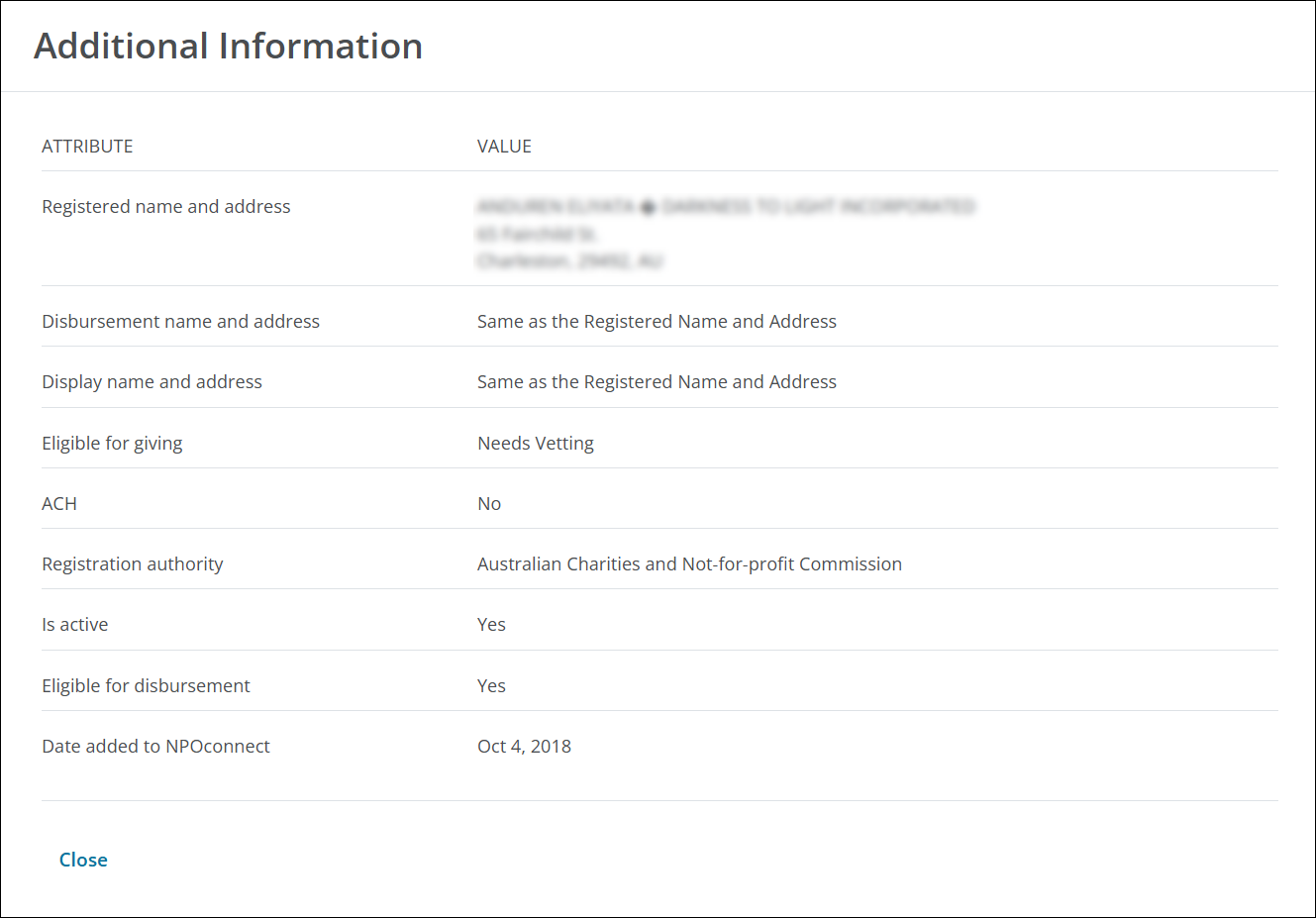
 Nonprofit Information block now notes if the Disbursement Name and Address and Display Name and Address are the same as the nonprofit’s Registered Name and Address
When you select Additional Information in the Nonprofit Information block, you’ll now see Same as the Registered Name and Address in the following fields if these values are the same as the name and address the nonprofit is officially registered under.
-
Disbursement name and address
-
Display name and address
Note: If the names and addresses used for disbursement and/or display are different, the updated information will be shown in these fields instead.
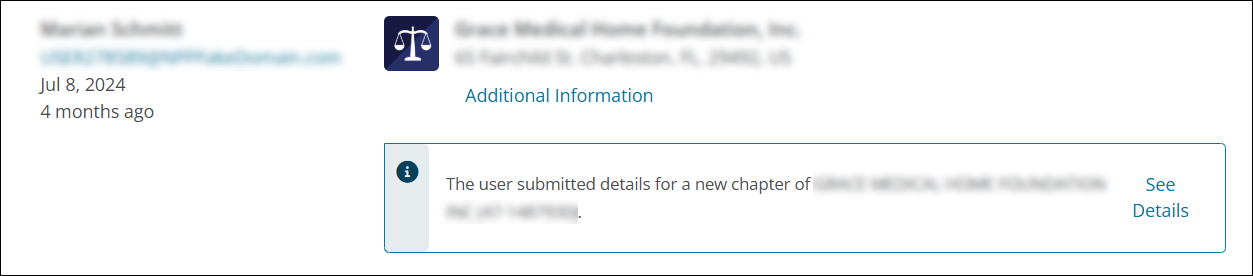
Approved and Declined Administrator Requests now show chapter information, if relevant
For Approved and Declined Administrator Requests for a newly created chapter, you’ll now see the chapter callout in the Nonprofit Information block like what’s shown for Pending requests.
Additional updates
-
A callout has been added to the NPOconnect Email Log report as a reminder that this report only shows emails sent in the last year. Any emails sent one year before today are not available.
-
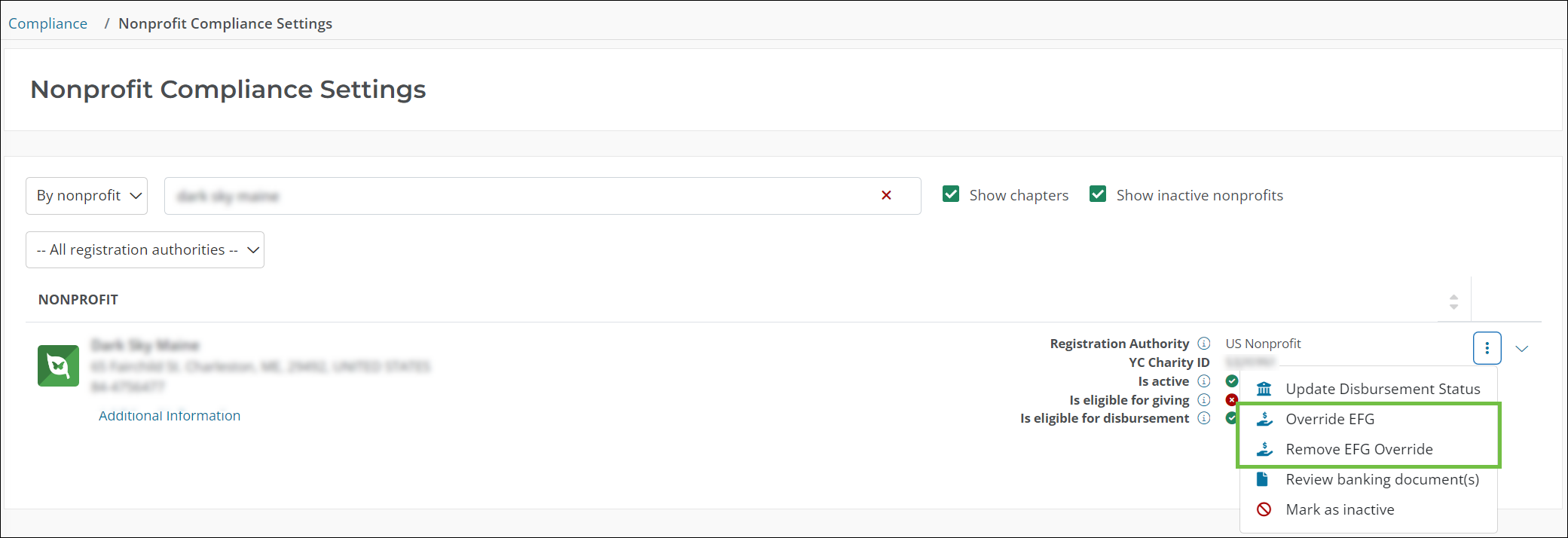
In the Compliance > Nonprofit Compliance Settings area, the Remove EFG Override option only appears for nonprofits whose eligibility has been manually overridden.
-
In the Help and Support area of NPOconnect, select the Release Notes tile to open the What’s New resources in the NPOconnect Internal Admin Help.
Note: If you’re signed in as a nonprofit instead of an Internal Admin, you’ll be directed to the external NPOconnect Help instead.
Note: To view all nonprofit-facing announcements, see the What's New in the external NPOconnect Help.
November 19, 2024 - 1.99.0 Release
New report details organizations revoked under CA AB 488
A new report – US State Revocations – is available for YourCause Admins that allows you to view active nonprofits revoked under California Assembly Bill 488 (CA AB 488). In Reporting, search for the report name or filter by Nonprofit Administration reports to access it. As shown below, this displays a table view of nonprofits, including their revocation list and status.
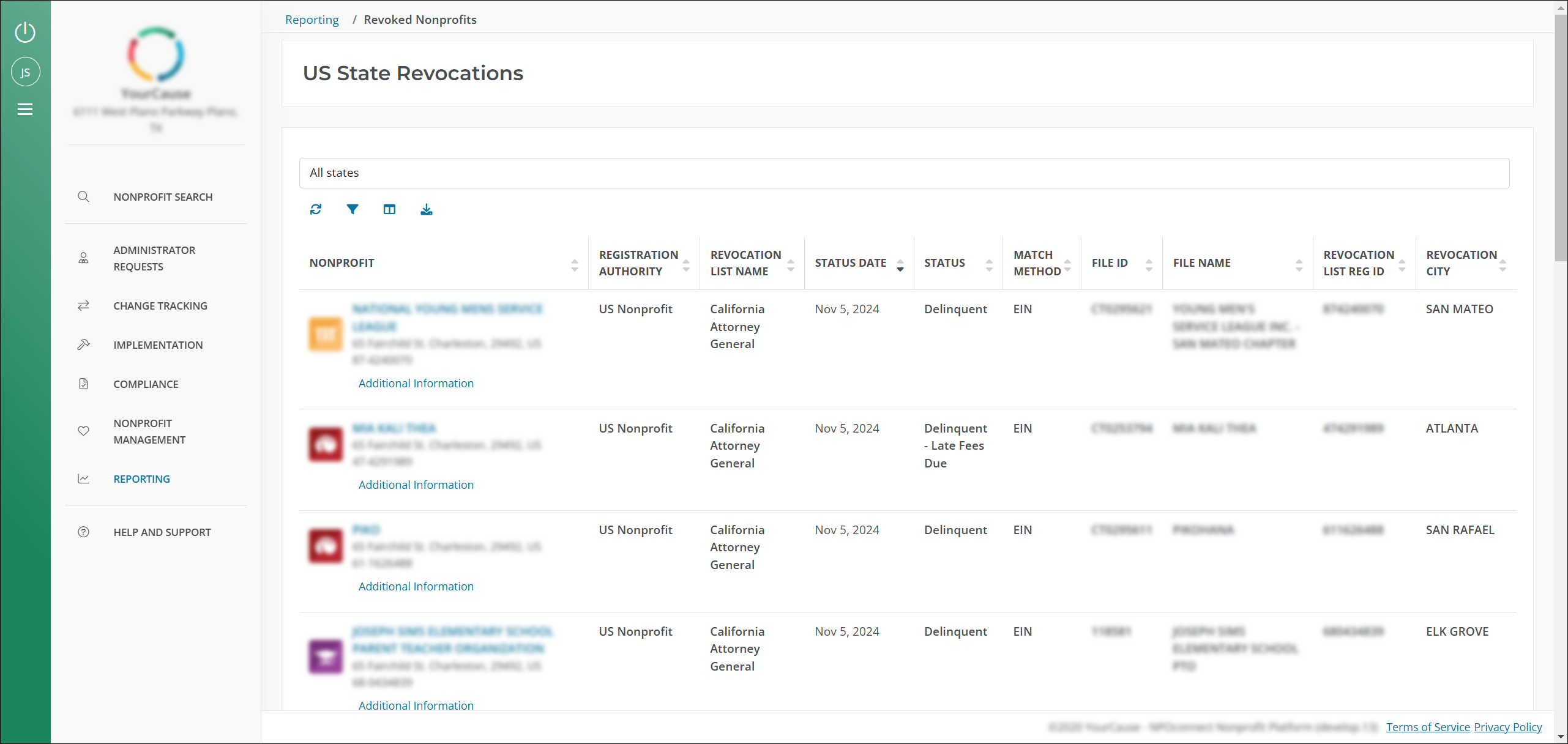
Tip: To find information about a specific nonprofit, revocation list, etc., select the Filter icon under the All states dropdown to narrow the results.
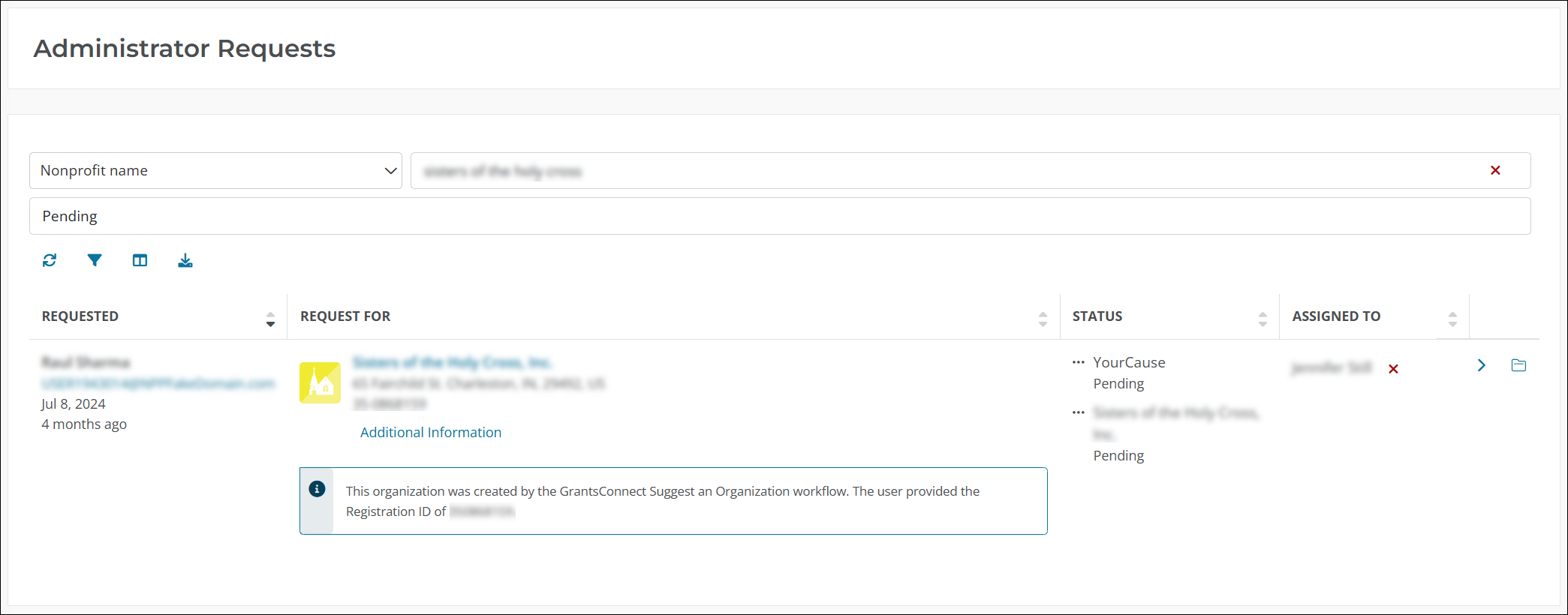
New callout box in the Administrator Requests area denotes organizations that were added through GrantsConnect
When reviewing Administrator Requests, you’ll now see an information box beneath the nonprofit’s information if the request was created through GrantsConnect’s Suggest an Organization (Add Your Organization) workflow.
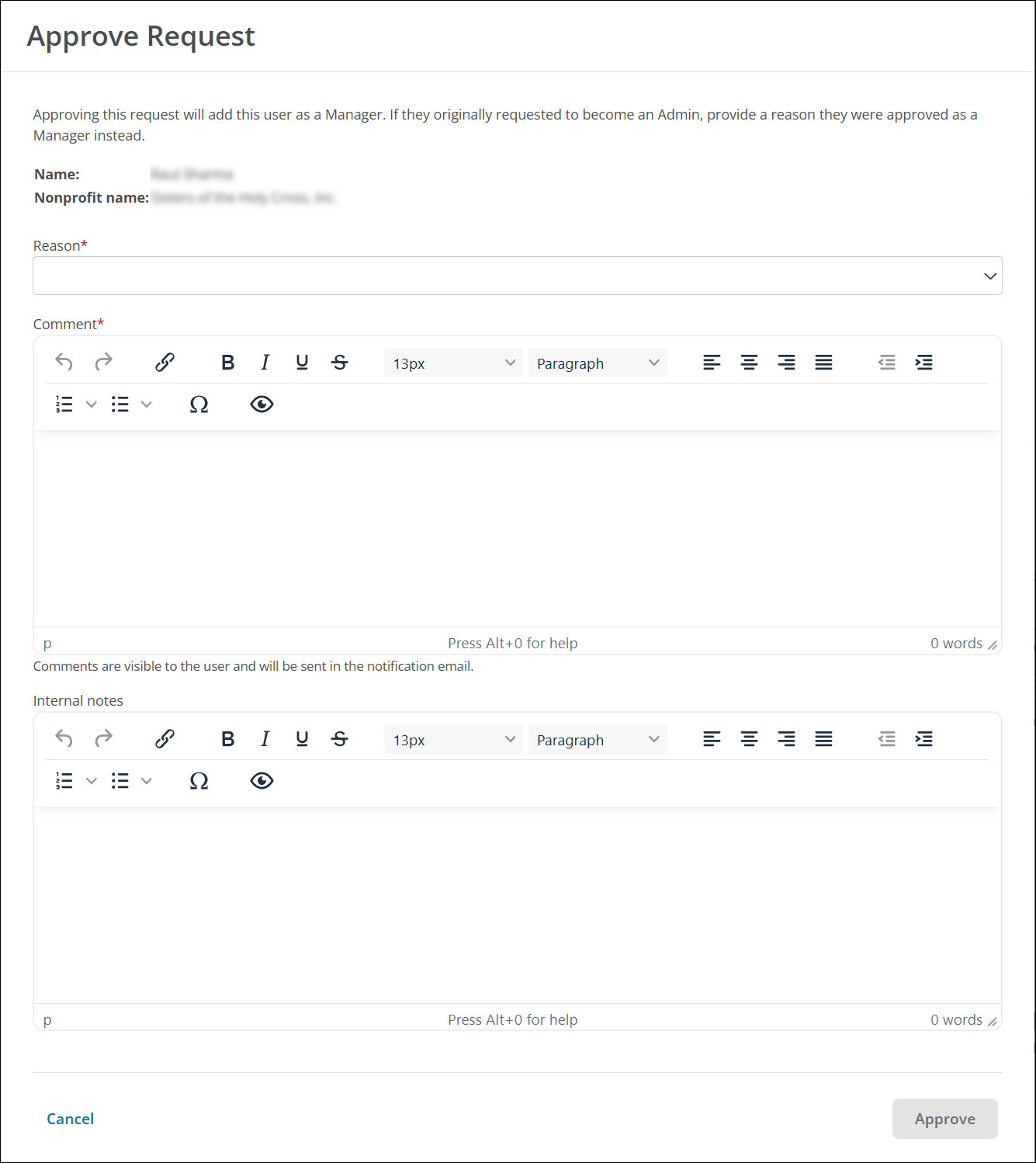
Administrator Request review process updated to include new Comments field for communicating directly with users, new reason types, and more
We’ve made several updates to the internal Administrator Request area, as well as the process for reviewing and actioning requests. The goal of this update is to provide more clarity to nonprofit users who are approved as Managers instead of Admins. Some of these updates – like the addition of new reason types – help to streamline communication for YourCause Admins.
The following updates have been made to the modals for Approve as Admin, Approve as Manager, and Decline Request:
-
View user information – You can now view the user’s name, nonprofit, and the role you’re approving them for at the top of the modal.
-
Add internal notes for YourCause Admins – The new Internal notes field allows you to enter notes that will only be visible to YourCause Admins.
-
Add comments and instructions to send to the user – The new Comment field allows you to communicate the reason an action was taken, such as approving a request as a Manager instead of Admin, or next steps. This comment is then shared with the user in the Welcome email they receive.
Note: This field is now required when approving a request as a Manager. Please only include information that you want sent to the user. Any internal content can be added to the Internal notes field.
-
Comments and notes support rich text - The Comment and Internal notes fields support rich text, allowing you to format content in list, steps, and more.
-
Easily communicate that the user registered under an incorrect name – The new Must register under personal name OR registered under wrong name reason is now available in Decline Request.
Tip: To view internal comments (i.e., Internal notes) for previous requests, select the new View comments icon next to the request.
Note: To view all nonprofit-facing announcements, see the What's New in the external NPOconnect Help.
November 6, 2024 - 1.98.0 Release
There are no internal-only announcements for this release.
Note: To view all nonprofit-facing announcements, see the What's New in the external NPOconnect Help.
October 21, 2024 - 1.97.0 Release
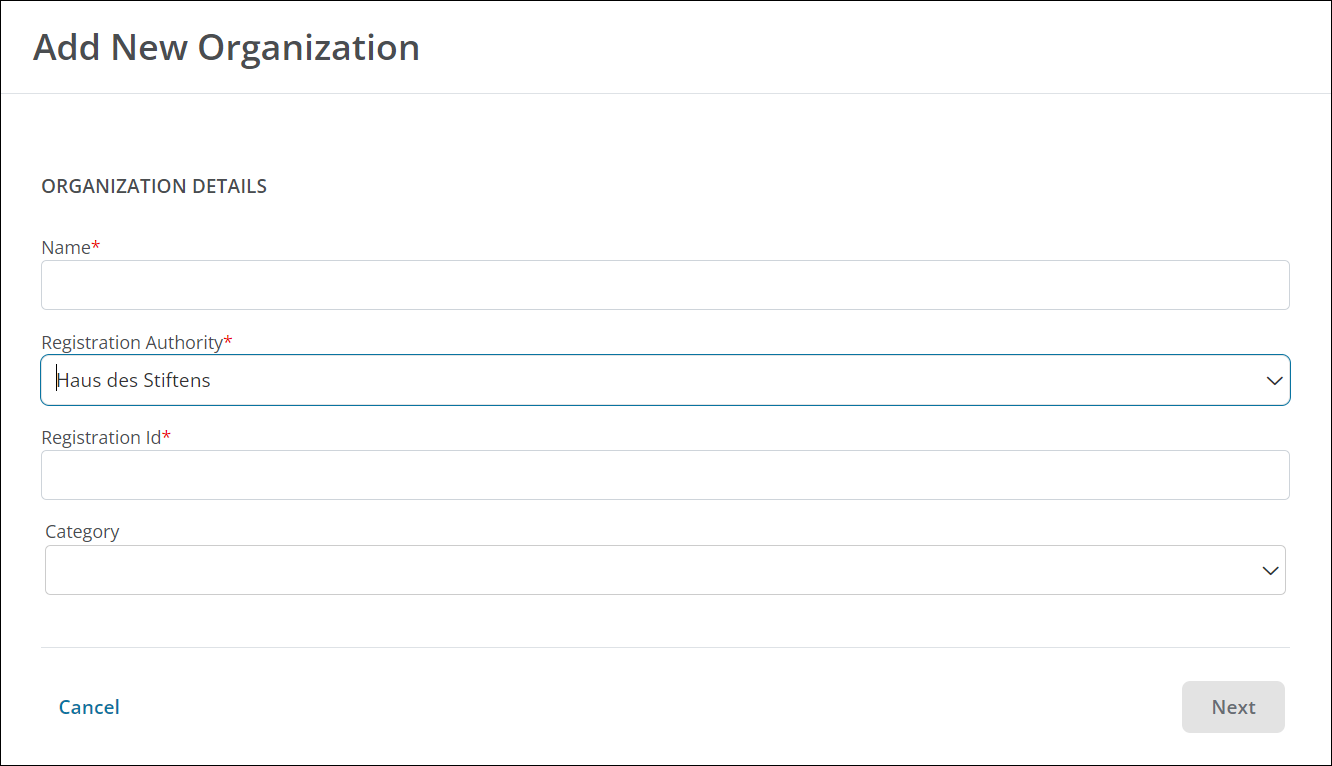
Select the registration authority when adding a new organization
You can now specify the registration authority when adding a new organization to NPOconnect in the Nonprofit Management > Organizations area. This allows us to automatically initiate the vetting process by sending a corresponding vetting request after the organization is added.
System updated to only maintain 18 months of historical Charity Compare data
As part of our updates to Data Retention in NPOconnect, we will now maintain a rolling 18 months of Charity Compare data. Moving forward, any files that were created more than 18 months before the date the recurring automatic process runs will be deleted from the system.
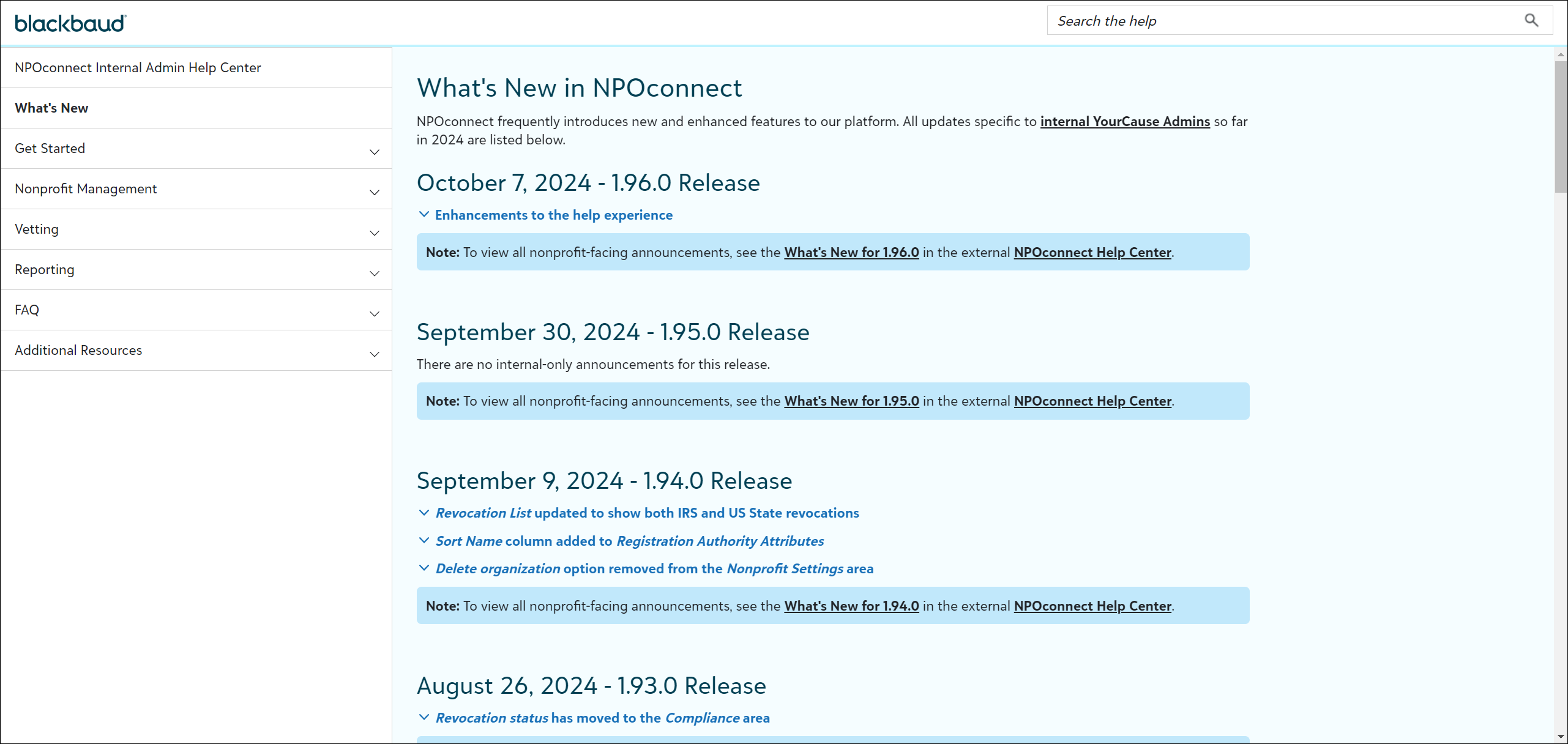
Enhancements to the help experience
To improve how you interact with and consume help resources, we’ve made accessibility enhancements and updated the look and feel of our Help. While help still functions the same, here are some examples of the changes you’ll see:
-
Help style – We’ve updated the color and style to provide a more consistent experience with other Blackbaud solutions.
-
Text size – Text is now larger to make it easier to view.
-
Tip style – Updated look of tips make additional help content easier to scan.
-
Nested subheadings - The introduction of nested subheadings in the navigation will improve scanning and help you understand the hierarchy of content.
Note: This update applies to both the external NPOconnect Help and the NPOconnect Internal Admin Help.
Note: To view all nonprofit-facing announcements, see the What's New in the external NPOconnect Help. This includes updates to My Nonprofits to display users' roles and allow Managers to request their role be upgraded.
October 7, 2024 - 1.96.0 Release
Enhancements to the help experience
To improve how you interact with and consume help resources, we’re making accessibility enhancements and updating the look and feel of our Help. These updates will be made with our next release.
Note: This update applies to both the external NPOconnect Help and the NPOconnect Internal Admin Help.
Note: To view all nonprofit-facing announcements, see the What's New in the external NPOconnect Help.
September 30, 2024 - 1.95.0 Release
There are no internal-only announcements for this release.
Note: To view all nonprofit-facing announcements, see the What's New in the external NPOconnect Help.
September 9, 2024 - 1.94.0 Release
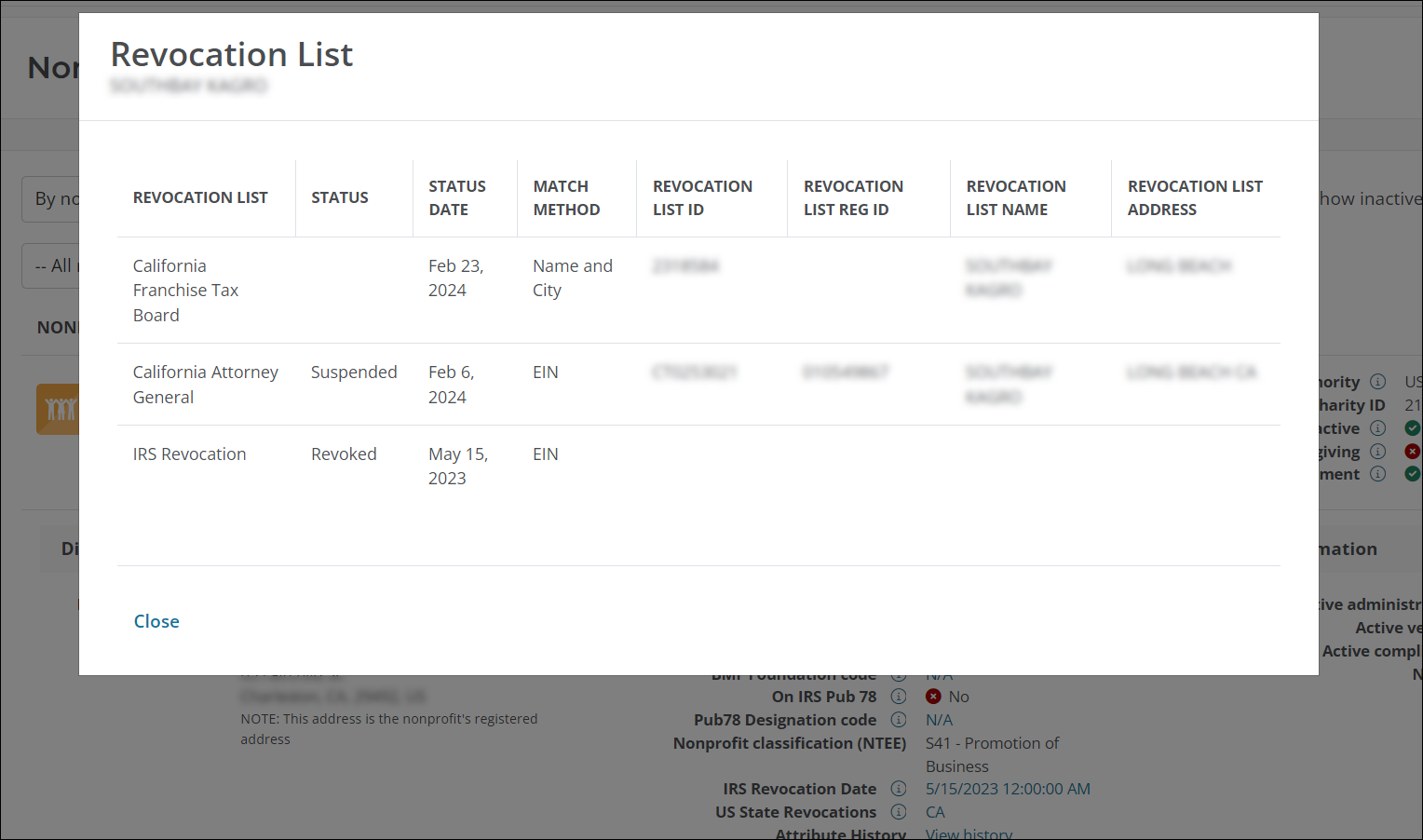
Revocation List updated to show both IRS and US State revocations
The Revocation List screen now shows both state and IRS revocations. You can access this information by selecting the value in the IRS Revocation Date or US State Revocation dates fields in the Registration Authority Attributes section of the Nonprofit Information block.
Sort Name column added to Registration Authority Attributes
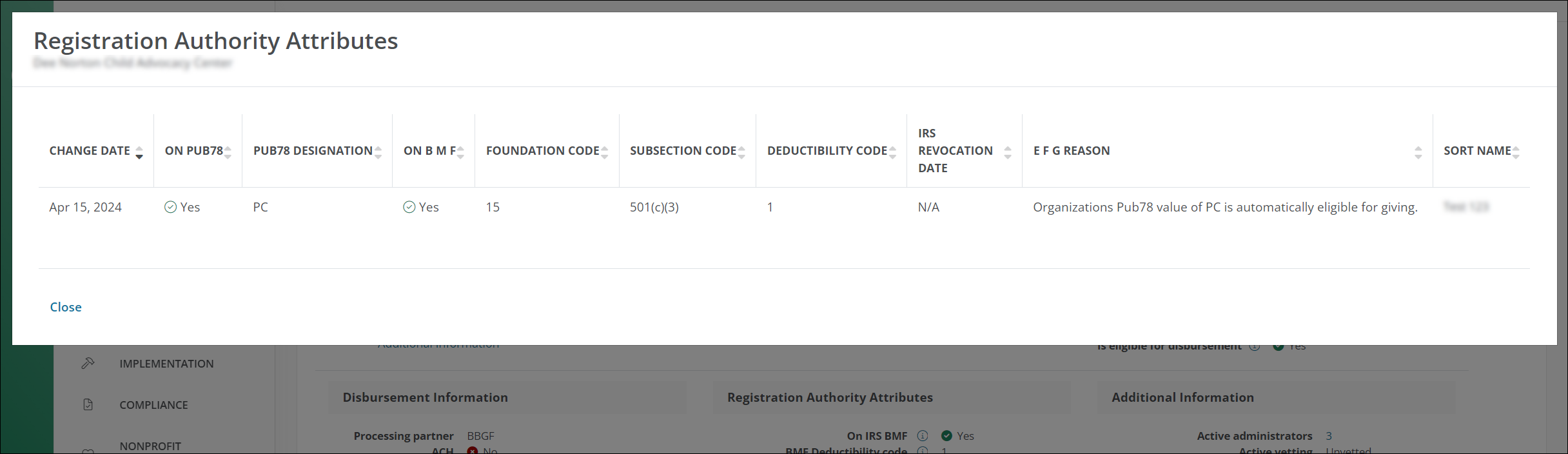
The Registration Authority Attributes > View history screen now includes the Sort Name column. Additionally, it opens in a full page view, making it easier to see the table without scrolling.
Delete organization option removed from the Nonprofit Settings area
The Delete organization tool has been removed from Nonprofit Management > Nonprofit Settings. Moving forward, it’s recommended to navigate to Nonprofit Management > Nonprofit Settings and select Mark as inactive to manage organizations that should no longer be active in NPOconnect.
Note: To view all nonprofit-facing announcements, see the What's New in the external NPOconnect Help.
August 26, 2024 - 1.93.0 Release
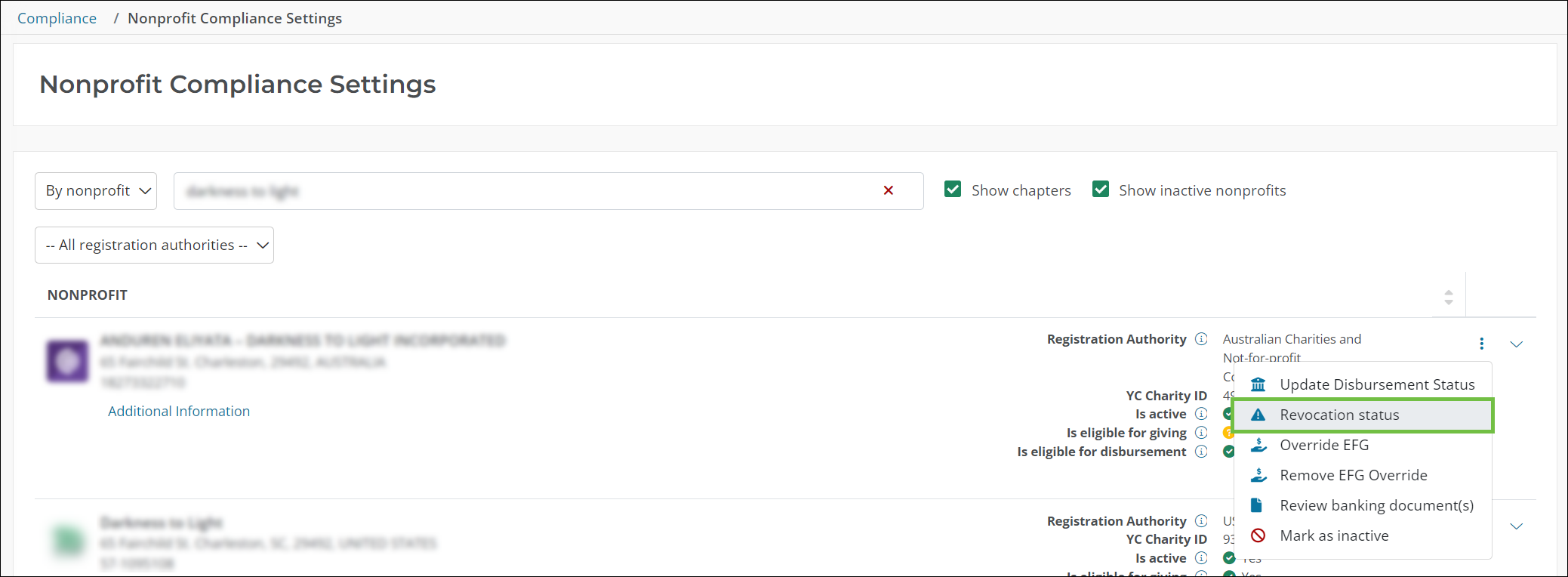
Revocation status has moved to the Compliance area
The Revocation status tool has been moved from the Nonprofit Management > Nonprofit Settings area to the Compliance > Nonprofit Compliance Settings area. This functionality is only available to internal users in the Compliance Admin role.
Note: There are no nonprofit-facing announcements for this release.
August 12, 2024 - 1.92.0 Release
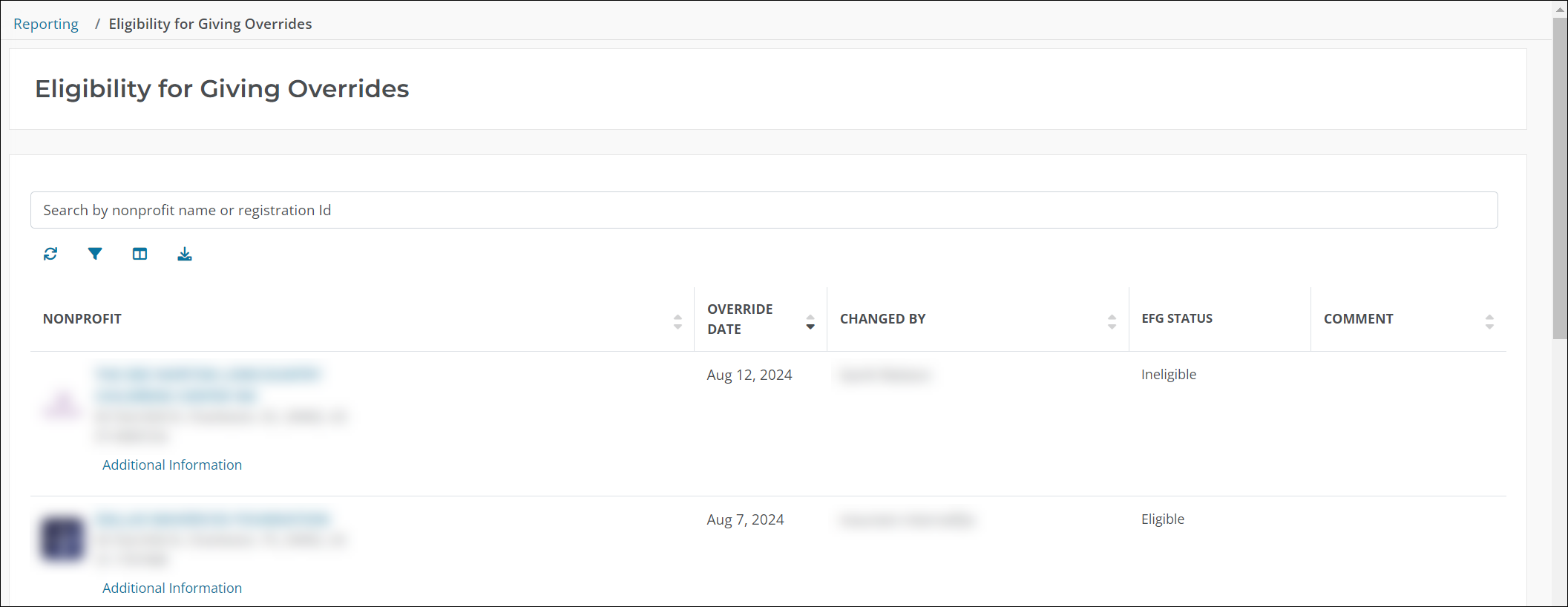
New report shows all organizations whose Eligible for Giving status has been overridden
You can now pull a report of all nonprofit organizations whose Eligible for Giving status has been overridden by Blackbaud Compliance. Details in the report include:
-
Nonprofit name and information
-
Override date
-
Name of who performed the override
-
Override status
-
Comment
Note: For more information, see Build Eligibility for Giving Overrides Report.
Note: To view all nonprofit-facing announcements, see the What's New in the external NPOconnect Help.
July 29, 2024 - 1.91.0 Release
Blackbaud Compliance can now remove an Eligible for Giving override without manually updating the status
The Remove EFG Override tool is now available in the Compliance > Nonprofit Compliance Settings area, allowing the Blackbaud Compliance team to remove an override and reset the nonprofit organization’s Eligible for Giving status to its current attribution based on its IRS attributes, vetting status, etc. This tool should be used to remove an override rather than simply changing the status using the Override EFG (previously Update Eligibility Status) tool.
Note: A change tracking record is created when either of these actions are taken.
Note: To view all nonprofit-facing announcements, see the What's New in the external NPOconnect Help.
July 15, 2024 - 1.90.0 Release
There are no internal-only announcements for this release.
Note: To view all nonprofit-facing announcements, see the What's New in the external NPOconnect Help.
July 1, 2024 - 1.89.0 Release
NPOconnect Internal Admin Help Center is now available for YourCause Admins and internal stakeholders
Help resources for YourCause Admins and other stakeholders are now available in the new NPOconnect Internal Admin Help Center. This resource contains internal release notes previously housed in Confluence, instructions for building internal reports, and more.
Note: As part of this launch, the Resources for YourCause Admins articles have been removed from the main NPOconnect Help Center. Outside of this update, this does not impact external-facing documentation. Please continue to refer to the main NPOconnect Help for resources geared towards nonprofit organizations and clients.
Note: There are no nonprofit-facing announcements for this release.
June 17, 2024 - 1.88.0 Release
Prospective Nonprofit Administrators report columns have been updated
The columns included in the Prospective Nonprofit Administrators report have been updated to the following:
-
Nonprofit Id
-
Registration Authority
-
Registration Id
-
YC Charity Id
-
Nonprofit Name
-
Is Active
-
Eligible for Giving Status
-
Number of Active Administrators
-
Prospect
-
Date Added
-
Outreach Reason
-
Outreach Attempts
-
Outreach Status
-
Latest Outreach
-
Latest Outreach Delivery Status
-
Latest Outreach Delivery Status Type
-
Latest Outreach Delivery Status Sub Type
-
Latest Outreach Delivery Status Date
Note: This report can be downloaded from the Nonprofit Management > Prospective Nonprofit Administrators area. For more information, see Download Prospects.
Note: There are no nonprofit-facing announcements for this release.
June 3, 2024 - 1.87.0 Release
Nonprofit name is no longer required to process Charity Compare files
When running a Charity Compare, you’re no longer required to include the nonprofit name in the compare file. Instead, the comparison can be run using the nonprofit’s Registration ID.
Note: There are no nonprofit-facing announcements for this release.
May 17, 2024 - 1.86.0 Release
There are no internal-only announcements for this release.
Note: To view all nonprofit-facing announcements, see the What's New in the external NPOconnect Help.
May 3, 2024 - 1.85.0 Release
New Partner Campaign to promote Blackbaud Purchase Cards is now live in NPOconnect
We’ve launched a new Partner Campaign in NPOconnect to promote Blackbaud Purchase Cards to nonprofit organizations. When Nonprofit Administrators sign in to NPOconnect and navigate to My Workspace, they’ll now see a graphic above their Notifications that provides more detail on the opportunity. They can click on the collateral to learn more about this specific campaign with Blackbaud Purchase Cards.
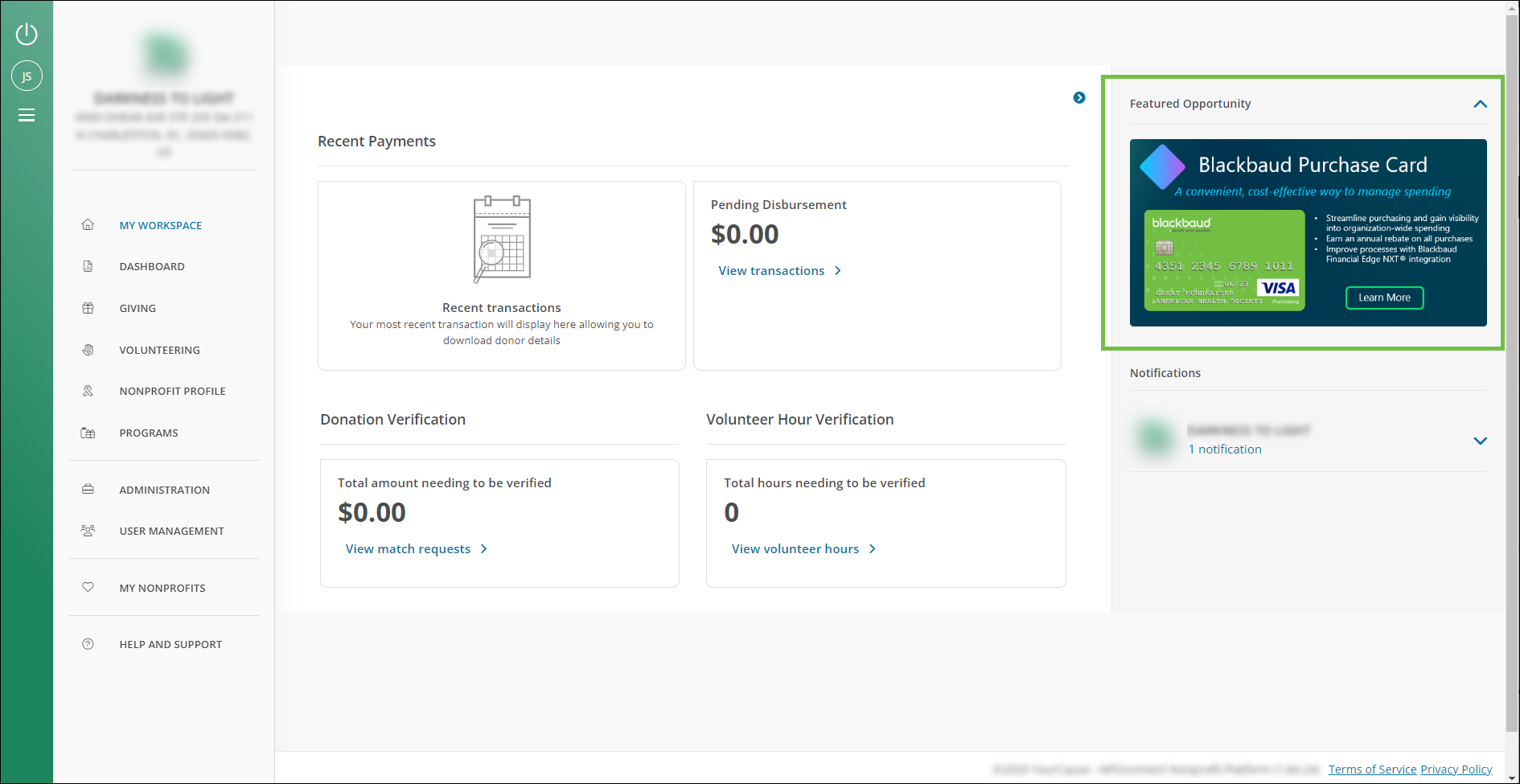
Note: This is currently visible to all Nonprofit Administrators. We automatically track who sees the campaign and clicks on it to navigate to the opportunity, allowing us to better understand its reach and efficacy.
Domestic vetting application revision requests now support rich text (bullet points, etc.)
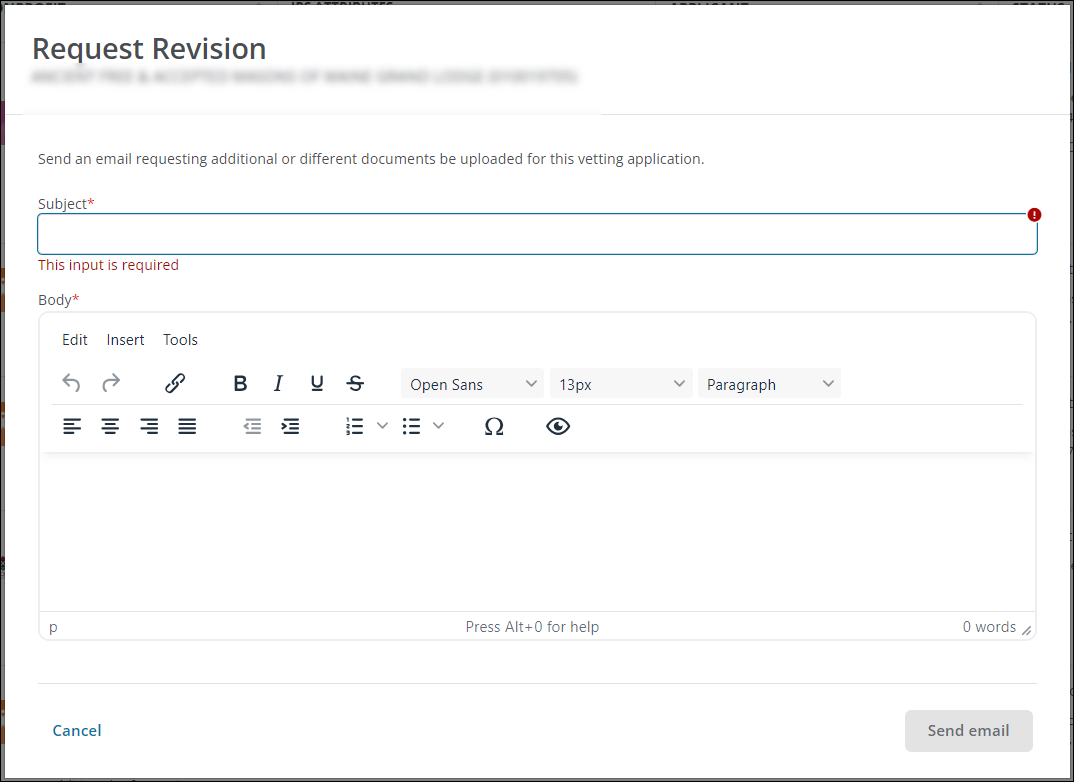
When requesting a revision for domestic vetting applications, you can now enter rich text in the email body. This allows you to format your request using bullet points, numbered lists, bold words, etc.
Note: To view all nonprofit-facing announcements, see the What's New in the external NPOconnect Help.
April 19, 2024 - 1.84.0 Release
CA AB 488 data imports are now included in the Nonprofit Data Import History report
You can now view when the data related to California Assembly Bill 488 (CA AB 488) was last updated in NPOconnect in the Nonprofit Data Import History report. These feeds are listed as California Attorney General and California Franchise Tax Board in the Registration/Vetting Authority column, as shown below.
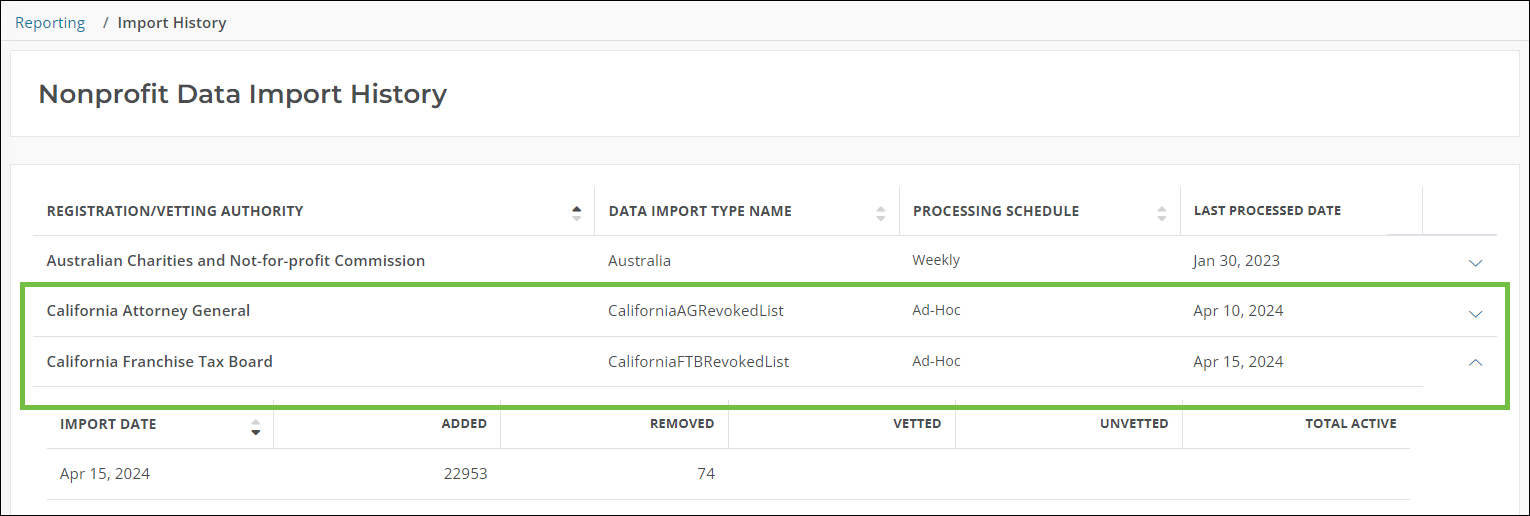
Note: In the expanded view of each feed, the Added column represents the number of revoked nonprofits while the Removed column shows those that have been removed from the revocation list.
Revocation Status area now shows a nonprofit’s IRS revocations in addition to US state revocations
You can now view a nonprofit’s IRS revocation status on the Revocation Status page accessible from the Nonprofit Management > Nonprofit Settings area. This information will appear in the table alongside any US state revocations for the organization.
Note: IRS revocations are only shown for a nonprofit if they have a status of Revoked and are Active. We do not display previous, inactive revocations in this table.
Tip: You can also view this information in the Nonprofit Information block in the Nonprofit Search by clicking on the IRS Revocation Date field.
Blackbaud Compliance can now manually remove a nonprofit’s IRS revocation in NPOconnect
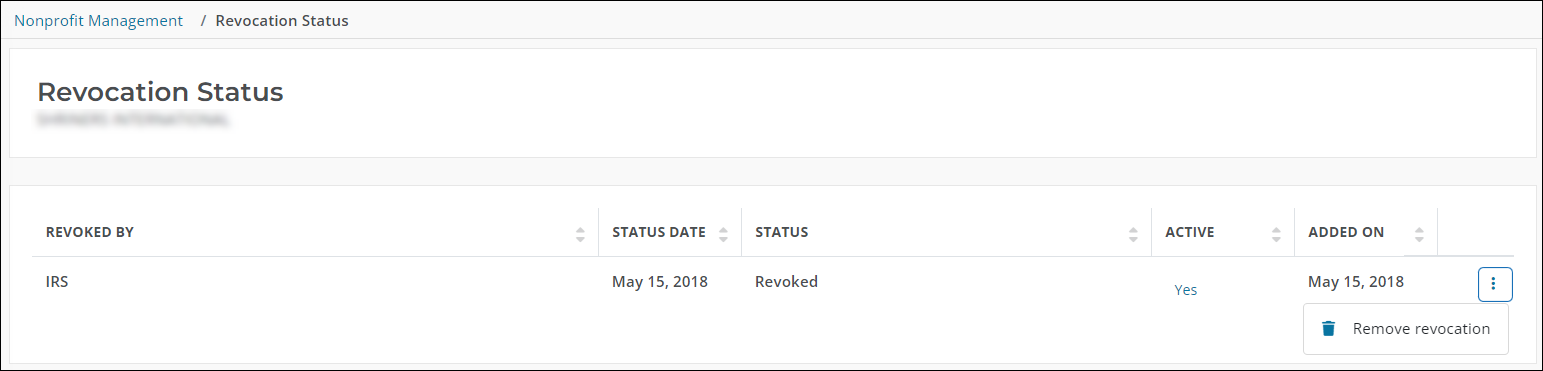
The Blackbaud Compliance team can now remove a nonprofit’s IRS revocation if an active Nonprofit Administrator provides sufficient proof that they’re in “good standing” and no longer on the revocation list. To do this, navigate to the Nonprofit Management > Nonprofit Settings area and click on the Revocation Status option for the nonprofit. On the Revocation Status page, click on Remove revocation and follow the prompts to remove it.
Note: To view all nonprofit-facing announcements, see the What's New for 1.84.0 in the external NPOconnect Help.
March 25, 2024 - 1.83.0 Release
Vetted organizations will now remain active in NPOconnect if removed from the GlobalGiving Atlas data feed
Previously, an organization would be automatically deactivated in NPOconnect if they’re removed from the GlobalGiving Atlas data feed regardless of their Eligible for Giving status. With this release, vetted organizations will remain active in NPOconnect should they fall off this list.
Note: This update only applies to nonprofit organizations made available in NPOconnect through the GlobalGiving Atlas data feed.
Note: To view all nonprofit-facing announcements, see the What's New in the external NPOconnect Help.
March 11, 2024 - 1.82.0 Release
There are no internal-only announcements for this release.
Note: To view all nonprofit-facing announcements, see the What's New in the external NPOconnect Help.
February 26, 2024 - 1.81.0 Release
There are no internal-only announcements for this release.
Note: To view all nonprofit-facing announcements, see the What's New in the external NPOconnect Help.
February 12, 2024 - 1.80.0 Release
There are no internal-only announcements for this release.
Note: To view all nonprofit-facing announcements, see the What's New in the external NPOconnect Help.
January 30, 2024 - 1.79.0 Release
Bulk Vetting Request process updated to streamline the import template and provide more useful feedback
We’ve made enhancements to the bulk import process for Vetting Requests to make it more user friendly and provide useful feedback. The following updates have been made to the import template:
-
Unnecessary fields have been removed from the file.
-
Some fields have been relabeled for clarity.
-
Fields now denote if they are required for import.
Also, the process has been updated so that the email sent to you once the import is complete includes the number of requests successfully uploaded and any errors.
Note: For more information, see Submit Vetting Requests.
Note: To view all nonprofit-facing announcements, see the What's New in the external NPOconnect Help.
January 12, 2024 - 1.78.0 Release
Nonprofits can now be manually removed from the CA AB 488 revocation list
The Blackbaud Compliance team can now remove nonprofits from the CA AB 488 revocation list if an active Nonprofit Administrator provides sufficient proof that they are no longer on the IRS revocation list and are in “good standing”. This can be done by clicking on Revocation Status in the Nonprofit Management > Nonprofit Settings area and then Remove revocation from the list.
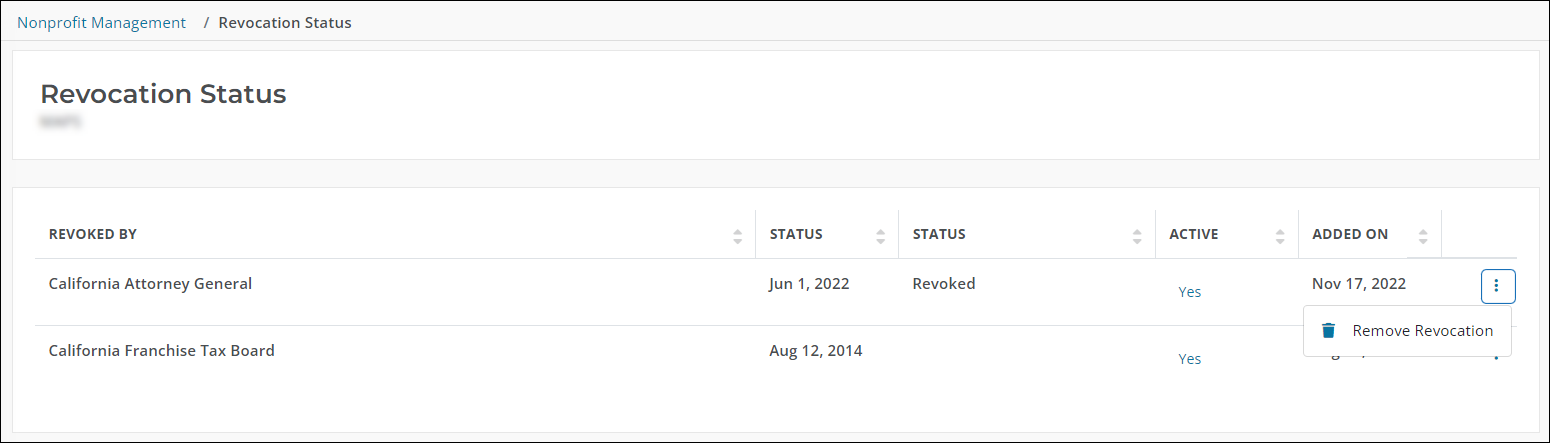
Note: This feature is only available to internal YourCause Administrators in a Compliance Admin role. Nonprofit Administrators are recommended to contact NPOconnect Support if their organization is in “good standing” but has not yet been removed from the revocation list.
CA AB 488 revocation history now available in the Nonprofit Information block
You can find additional information about a nonprofit’s revocation history in the Registration Authority Attributes section of the Nonprofit Information block in the extended nonprofit block. In the US State Revocations field, click on the state code to open a modal with details about the revocation list, how the nonprofit was matched, and when the status was last updated.
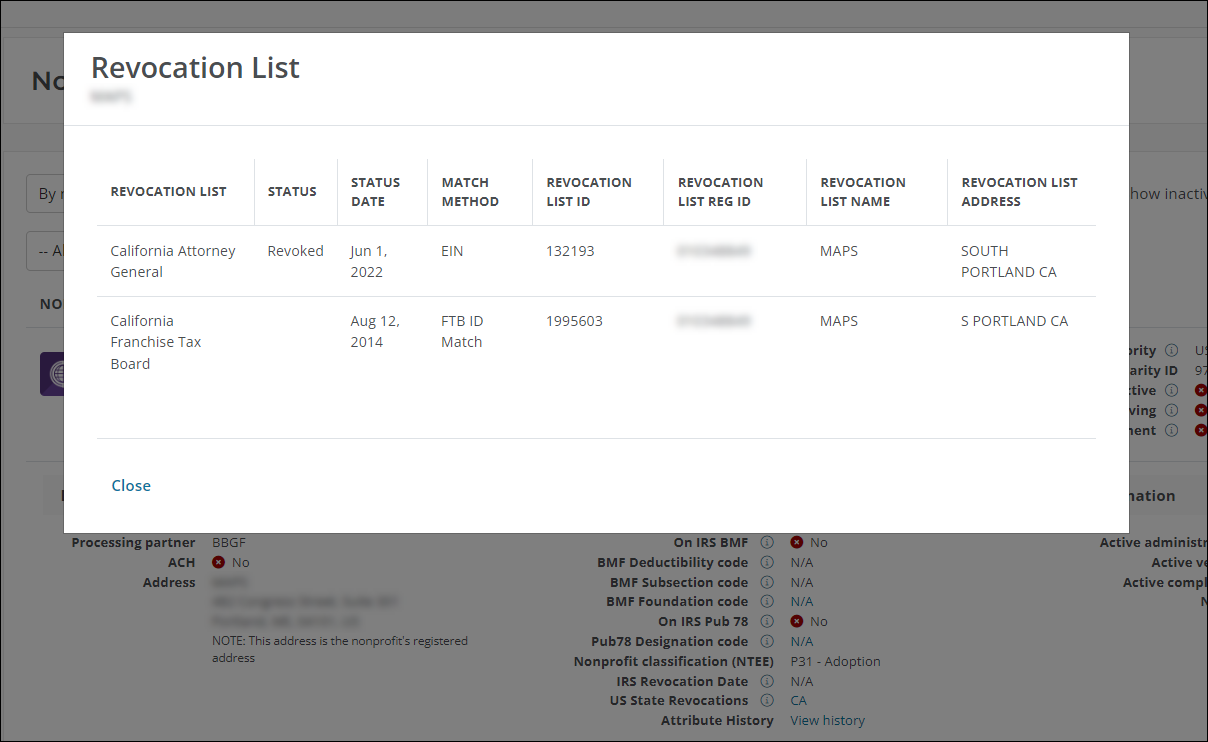
Note: State revocation history is currently only relevant to California Assembly Bill 488 (CA AB 488).
Tip: To view all nonprofit-facing announcements, see the What's New in the external NPOconnect Help.