What's New in Blackbaud Verified Network
Blackbaud Verified Network adds new and improved features throughout the year. Below is a list of updates released so far.
Tip: These updates are for your awareness. You don’t need to take action unless we note it in the update.
October 2026
 Update and Resubmit Your Administrator Request During Review
October 22, 2026
When the Blackbaud Compliance team needs more information to review your Administrator Request, they can now ask you to update it instead of declining it. Your request moves to On Hold, and you receive an email that explains what to correct or add. In My Nonprofits, select Update request, make your changes, and resubmit the same request for review.
Requests that stay On Hold for 30 days are canceled automatically. If that happens, you can submit a new request at any time. For steps, see Update Your Administrator Request.
Tip: Preview the emails you receive in Email Preview: Administrator Request Requires Updates and Email Preview: Your Nonprofit Administrator Request Was Canceled.
Preview Blackbaud Verified Network Communications in the Email Library
October 12, 2026
From vetting updates to account and disbursement notifications, the Email Library in Help gives Nonprofit Administrators and Nonprofit Managers one place to find examples of system emails across Blackbaud Verified Network processes. These previews help you understand what communications you'll receive for specific processes, identify emails in your inbox sent from our team, and determine when an email requires you to take action. To explore, see the Email Library.
Tip: Search by subject or purpose, or filter by category, role, or action, to understand why a message was sent and what it asks you to do. If you find a message in your spam folder, compare it with an example. To verify a requested action, sign in to Blackbaud Verified Network directly instead of using links in the email.
Note: If you expect to receive a specific email, find the subject to look for in the library or relevant help topic. If you still don't see the email in your inbox after a period of time, see Troubleshoot Missing Emails.
September 2026
Returned Check Address Confirmation Helps Nonprofit Admins Move Forward Faster
September 21, 2026
Nonprofit administrators are required to confirm the address on file in Blackbaud Verified Network after USPS returns a check. If the address is already correct when reviewing, you can now select Address is correct to confirm it quickly without re-entering the same information so payment follow-up can continue without extra steps. You receive confirmation when the address is verified, and the update is saved to your organization's change tracking.
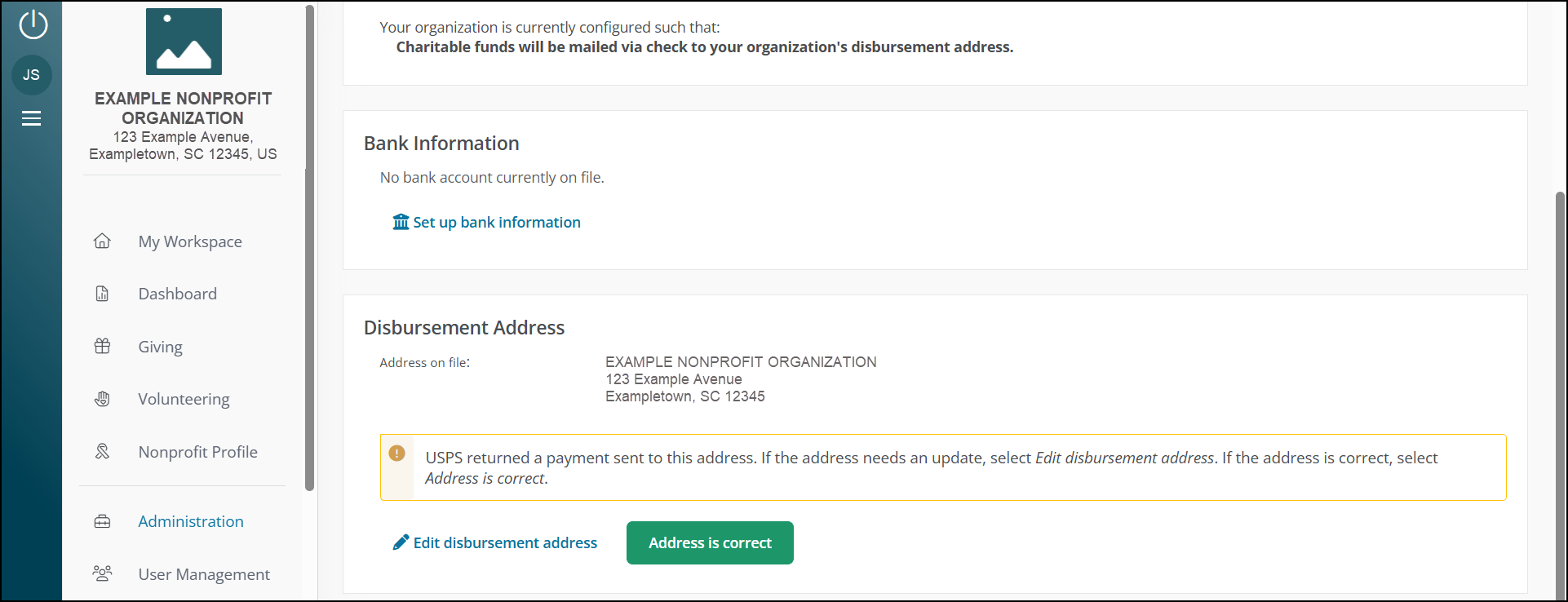
Note: This option appears only when the check is still eligible for reissue and no newer address request is pending review.
Blackbaud Integrated Payments Connection Details Now Show the Connecting User and Date
September 18, 2026
When you review your organization’s Blackbaud Integrated Payments connection in Blackbaud Verified Network, the current connection details now show the user who connected the account and the date the connection was made. This information appears on the Blackbaud Connections page and the Disbursement Information page.
Select Connection history to open a modal with the full connection timeline. You can review each Blackbaud Integrated Payments connection change, including the current connection, previous connections, and disconnected states when applicable.
For setup details, see Connect Blackbaud Integrated Payments for Disbursements.
Request to Manage a Nonprofit Clarifies Administrator Request Steps
September 1, 2026
Organization representatives who want to manage their nonprofit in Blackbaud Verified Network can now select Request to manage a nonprofit from Home or My Nonprofits. This replaces Claim my Nonprofit and Start a new administrator request and makes it clear that access requires an administrator request and approval.
Note: If an administrator request is declined, the email uses clearer language and explains how to submit a new request in My Nonprofits. This helps prospective nonprofit administrators understand the decision and what to do next.
August 2026
Blackbaud Verified Network Launches Updated Platform Experience With Enhanced Navigation and New URL
August 20, 2026 - 1.143.0 Release
Blackbaud Verified Network launches an updated platform experience on August 24, 2026 during our regular release window (9 PM ET). Your day-to-day workflows in the platform continue without interruption.
If you previously used or bookmarked https://nonprofit.yourcause.com, that address automatically redirects to the updated platform at https://app.blackbaud.com/npp/. You do not need to take action to access your account.
With this update, Blackbaud Verified Network becomes part of the broader Blackbaud platform experience, including shared navigation and a more connected experience across Blackbaud solutions. You can sign in to your Blackbaud ID (BBID) account directly from the Sign in link in the top navigation. Organizations that use multiple Blackbaud products can sign in once and access multiple Blackbaud products seamlessly from the top navigation. You no longer need to sign in separately for each product.
This release also introduces enhanced navigation, easier access to help and support resources, and multi-factor authentication (MFA) requirements for nonprofit managers to help strengthen account security.
Note: Nonprofit admins are currently required to use MFA. This update extends that same requirement to nonprofit managers so sign-in security is applied more consistently across nonprofit user roles.
Multi-Factor Authentication Is Now Required for Nonprofit Managers
August 20, 2026 - 1.143.0 Release
Beginning August 24, 2026, nonprofit managers must set up multi-factor authentication (MFA) to continue to sign in to Blackbaud Verified Network.
Nonprofit admins are currently required to use MFA. This update extends that same requirement to nonprofit managers so sign-in security is applied more consistently across nonprofit user roles. It does not change everyday nonprofit workflows after MFA is set up.
This update is part of the platform experience updates rolling out on August 24.
Note: If you already set up MFA for your Blackbaud ID account, you do not need to set it up again. For details, see Blackbaud ID: Manage Multi-Factor Authentication.
Reissue Payment Replaces Reissue Check in Payments and Transactions
August 20, 2026 - 1.143.0 Release
In the Giving area, under Payments and Transactions, the bulk action previously labeled Reissue Check is now labeled Reissue Payment. The updated wording reflects that reissued payments can be sent through different payment methods, while the workflow itself stays the same.
Note: This is a label update only. The steps to request a reissued payment are unchanged.
Nonprofit Search Better Supports Special Punctuation and Accented Letters
August 10, 2026 - 1.142.0 Release
Search results on the Nonprofit Search page now better support nonprofit names that include special punctuation and accented letters. When you search by nonprofit name, exact matches appear at the top of the results, including names with accented letters or special punctuation.
July 2026
Expedited Giving Improves Disbursement Speed and Transaction Visibility
July 27, 2026 - 1.141.0 Release
Expedited Giving and Expedited Giving Plus (shown in the product as Expedited Giving +) help eligible nonprofits receive donations and grant payments faster. When a payment qualifies, funds move through expedited disbursement paths that reduce processing time and help approved donations and grants reach your organization sooner.
To receive eligible expedited payments, your organization must use an electronic disbursement method, such as ACH direct deposit or a Blackbaud Integrated Payments merchant account, in Blackbaud Verified Network. Eligibility may also depend on how the donating organization has configured its giving programs.
Some payment types continue to follow standard disbursement methods, including payroll donations and matches, PAC match cause cards, check-based payments, and payments processed through global processing partners.
To learn more about eligibility requirements, electronic disbursement options, and how Expedited Giving and Expedited Giving Plus work, see About Expedited Giving and Expedited Giving Plus.
Disbursement Information Page Update
July 27, 2026 - 1.141.0 Release
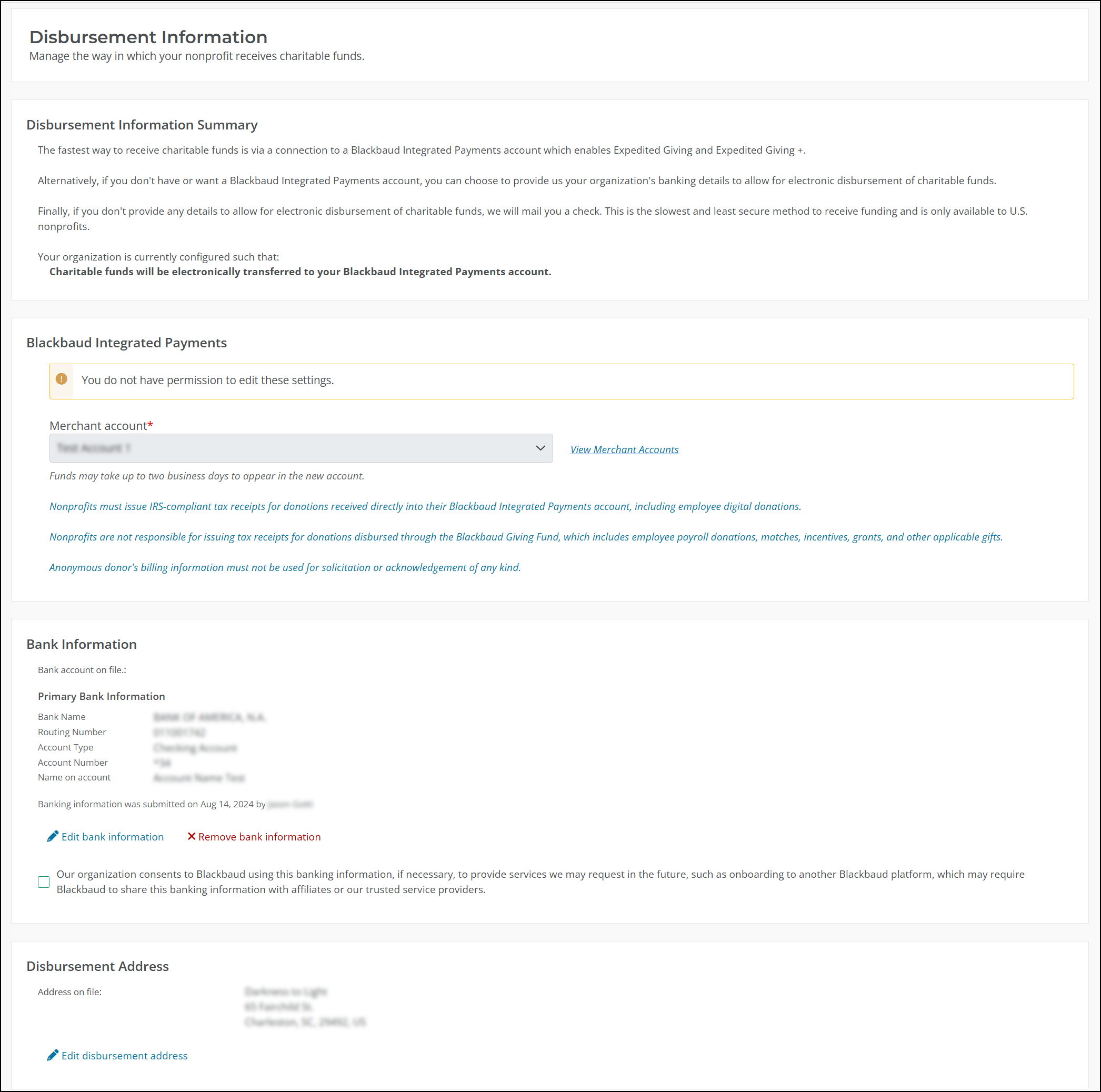
We refreshed the Disbursement Information page to improve readability and make key details easier to understand. Clearer descriptions provide more context about the information on the page, while existing workflows remain unchanged.
Updated Help Resources for Chapters and Organization Hierarchy
July 27, 2026 - 1.141.0 Release
We made updates in the Blackbaud Verified Network Help to make chapter and organization management easier:
-
Add and Manage Chapters - Find chapters faster in My Nonprofits with expanded troubleshooting for common issues such as pending approvals and signing in with a different email.
-
Add Chapter Organizations and How Do I Add My Organization? - Follow clearer guidance for existing admins who add chapters and new users who add organizations during registration.
-
Glossary: Organization Hierarchy Terms - Understand key terms such as chapter, affiliate, and parent organization so account relationships are easier to navigate.
Connect to Blackbaud Integrated Payments in the Disbursement Information Area
July 13, 2026 - 1.140.0 Release
Nonprofit administrators can now view and manage your Blackbaud Integrated Payments (BBIP) connection directly on the Disbursement Information page.
-
Connect your account in one place – The Disbursement Information page now shows Blackbaud Integrated Payments merchant accounts as a disbursement option. If you have not connected to a merchant account, you can do it here using the same steps as Blackbaud Connections.
-
Manage your connection - If your merchant account is already connected, you can view it and select options to change or disconnect it.
-
Confirm your setup - After you connect, the Disbursement Information Summary will show that funds are sent through Blackbaud Integrated Payments. This helps you quickly confirm how your funds are delivered.
This update lets you see all your disbursement options without switching pages. This helps you set up payments faster and avoid missing the option to use Blackbaud Integrated Payments for faster, more direct nonprofit funding.
For more details, see Connect Blackbaud Integrated Payments for Disbursements.
Note: Nonprofit administrators now receive one daily email that summarizes funds processed through Blackbaud Integrated Payments and shows a short list of recent activities. The email also explains where to view full details and clarifies that these donations are processed differently than standard payments, helping reduce confusion.
Global Vetting Guidance Is Now Easier to Navigate
July 13, 2026 - 1.140.0 Release
We reorganized global vetting help content and added a quick start guide so you can more easily choose the right vetting path and find partner-specific requirements in one place. This update makes the process clearer from the start and reduces time spent searching across topics.
Find the vetting guide for your country in How To Apply For Vetting: Guides For Your Country Or Region.
Note: As part of this update, all vetting guidance has moved to Nonprofit Organization Vetting Guide in Get Started in our Help, including resources for nonprofit organizations in the United States. For domestic vetting, see Vetting Guide for United States: Apply Through Blackbaud Giving Fund.
Tip: Previous global vetting help links should automatically redirect to the new topics. To avoid confusion and ensure the best experience, we recommend updating saved links and bookmarks when you can.
June 2026
Faster, More Direct Nonprofit Funding with Blackbaud Integrated Payments
June 29, 2026 - 1.139.0 Release
This release enhances how eligible donations and grants reach nonprofits by introducing Blackbaud Integrated Payments as an additional disbursement option within Blackbaud Verified Network. With this option, organizations and nonprofits have more flexibility in how approved funds are delivered and managed.
When eligible donations and grants are processed through Blackbaud Integrated Payments, funds follow standard charitable disbursement paths and are then deposited into the nonprofit’s connected merchant account. Nonprofits can receive funds through their merchant account and manage YourCause funds alongside their other Blackbaud Integrated Payments activity by using existing merchant account features.
For chapter organizations, charitable funds are disbursed directly to the parent organization. Chapters cannot select a Blackbaud Integrated Payments merchant account in Blackbaud Verified Network.
This change supports improved reporting, more flexible disbursement options, and stronger donor and nonprofit communications.
For setup instructions, see Connect Blackbaud Integrated Payments for Disbursements. If you do not have an active merchant account, review the Get Started with Blackbaud Integrated Payments tutorial.
May 2026
Volunteer Event Description and Preview Improvements
May 18, 2026 - 1.136.0 Release
Volunteer event descriptions are now required, support formatted text, and preview exactly as they appear in YourCause CSRconnect.
-
Description is required - You must enter a description before you save or publish a volunteer event. This matches CSRconnect and helps prevent incomplete submissions.
-
Rich text description - You can format the description using headings, lists, and spacing so the event layout stays clear and readable.
-
Accurate preview - You can preview the event and see it the same way it appears to CSRconnect administrators. For details, see Preview Volunteer Events.
These updates reduce rework and help you prepare volunteer events for approval. Required descriptions prevent missing information, formatted text keeps layouts consistent, and accurate previews let you confirm how events appear before approval.
April 2026
Bank-Returned Payments Now Labeled as Refunded by <Payment Number>
April 27, 2026 - 1.134.0 Release
Payment history now labels returned payments more clearly. When a bank returns a payment, nonprofit admins see Refunded by <payment number> when viewing payment details instead of Reissued within <payment number>.
This update helps admins quickly distinguish returned payments from true reissues, reducing review time and confusion during payment reconciliation.
Transactions Updated to Show Payment Processor Details
April 27, 2026 - 1.134.0 Release
The Transactions page now shows more details about the processor for each transaction. Nonprofit admins can see which processor handled a transaction, even when a payment does not have a Payment ID or was issued by a global processor like CanadaHelps. When you download transaction data, the file also now includes processor details. These details help admins see how each donation was processed and match transactions to the correct disbursement.
March 2026
Updates to Bank Information Entry and Submission
March 23, 2026 - 1.132.0 Release
We updated the bank detail update experience to better support security requirements and make it easier to complete updates.
When you update your bank details, you’re now prompted to enter your account number each time. The masked account number no longer appears, which shows that this information is required whenever you make a change.
You also get clearer guidance before you submit your update. When you hover over Submit, you see which required fields still need to be completed. This helps you know what to fix before you continue and reduces interruptions during the process.
These updates make expectations clearer and help you complete bank detail updates more smoothly.
Updates to Documents Accepted for Admin Registration
March 23, 2026 - 1.132.0 Release
We updated the documents you can use to verify your identity and role when you register as an admin for a nonprofit organization. Some documents, such as employee badges and paystubs, are no longer accepted.
To see the current list of accepted options, review Documents Accepted for Role Verification and Proof of Identity.
Account Deletion Requires Email Confirmation
March 9, 2026 - 1.131.0 Release
You can now delete your Blackbaud Verified Network account through a clear, email‑based process. This process helps you understand what happens before your account is removed.
When you select Verify identity and delete account in My account, Manage my account, we send an email to the email address on file that explains what will happen and asks you to confirm the deletion. Your account is not removed until you confirm through the link in the email.
After you confirm, you're automatically signed out of Blackbaud Verified Network. You cannot sign back in to Blackbaud Verified Network unless you create a new account.
Note: This process permanently deletes your Blackbaud Verified Network account. It does not impact your Blackbaud ID account. For details, see Delete Your Account.
Tip: If you're the only admin for your nonprofit, invite another admin before you continue. This helps your organization keep its information up to date.
February 2026
Bank Information Validation Keeps Bank Country Aligned with Nonprofit Country
February 23, 2026 - 1.130.0 Release
We updated the bank information pages to help nonprofits enter correct bank details. When setting up or editing bank details, we now check that the bank country matches the country where the nonprofit is registered. The Account Country is set to the nonprofit’s registered country and cannot be changed.
This update helps global nonprofits avoid mistakes during setup and gives admins confidence that their banking information is correct.
January 2026
My Account Layout Updated and Account Details Moved to Blackbaud ID Important: Changes to My Account
January 12, 2026 - 1.127.0 Release
We changed My Account to show only settings managed in Blackbaud Verified Network. Your email, password, and other account details stay in Blackbaud ID (BBID).
What’s New
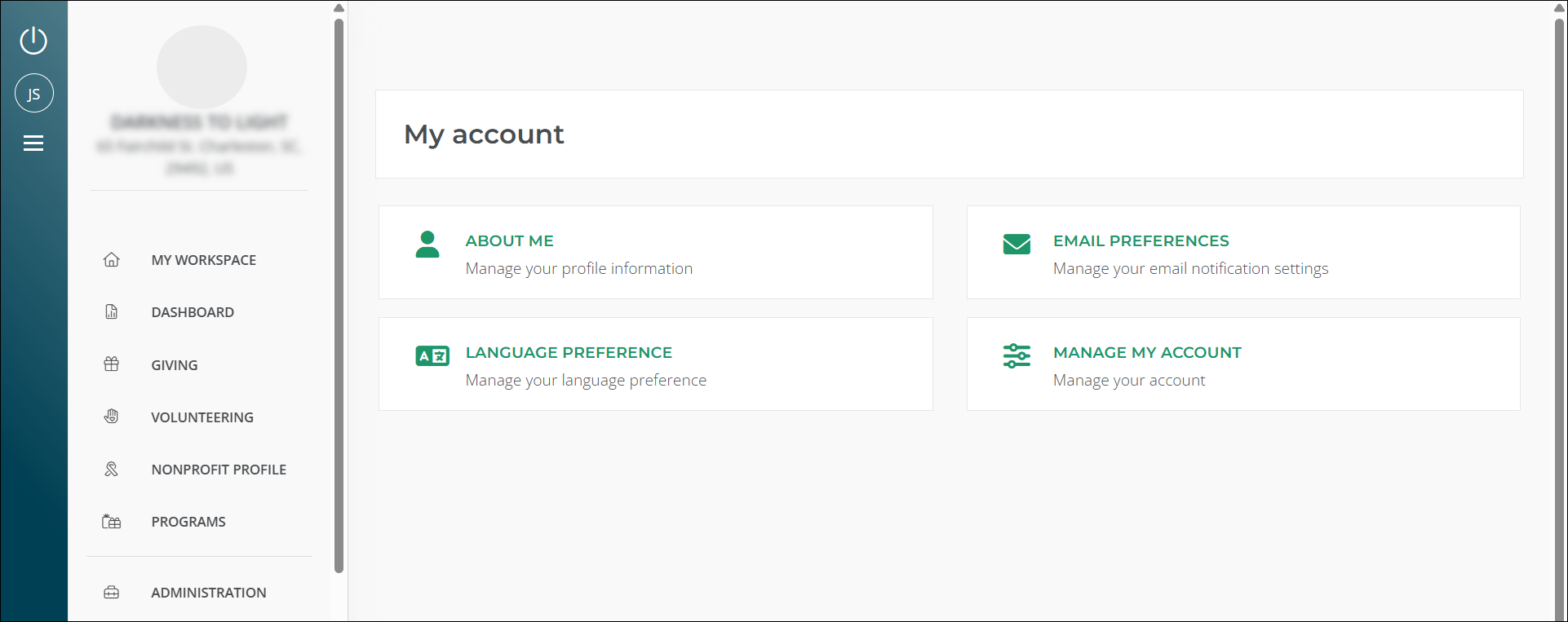
My Account now has four tiles:
-
About Me: Update profile questions about how you use Blackbaud Verified Network.
-
Email Preferences: Manage communication settings.
Tip: To check the email address for your account, go to My Account, then Email Preferences.
-
Language Preferences: Choose your language.
-
Manage My Account: Download your data and manage account options.
Removed Fields
We removed fields for first name, last name, email, phone, and job title from My Account.
Tip: To update your name or email, sign in to your BBID at app.blackbaud.com and follow the instructions in Update Your Name, Email Address, and Password in Blackbaud ID.
Quickly Identify Chapters in My Nonprofits with Their Unique Registration ID
January 12, 2026 - 1.127.0 Release
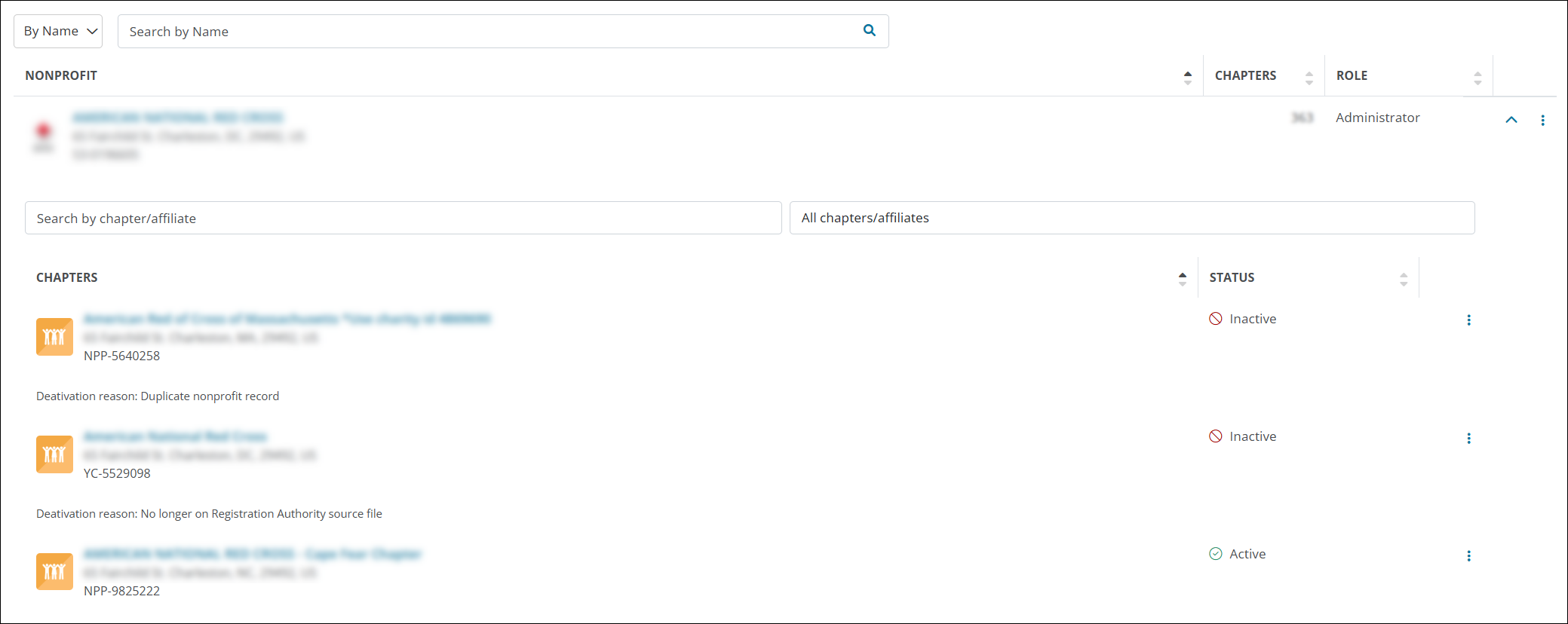
To help nonprofit administrators distinguish between chapters with similar names, areas like My Nonprofits now display each chapter’s Registration ID below its name and address. Previously, the Registration ID for the parent organization was shown instead.
This change makes it easier to identify specific chapters and reference the correct Registration ID when managing donations or contacting our team.
Tip: View details about previous releases in What's Recent in 2025 and What's Recent in 2024.